[ Edit: 2012/ 4/ 9 Model: E26-A ]
2-8 Instruments and controls
JVI0438X
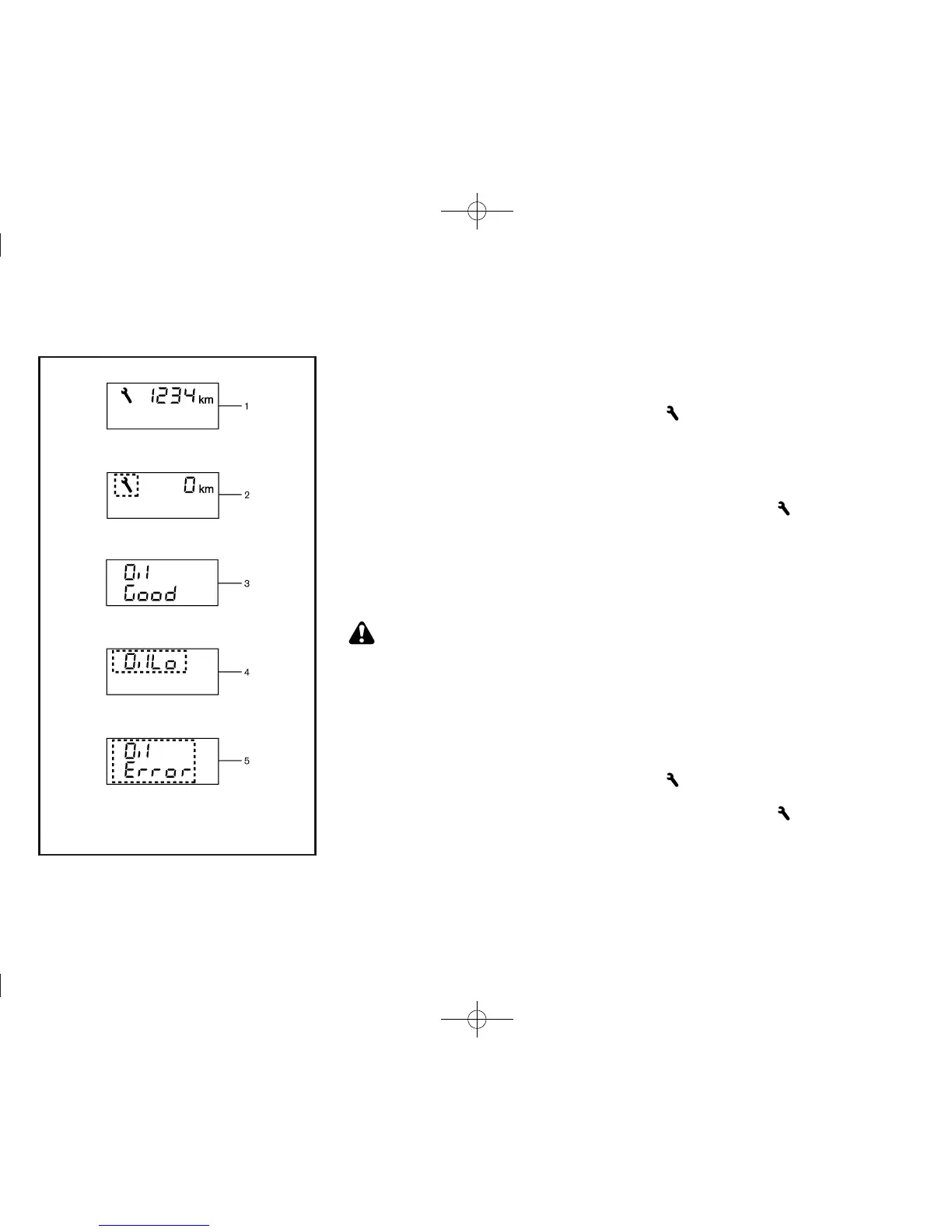
When the ignition switch is in the “ON” position,
engine oil information is displayed.
Engine oil information informs you of the distance to oil
change, oil level indication and oil level sensor
malfunctions.
1. Distance to oil change
GUID-FDBC8737-3B4C-4221-8FFA-8D1D4E8244BD
For model without Diesel Particulate Filter
(DPF):
When the ignition switch is turned to the ON position,
the distance to oil change is displayed.
For model equipped with Diesel Particulate
Filter (DPF):
When the ignition switch is turned to the ON position,
the distance to oil change is displayed if the distance
to oil change is less than 1,500 km (940 miles).
2. Oil replacement indicator (model without
Diesel Particulate Filter (DPF))
GUID-8426767C-23DE-4CE4-9245-AF8027D72132
CAUTION:
If the oil replacement indicator is displayed,
change the engine oil as soon as possible.
Operating your vehicle with oil that has deterio-
rated can damage the engine.
When the distance to oil change information showing
zero (0) or less is displayed: When the ignition switch
is turned to the ON position, a wrench symbol blinks
and the distance to oil change information showing
zero (0) is displayed for approximately 5 seconds.
Setting distance to oil change:
GUID-896AA31A-81D 0-4E9B-81ED-1F58D53AA854
The distance to oil change interval can be adjusted or
disabled using the trip computer mode switch
*
A
.
Refer to the separate maintenance booklet for the
appropriate distance to oil change interval.
To adjust oil change interval:
1. Push and hold the trip computer mode switch
*
A
for more than 3 seconds while the wrench symbol
and distance to oil change information are
displayed.
If adjusting the distance from zero (0): Push and
hold the trip computer mode switch
*
A
for more
than 3 seconds within 5 seconds of turning the
ignition switch to the “ON” position.
The wrench symbol
and the distance will
start flashing.
2. While the display is flashing, push and hold the
trip computer mode switch
*
A
for more than 3
seconds to enter the adjustment mode.
If adjusting the distance from zero (0): Push the
trip computer mode switch
*
A
. The default
distance to oil change will be restored.
3. Turn the trip computer mode switch
*
B
clock-
wise or counterclockwise to increase or decrease
the interval. Each turn increases or decreases the
interval by 1,000 km (500 miles).
If no further action is taken, the display will switch to
the oil level indication and the new interval will be set.
To cancel oil change reminder:
1. Push and hold the trip computer mode switch
*
A
for more than 3 seconds while the wrench symbol
and distance to oil change information are
displayed.
The wrench symbol
and the distance will
start flashing.
2. While the display is flashing, push the trip
computer mode switch
*
A
again to enter the
adjustment mode.


 To Next Page
 Loading...