[ Edit: 2012/ 4/ 9 Model: E26-A ]
FM-AM RADIO
GUID-F13AC459-E1FC-4 7E2-81AA-9648B0F3885D
SAA1833
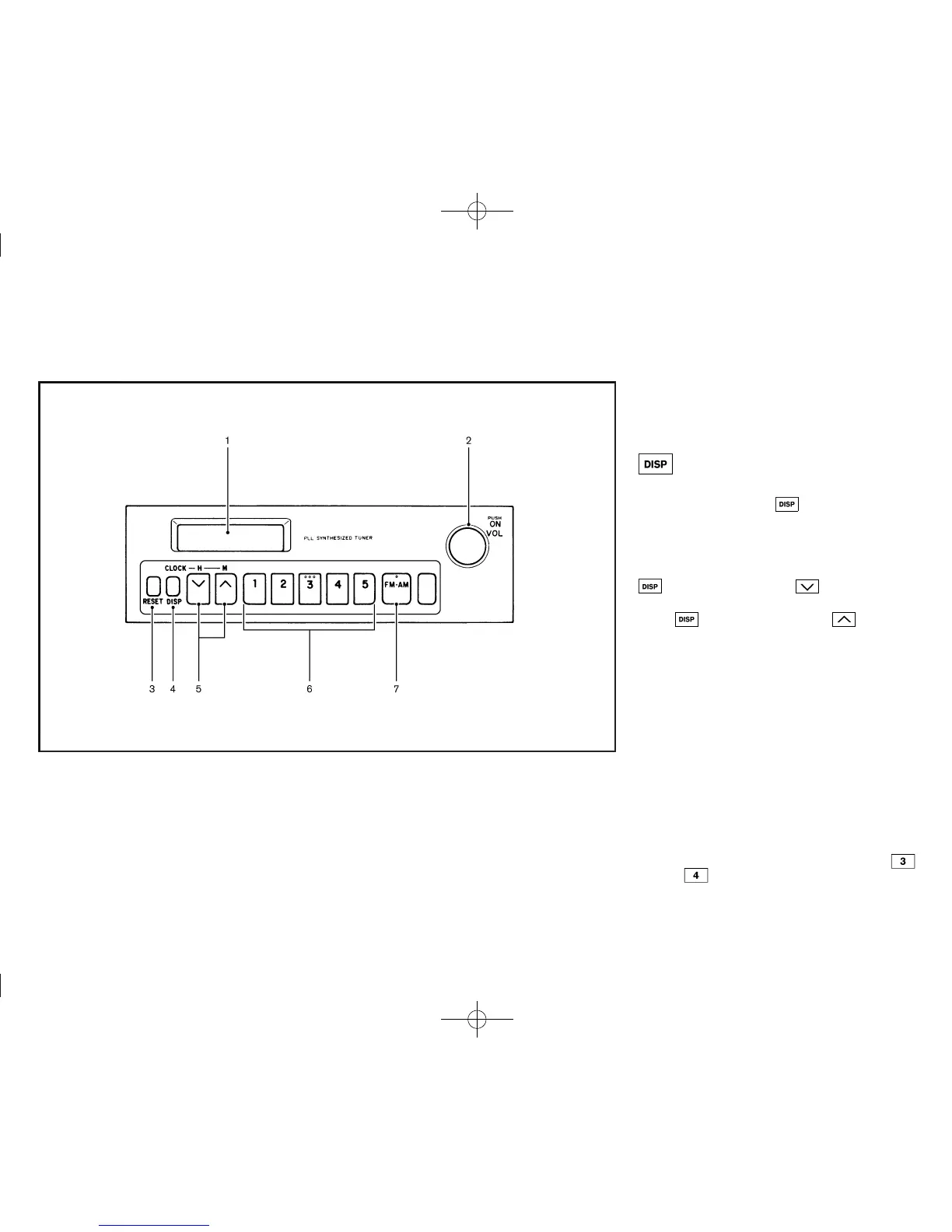
1. Display
2. Power button/Volume control knob
3. RESET button
4. Display select button
5. Tune buttons
6. Station memory buttons
7. Radio band select button
Audio main operation
GUID-070D1E27-CB86-49A9-B393-C54A49112AA6
Power button:
GUID-896AA31A-81D 0-4E9B-81ED-1F58D53AA854
To turn on and off the audio system, push the Power
button.
Volume control knob:
GUID-896AA31A-81D 0-4E9B-81ED-1F58D53AA854
To control the volume, turn the Volume control knob.
Turn the knob clockwise to turn up the volume.
Turn the knob counterclockwise to turn down the
volume.
Display select button:
GUID-896AA31A-81D 0-4E9B-81ED-1F58D53AA854
To display the station frequency on the display, push
the Display select button
while the radio is on.
The display will return to the clock mode after a few
seconds.
Clock adjustment:
GUID-896AA31A-81D 0-4E9B-81ED-1F58D53AA854
To adjust the hour, hold down the Display select button
and use the Tune button .
To adjust the minute, hold down the Display select
button
and use the Tune button .
To reset the minute, press the RESET button. The time
will be reset as follows:
. In case the displayed minute is in the range of 00 -
29, the hour will stay the same and the minute will
be reset to 00.
. In case the displayed minute is in the range of 30 -
59, the hour will be advanced by one hour and the
minute will be reset to 00.
FM-AM radio operation
GUID-8B6B00E7-0AD7-4D30-9BE3-C3247FCCB4FC
Frequency range and step change operations:
GUID-896AA31A-81D 0-4E9B-81ED-1F58D53AA854
To change the frequency range and step specification
of the radio, perform the following operations.
1. Turn the audio unit on.
2. Press and hold the station select buttons
and .
Heater and air conditioner, and audio system 4-7



 To Next Page