PlayStation
®
4 setup
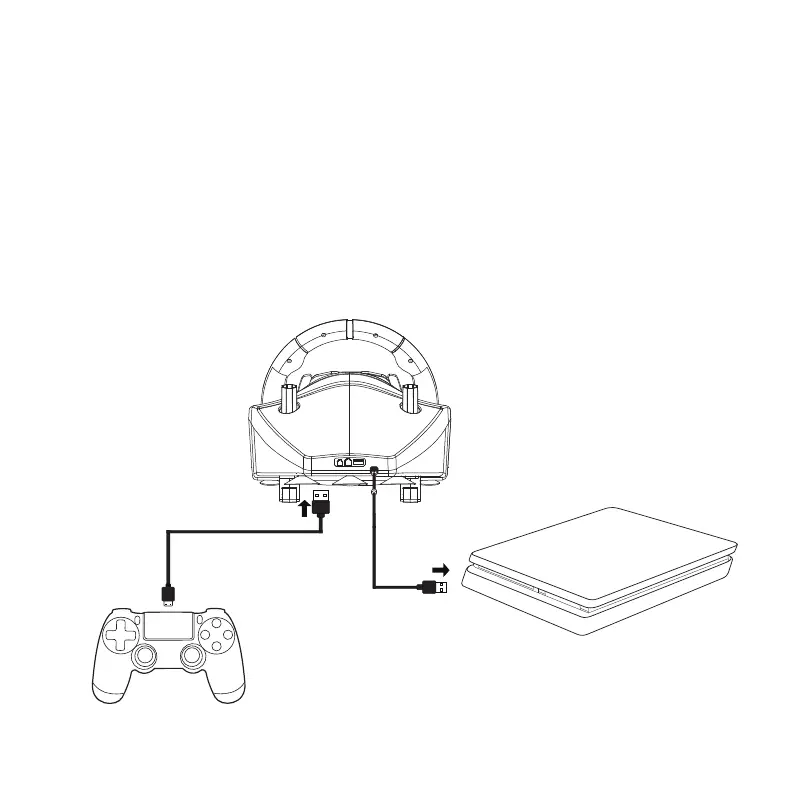
After you have setted the wheel and gear shifter as indicated in page 2, connect
the original SONY
®
controller to the wheel with the USB-A to USB Micro B cable,
provided in the packaging.
Connect the wheel to the console’s USB port and turn the console on.
The wheel’s LED automatically switch on blue colour, then press the PS
®
button
on the wheel.
At this point, the wheel is ready. Play the game and customize your in-game
setup, following the “PS4
®
buttons layout” as displayed in page 6.
(1)
(2)
(3)
(4)
Page 5
You must connect the original SONY
®
DUALSHOCK 4
®
controller to the wheel.
Third party’s controllers, not officially licensed by SONY
®,
are not going to work.
Note:
In case you lose the USB-A to
USB Micro B cable, you can
replace it with any similar cable
available in the market, paying
attention that it has DATA function.
Note:


 To Next Page