Xbox
®
One setup
Page 7
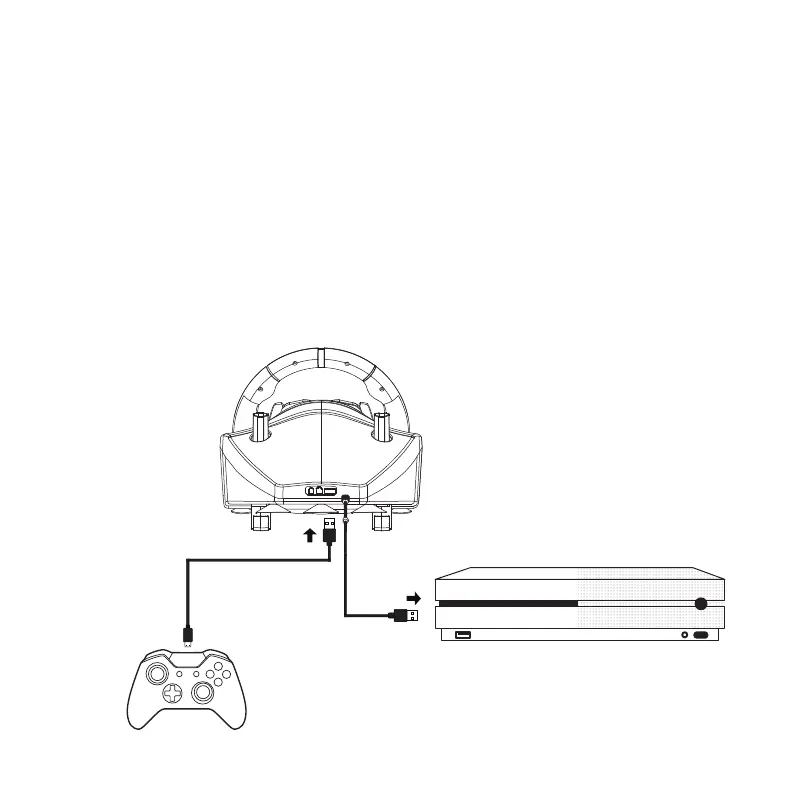
After you have setted the wheel and gear shifter as indicated in page 2, connect
the original Xbox
®
One controller to the wheel with the USB-A to USB Micro B
cable, provided in the packaging.
Connect the wheel to the console’s USB port and turn the console on.
The wheel’s LED automatically switch on green colour, then press the Home
button on the wheel.
At this point, the wheel is ready. Play the game and customize your in-game
setup, following the “Xbox
®
One buttons layout” as displayed in page 9.
(1)
(2)
(3)
(4)
Note:
You must connect the original Xbox
®One
controller to the wheel.
Third party’s controllers, not officially licensed by Xbox
®,
are not going to work.
Note:
In case you lose the USB-A
to USB Micro B cable, you
can replace it with any
similar cable available in the
market, paying attention that
it has DATA function.


 To Next Page