BATTERIES
The NL400 / NL400G used nickel-hydrogen batteries that can be recharged.
Charging the battery is done by the AC adapter (included in standard) - Use the connector on
the front panel of laser level.
Charging process is indicated by illumination of the LED. When the LED lights up green, the
charging process is completed.
Never use alkaline batteries to power the NL400 / NL400G
If it's necessary to replace the battery - battery compartment should be unscrewed with a
screwdriver. Replacement batteries can be purchased from an authorized distributor.
Use levelers NL400 / NL400G with care, protect from moisture. Never put a wet instrument to
the transport box (wait until dry).
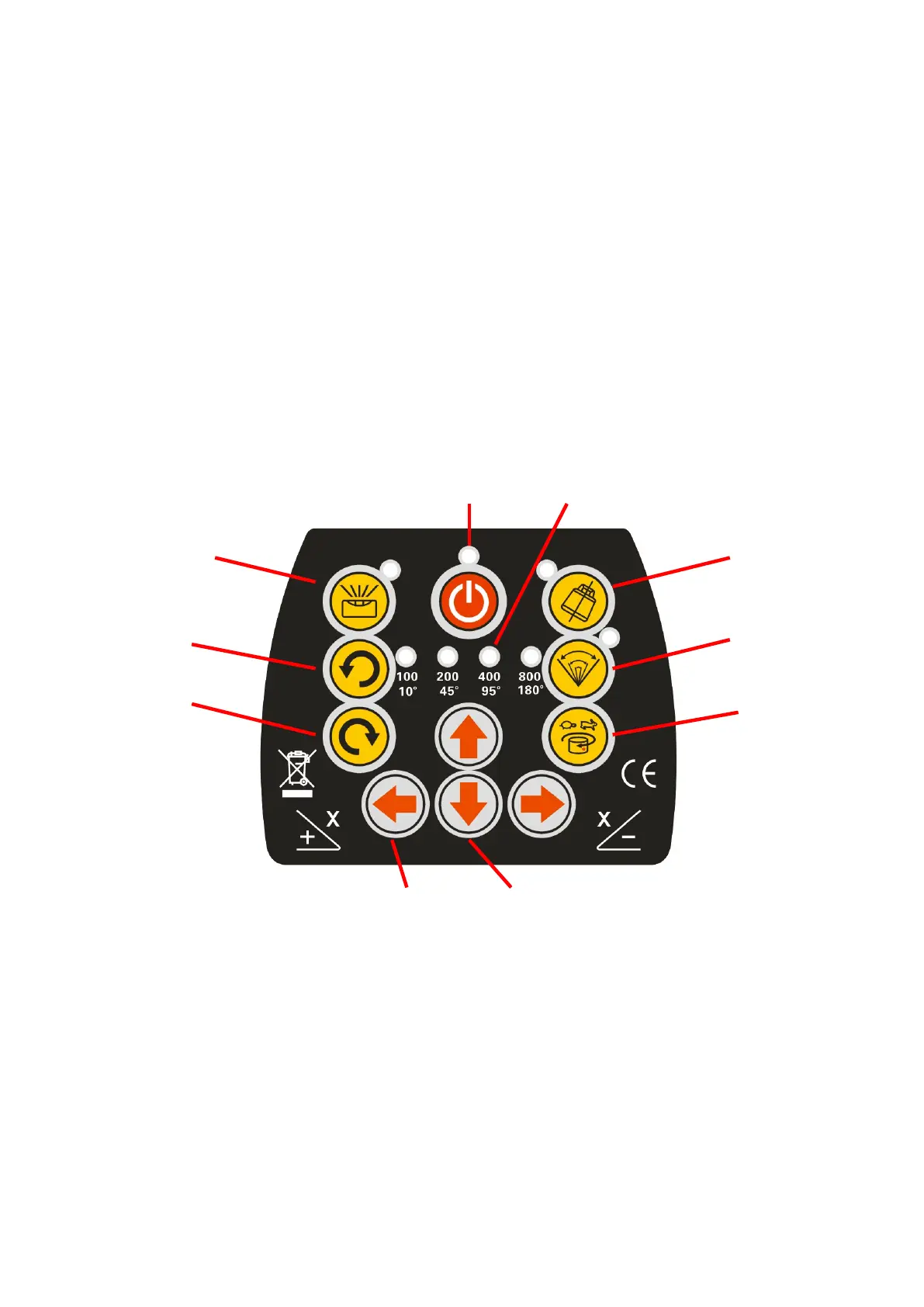
CONTROL PANEL
1, 2, 3 13
4, 7 12
8 6
9 5
10 11
Description of buttons and functions:
1) ON / OFF switch
- Turns the device on and off
2) LED declaring the power state of the instrument
- Lights red when the device is turned on
3) LED of discharged batteries
- While the LED is blinking, the batteries should be plugged in to charge.
4) LED of manual mode
- LED lights green when the unit is in manual mode
5) Adjusting the speed of head rotation


 To Next Page