
 Need help?
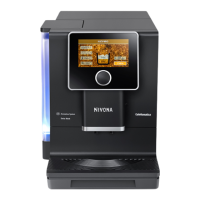
Do you have a question about the Nivona CafeRomatica 960 and is the answer not in the manual?
Expresses delight and thanks for choosing a Nivona product.
Explains the meaning of caution, note, and tip symbols used in the manual.
Specifies the machine is for private household use only and not for commercial applications.
Details safe placement, voltage matching, altitude limits, and handling of the power cable.
Defines age and capability requirements for machine use and supervision.
Describes the use of the rotary dial and touchscreen for machine operation.
Explains navigation, selection, and confirmation using the rotary dial and touchscreen.
Details the functions of buttons like START, CANCEL, SAVE, DELETE, and navigation arrows.
Covers unpacking, placement, and initial connections for the machine.
Guides users through setting language and water filter options during the first startup.
Steps for selecting and preparing milk-based and other speciality coffees.
Allows individual adjustment and permanent storage of factory recipe settings.
Instructions for preparing two cups consecutively from a single beverage draw.
Option to define the order of milk and coffee in speciality drinks.
Explains how flavour profiles (dynamic, constant, intense) affect brewing and taste.
Describes transferring coffee recipes via the NIVONA App using Bluetooth.
Allows setting, naming, and storing up to 9 custom beverages.
Steps for using the dedicated ground coffee function, including filling and preparation.
Overview of adjustable parameters like programming, times, comfort, filter, water hardness, language, and Bluetooth.
Instructions on how to adjust the grinder setting for optimal coffee extraction.
Details the system that creates different tastes by adjusting brewing process and extraction.
Guide to connecting and operating the machine via the NIVONA smartphone application.
Describes setting a personalized display lock using a picture from a mobile device.
Procedure for rinsing the frother after making milk-based coffees.
Step-by-step guide for thorough cleaning of the milk frother using detergent.
Instructions for performing a routine rinse of the machine's internal system.
Guide for executing the internal system cleaning program for hygiene.
Detailed instructions for the descaling process to remove limescale buildup.
Steps for disassembling, cleaning, and reassembling the brewing unit.
Advice on daily cleaning of parts like the drip pan and milk system components.
Comprehensive instructions for taking apart, cleaning, and reassembling the frother.
Procedure for replacing the water filter when indicated or due.
How to view the progress bar indicating upcoming cleaning or descaling needs.
Advises noting down error messages and consulting the troubleshooting table.
Actions to take when a fault is detected, including switching off and unplugging.
Lists essential details like model, serial number, and error codes needed for support.
Guidance on making the machine ready for shipment for service or repair.
 General
| Brand | Nivona |
|---|---|
| Model | CafeRomatica 960 |
| Category | Coffee Maker |
| Language | English |

 To Next Page