EasyManua.ls Logo

Njoy Horus Plus 2000 - Touch Screen LCD Display

Default Icon
28 pages
Print Icon
To Next Page IconTo Next Page
To Previous Page IconTo Previous Page
Loading...
5
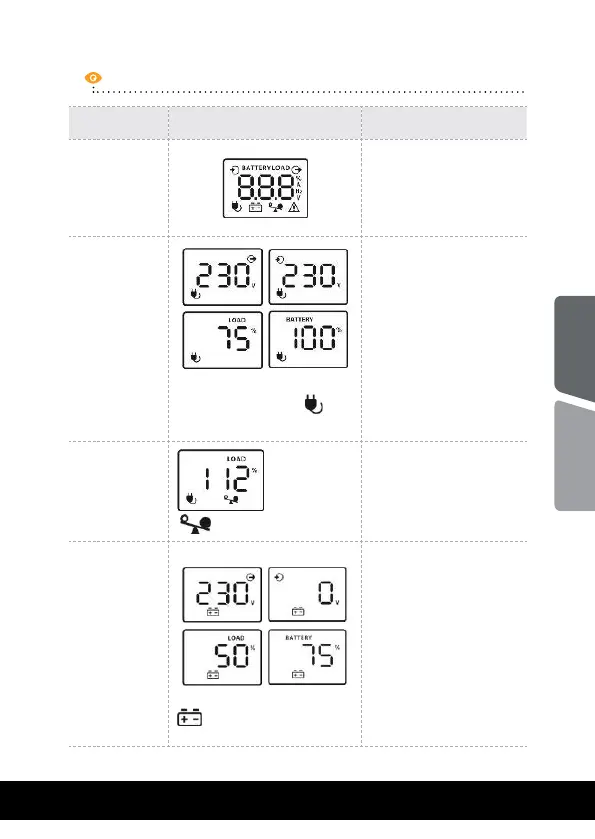
UPS Mode LCD Display Description
UPS Power
ON
When UPS is ON,
it will enter this
mode for 4
seconds
AC Mode
When AVR is functioning, a
plug icon will flash
every second
LCD information will
be displayedin the
following order when
LCD is touched:
1. Output voltage
2. Input voltage
3. Load level
4. Battery capacity
Overload in
AC Mode
icon will flash
When overload
occures, alarm
will beep every 0.5
seconds.
Battery
Mode
When battery level is low,
battery icon will flash
Alarm will beep
every 10 seconds and
LCD information will
be displayed in the
following order when
LCD is touched:
1. Output voltage
2. Input voltage
3. Load level
4. Battery capacity
Touch screen LCD Display
English
Română

Related product manuals