www.nkrowing.com.au
2
COX-BOX OPERATION
On/Off
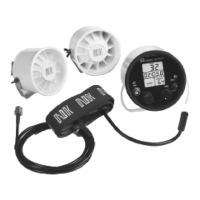
To use your Cox-Box, simply place the unit in the cup bracket and plug it into the wiring harness. Be sure to align the
plug and receptacle properly! There is an arrow molded into the rubber for help visually aligning the parts. The P5 can
be damaged because of frequent improper alignment.
The large knob turns the unit on and off, and controls the volume. Turn the knob clockwise to turn the Cox-Box on.
Find an appropriate volume so that everyone in the crew can hear the coxswain. Adjusting the speakers slightly may
help with this. Keep the volume as low as possible to prolong the battery life.
Pausing/Stopping Timer
If you do not want the timer to run, fl ip the toggle switch up to “HOLD”—this freezes the time display—the rate
meter and counter will continue to operate. When ready for the timer to begin or resume, set the toggle switch
back to “RUN.” Putting the unit in hold is useful to start and stop the timer (for example, just prior to or immediately
following a race) or to pause the time (in between pieces or while turning). The timer will not start unless the Cox-Box
is in Ready Mode.
While the timer is running, the unit will store stroke rates in the memory. The data will not store if the unit is in “HOLD”
mode.
If any of these functions do not work properly, review each step of the installation, checking all distances
and alignments. Also review the “Troubleshooting” section for help pinpointing the problem.
If you still are having problems, please contact our Repair Department
on 02 6553 2473 or write to info@nk.com.au
Recalling the Memory
The Cox-Box unit will store stroke rates during a timed piece for up to 25 minutes and 40 seconds (81 points of
memory—in increments of 10 seconds for the fi rst minute [0, 10, 20…] then every 20 seconds thereafter).
Each time you push the toggle switch down, the unit will scroll through each of the stored data points. The increments
will continue until the time at which the unit was stopped or 25:40 is reached.
If the Cox-Box unit is turned off and back on again—the memory is not lost. To clear memory, you must press the
toggle switch down and hold it for at least ½ second.
?
Additional Information
Never attempt to repair the Cox-Box unit yourself. The units are specially sealed to make them watertight.
Breaking this seal often causes very expensive damage and will void the warranty. The only accessory that
we will repair is the microphone. We do encourage and will support experienced individuals to repair and
maintain wiring harnesses and speakers.


 To Next Page
 Loading...