Special Features for Librarians and Technicians Section 3
3.1.1 Library-Level Diagnostic Message Retrieval
Library diagnostic functions enable the playback and erasure of error messages that have been recorded in the player’s
memory. This capacity is expected to be useful for telephone support when librarians may be able to instruct patrons
to enable their player to recall saved error messages. By holding the telephone microphone near the player speaker,
the librarian can hear the error codes and then discuss the recent history of the player with the patron to try to
establish what caused the error and the appropriate action to take.
The player must be turned off before activating the Library diagnostic level. To activate the Library diagnostic level,
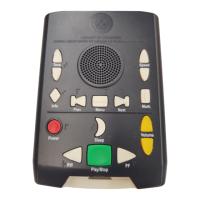
turn off the player then press and hold the Rewind, Sleep and Tone Up keys and then press the Power key.
When the Library diagnostic level is entered, the following steps and announcements occur:
1. Power On beep: The player boots, and the memory test is performed.
This step may take a few moments.
2. Audio announcement “Player Status”
3. Audio announcement “Cartridge OK” or “Cartridge Error”
4. Audio announcement “AT Device OK” or “AT Device Error”
5. Audio announcement “Power OK” or “Power Error”
6. Audio announcement “System OK” or “System Error”
The five audio announcements listed above are repeated in a loop until the Power key is pressed and held for at least
2 seconds or the Sleep key is pressed and held for 5 seconds.
Pressing and holding the Power key for at least 2 seconds will cause the player to exit the Library diagnostic level
and turn off. Errors are NOT erased from memory so the error messages can be replayed at a later time by returning to
the Library diagnostic level.
Pressing the Sleep key and holding it for at least 5 seconds will cause the player to exit the Library diagnostic level,
erase errors from memory, and turn off.
Audio on the player must be functioning for the Library diagnostic level to be used. If no sound is audible, try the
following steps to restore audio:
• Increase the volume level.
• Reset the player by pressing and holding the Power button for 7 seconds (until a beep is heard).
• Try using headphones. It is possible that the speaker audio has failed but the headphone audio is functioning
normally.
If these efforts fail, the player requires service.
February 2010 Digital Talking-Book Player 30
Library Guide


 To Next Page