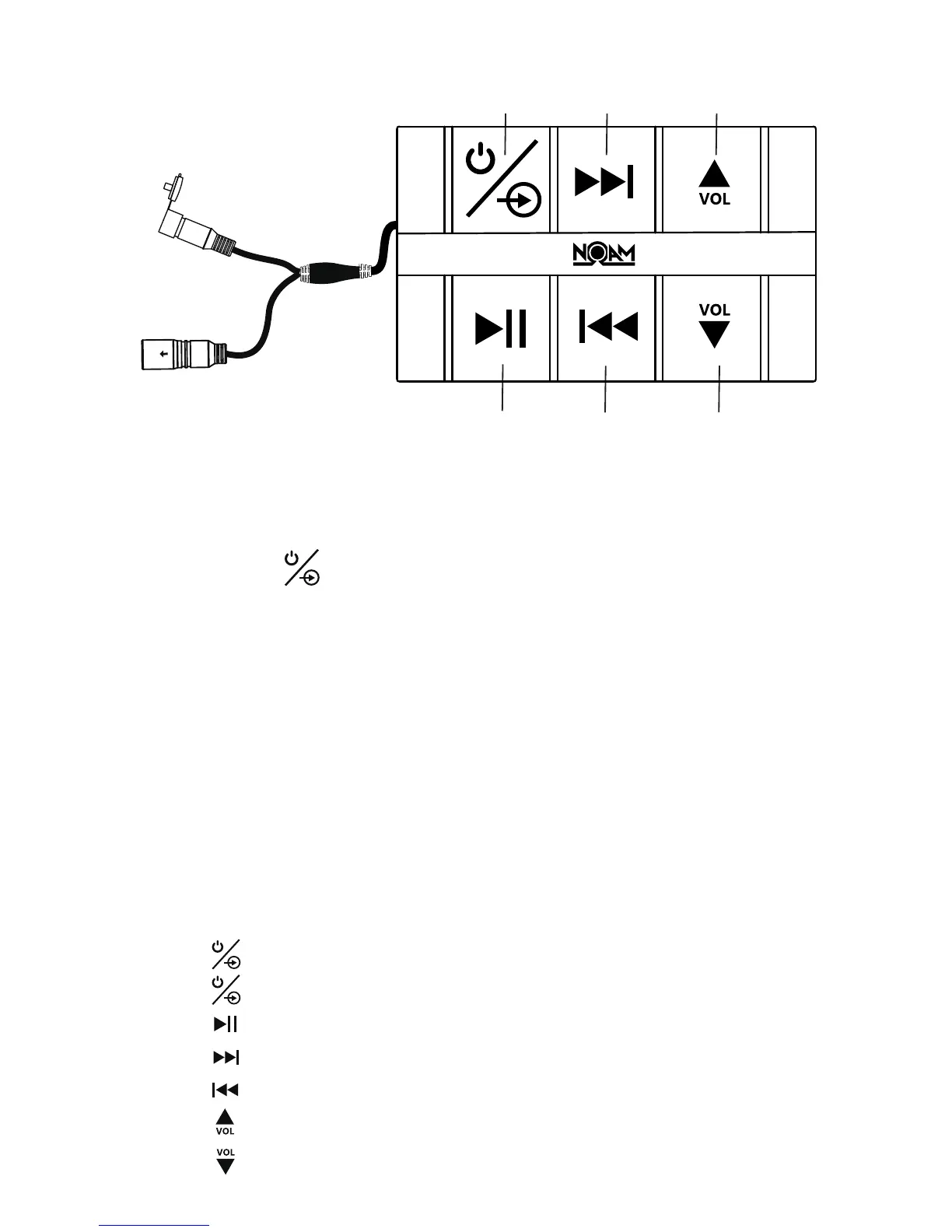
5
3.
4.
Press shortly for Previous track
5.
6.
Press to start or pause the music
1.
and hold for three seconds to turn On/OFF
Press
shortly in order to control the red background lightPress
2.
Press shortly for next track
7. Press shortly for volume down
Press shortly for volume up
Playing Music:
4.
5.
lights (red)
1.
2.
Press and Hold
3.
When Bluetooth is disconnected or the 3.5mm AUX Input is
plugged in, the power indicator will glow red.
Bluetooth Pairing and Connection:
Connect Bluetooth controller box to your device
for three seconds until power indicator
The system will automatically go into pairing mode
The power indicator will turn red for about 4-6 seconds and then
alternating red and blue (Bluetooth blue Power red)
Please be sure that Bluetooth is turned ON. Select NOAM Audio
on your device to connect Bluetooth controller (if the Bluetooth
controller is connected the light will turn blue and not flash)
When the device is out of Bluetooth range, Bluetooth will be
disconnected automatically and automatically reconnect when
detected in range again. (If not please just repeat steps 2 and 3)
Play / Pause
Previous
Song
Volume Down
Next Song
On/Off &
Background Light Volume Up
AUX Input
Connect to the Amplifier


 To Next Page