11
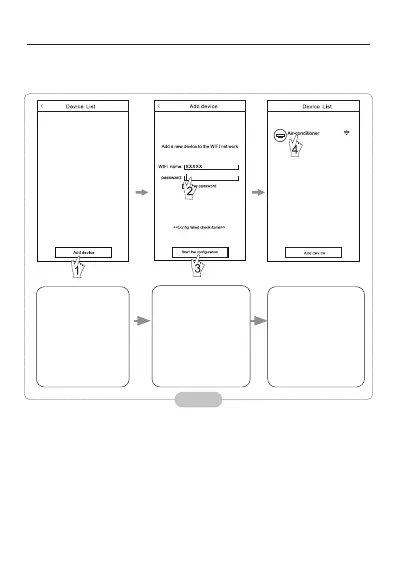
Congure the Devices
Activate the
control software
and click “Add
device”within 30
minutes after the
WIFI module is
reset.
Once the
conguration is
complete, the “Device
List” interface will
be automatically
returned to and the
congured the AC
can be seen.
After the control software is downloaded and installed on the mobile
terminal, congure the AC devices according to the following gure.
Note:
1. In the case of rst time conguration or after the connected wireless
router or access point is changed, make sure the mobile terminal is
already connected to the wireless router or access point to be paired with
the Wi-Fi module.
2. If the conguration is failed, press “Cong faild check items” to check the
notes about the failure before recongure the AC.
After the conguration is successful, click the corresponding AC name to
enter the control interface for further operation.
Fig. 12
the Wi-Fi name
will automatically
appear in “Wi-Fi
name”. Enter the
password of the
Wi-Fi and dick “Start
the conguration”.



 To Next Page