
 Need help?
Do you have a question about the NOCO Genius Boost Max GB500+ and is the answer not in the manual?
Product is an electrical device that can shock and cause serious injury. Do not cut power cords or submerge.
Batteries can explode. Do not leave product unattended or use with damaged batteries.
Product emits heat. Keep away from combustible materials and sources of spark or fire.
Wear eye protection. Batteries can explode, causing flying debris and acid irritation.
Lead-acid batteries produce explosive gases. Follow safety instructions to reduce risk.
Disables safety measures; improper use may result in injury/death and void warranty. Use with caution.
Do not overcharge, smoke, or spark near the unit. Charge in a well-ventilated area.
Do not use damaged cords/cables. Store indoors. Not for commercial repair facilities.
Product contains chemicals known to cause cancer and reproductive harm. Visit P65Warnings.ca.gov.
Wear eye protection, handle batteries carefully, avoid metal objects, and wash hands after handling.
Keep accessories away from children due to choking hazard. Do not leave children unattended with product.
Do not alter the product. Use only approved accessories. Modifications void warranty.
Operate in ventilated areas, avoid hazards, and stay within -20°C to 50°C operating temperature.
Store in dry, secure locations. Compatible with 12V/24V lead-acid batteries only.
Handle internal battery safely. Use approved chargers. Avoid moisture and overcharging for battery life.
Product may affect medical devices. Flashlight may cause seizures or eye injury. Consult physician if concerned.
Avoid explosive areas. Product complies with FCC rules on radio frequency emissions.
Product not intended for applications where failure could cause severe damage or injury.
Charge the GB500 using the included adapter before use. Recharge time is 6-8 hours.
Details on 12V DC Charging, AC Charging, and powering 12V devices.
Connect the GB500 to the vehicle battery, ensuring correct polarity and voltage selection.
Instructions on how to safely jump start a vehicle, including power loads and sequence.
Explains the 60-second countdown and the manual override for low voltage batteries.
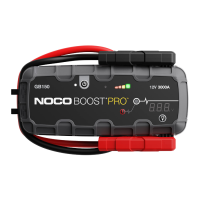
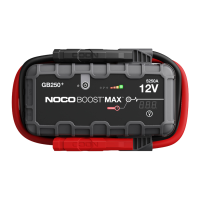
Visual identification of all numbered components on the GB500+ device.
Detailed explanation of each LED indicator, button, and knob on the GB500+ unit.
Solutions for issues indicated by various Error LED flash patterns.
Addresses problems related to Hot/Cold LEDs and the Boost Light not illuminating.
Advice on warming the battery using multiple jump starts when the Cold LED is illuminated.
Details on battery, current rating, operating temperatures, dimensions, weight, and housing protection.
Details on defect coverage, repair/replacement, and how to initiate a warranty claim.
Outlines conditions that void the warranty and items not covered (wear, cosmetic damage).
Information on registering the product online and contacting NOCO Support for questions.
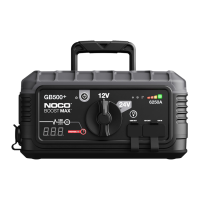
The NOCO BOOST MAX GB500+ is a powerful and versatile jump starter designed for 12-volt and 24-volt lead-acid battery systems, offering robust safety features and multiple functionalities beyond just jump starting. It is crucial to read and understand all safety information before using this product, as failure to follow instructions can lead to electrical shock, explosion, fire, serious injury, death, or property damage.
The primary function of the GB500+ is to jump start vehicles with 12-volt or 24-volt lead-acid batteries. It is equipped with a high peak current rating to handle demanding starting tasks. Beyond jump starting, the device also serves as a portable power source, featuring USB Out ports for charging electronic devices and a 12V Out port for powering standard 12V accessories. It also includes a high-output LED worklight with multiple modes for various lighting needs. The built-in voltmeter provides enhanced diagnostics and troubleshooting by displaying the vehicle's battery voltage.
To use the GB500+, it must first be adequately charged. The device comes partially charged and requires a full charge before initial use. Charging can be done using either the included 12V DC Adapter or the 56W XGC Power Adapter, connected to the 12V IN port. The GB500+ must be in 12V mode for charging, and the voltage selection knob should be set accordingly. Charge level is indicated by a series of LEDs, which pulse during charging and become solid when fully charged. The Green 100% LED will remain solid, with the other charge LEDs turning off once fully charged, occasionally pulsing for maintenance charging.
For jump starting, ensure all vehicle power loads (headlights, radio, air conditioning, etc.) are turned "Off." Verify the vehicle's battery system voltage and set the GB500+ voltage selection knob to the correct 12V or 24V position. It is critical to never change the voltage while the unit is connected to a battery; only change it when the unit is off. Securely connect the negative (black) Boost Max Connector to the negative port on the GB500+ and the positive (red) Boost Max Connector to the positive port on the GB500+. Always clean battery terminals before connecting the clamps to prevent faulty connections or smoke. Connect the positive (red) clamp to the positive battery terminal and the negative (black) clamp to the negative battery terminal or vehicle chassis. Press the Power Button to initiate jump starting. All LEDs will flash, indicating proper function. If connected correctly, the White Boost LED will illuminate, and the 25%-100% LEDs will chase, signaling the start of a 60-Second Timeout countdown. Attempt to start the vehicle. If it doesn't start immediately, wait 20-30 seconds and try again. Do not attempt more than five consecutive jump starts within a 15-minute period, allowing the GB500+ to rest for 15 minutes between attempts. Once the vehicle starts, power off the unit, disconnect the battery clamps, and remove the GB500+.
The 60-Second Timeout is a safety feature that disables the jump starting function after 60 seconds if a battery is detected. To reset, power off and then power on the unit. The GB500+ is designed to jump start batteries down to 3-volts. For batteries below 3-volts, the Boost LED will be "Off," indicating the GB500+ cannot detect the battery. In such cases, a Manual Override feature can be used by pushing and holding the Manual Override Button for three seconds. This mode disables safety protection and manually forces Boost "On." Extreme caution is advised when using Manual Override mode, as spark proof and reverse polarity protection features are disabled. This mode is only for 12-volt or 24-volt lead-acid batteries, and users must pay very close attention to battery polarity. Avoid allowing positive and negative battery clamps to touch, as this will generate sparks and high heat. If unsure, seek professional help.
The GB50+ can power 12V devices by connecting a 12V Cable to the 12V OUT port and a standard 12V device (up to 15A) to the female 12V plug. The unit must be in 12V mode for this function. USB devices can be charged via the USB Out ports, which function in both 12V and 24V modes. The integrated worklight offers seven modes: 100%, 50%, 10%, SOS, Blink, Strobe, and Off, toggled by the Light Mode Button. The Strobe Mode, in particular, may cause seizures in persons with photosensitive epilepsy.
The GB500+ is designed for durability and ease of maintenance. For cleaning, power off the product and use a soft, lint-free (microfiber) cloth. Avoid getting moisture in openings. If the product comes into contact with liquid or contaminants, clean and dry it immediately. The internal lithium-ion battery should only be replaced by NOCO and must be recycled or disposed of separately from household waste, never in household trash. To maximize battery life, avoid charging the product for more than a week at a time, as overcharging can shorten battery life. An unused product will discharge over time and should be recharged before use. Disconnect the product from power sources when not in use.
The device includes several indicator LEDs for diagnostics:
The GB500+ is designed to operate in ambient temperatures between -20°C to 50°C. Do not operate outside these ranges or jump start a frozen battery. Store the product in a dry location on a flat, secure surface, avoiding areas with high concentrations of dust or airborne materials. The storage temperature should be -20°C to 25°C, never exceeding 80°C.
The GB500+ is an electrical device and should be handled with care. Avoid impacts, as the product can become damaged. Do not use a damaged product, including those with cracks in the casing or damaged cables. Do not use with a damaged power cord. Humidity and liquids can damage the product, so avoid handling it or any electrical components near liquids. Do not attempt to alter, modify, or repair any part of the product, as this will void the warranty and can cause injury, death, or property damage. Only use NOCO-approved accessories.
 General
| Internal Battery | Lithium-ion |
|---|---|
| USB Charging | Yes |
| 12V Output | Yes |
| Operating Voltage | 12V |
| Battery Compatibility | 12V Lead-Acid Batteries |
| Jump Starter Type | Portable |
| Safety Features | Reverse polarity protection, spark-proof technology, over-current protection |
| USB Ports | 2 (5V/2.1A each) |

 To Next Page