OK Back
FM radio
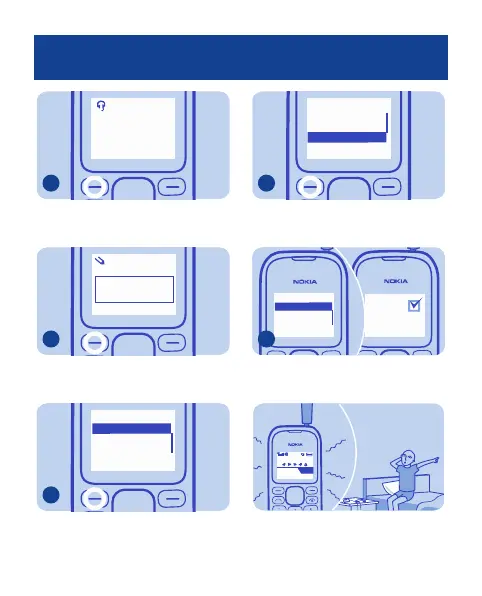
Auto-tuning:
106.60 MHZ
To save the channel, press OK.
6
OK
abc
Channel name:
Station 1
Back
3
Write a name for the channel, and
press OK.
7
Select Back
3. (empty)
1. (empty)
2. (empty)
Channels
Select an empty channel. To save
more channels, repeat steps 4–8.
8
Select Back
FM radio
Delete channel
Rename
Loudspeaker
8
To use the loudspeaker, press
Options, and select Loudspeaker.
9
Radio
1FM radio
Save channel
Auto tuning
Select Back
Switch off
off
To close the radio, press Options, and
select Switch off.
10
SnoozeStop
Alarm!
08:30
Tip: To wake up to the sound of the
radio, press Options, and select
Clock radio. Set the wake up time.
23


 To Next Page