Need help?
Do you have a question about the Nokia 125 and is the answer not in the manual?
Overview of physical components and their functions.
Instructions for initial phone setup and powering on.
Steps to insert the primary SIM card into the device.
Steps to insert a secondary SIM card.
Explanation of how to navigate and use the phone's keypad.
Instructions for typing text using the phone's keypad.
Managing phone contacts, adding and saving.
How to initiate a call to a saved contact.
Steps for composing and sending text messages.
Customizing ringtones and notification sounds.
Modifying the phone's wallpaper and display.
Configuring the display of date and time on the home screen.
Managing phone profiles for different situations.
Customizing home screen shortcuts for quick access.
Instructions for using the FM radio feature.
Manually adjusting the phone's time and date settings.
Setting and managing alarms on the device.
Adding and managing events in the calendar.
Resetting the phone to its original factory defaults.
Specific Absorption Rate information for radio frequency exposure.
Explanation of the symbol for waste electrical and electronic equipment.
Guidance on protecting the device from viruses and malicious content.
Legal information regarding content ownership and usage rights.
The Nokia 125 is a user-friendly mobile phone designed for essential communication and basic features. This guide provides comprehensive instructions on how to set up, use, and maintain your device, ensuring a smooth experience.
The Nokia 125 serves as a reliable communication tool, primarily focused on making and receiving calls and sending text messages. It supports dual SIM functionality, allowing users to manage two different network connections simultaneously. This is particularly useful for separating personal and work contacts or taking advantage of different network plans. The phone also includes a built-in FM radio for entertainment and a flashlight for convenience in low-light conditions. Basic organizational tools such as an alarm clock and calendar are also integrated, helping users manage their daily schedules. The device prioritizes ease of use with its clear keypad and intuitive menu navigation.
To begin using your Nokia 125, you first need to insert your SIM card(s) and battery. The phone supports two SIM cards, which can be inserted into the designated SIM1 and SIM2 slots. To do this, remove the back cover by lifting it from the small slot at the bottom of the phone. If the battery is already in place, remove it. Then, slide your SIM card(s) into the respective slots. Once the SIM cards are in, reinsert the battery and replace the back cover. The phone's pre-set security code is 12345. You can enable or change this code through the "Security settings" menu to protect your device.
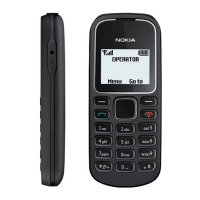
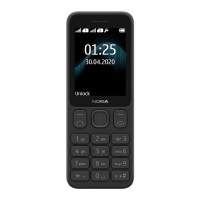
The Nokia 125 features a straightforward layout of keys and components. The call key initiates calls, while the power/end key is used to switch the phone on/off and end calls. Navigation is handled by the scroll key, which allows you to move up, down, left, or right through menus and options. The left and right selection keys provide context-sensitive options displayed on the screen. Other physical features include an earpiece/loudspeaker, USB connector for charging and data transfer, and a headset connector for audio accessories. A built-in flashlight is also available, activated by pressing the scroll key up twice from the home screen.
To make a call, you can either dial the number directly using the keypad or select a contact from your phonebook. To call a contact, navigate to "Menu" > "Contacts" > "Names," scroll to the desired contact, and press the call key. The dual SIM functionality allows you to choose which SIM card to use for the call if you have two inserted.
Composing and sending text messages is simple. Go to "Menu" > "Messages" > "Create message." Type your message using the keypad. The phone supports predictive text, which can be enabled or disabled via "Opt." > "Dictionary." After typing your message, press the left selection key (often labeled "Send") and choose the recipient from your contacts or enter a phone number manually. If you have two SIM cards, you will be prompted to select which SIM to use for sending the message.
The Nokia 125 offers several options to personalize your device. You can change the phone's tones, such as ringtones and message alerts, by going to "Menu" > "Settings" > "Tone settings." You can also customize the home screen wallpaper by selecting "Menu" > "Display settings" > "Wallpaper." The phone allows you to choose from a selection of wallpapers and decide how they are positioned on the screen. Additionally, you can manage different profiles (e.g., General, Silent, Outdoor) to quickly adjust sound and vibration settings for various situations.
The "Go to" menu, accessible from the bottom left of the home screen, provides quick access to frequently used apps and settings. You can customize this list by going to "Menu" > "Settings" > "Go to settings," selecting "Select options," and marking the shortcuts you wish to include. You can also reorganize the order of these shortcuts.
To listen to the FM radio, connect a headset (which acts as an antenna) and go to "Menu" > "Radio." You can search for available stations, save your favorite ones, and adjust the volume using the scroll key. To close the radio, select "Stop."
You can manually set the time and date on your phone by navigating to "Menu" > "Settings" > "Time settings." Here, you can switch off "Auto-update of date and time" and then manually adjust the clock and date settings. The phone also includes an alarm clock, which can be set and configured to repeat on specific days. The calendar feature allows you to add reminders for important events.
To maximize battery life, avoid touching the antenna area while the antenna is in use, as this can reduce communication quality and increase power consumption. Ensure you use only approved chargers and accessories with your device.
The Nokia 125 is designed to be durable, but it's important to protect it from physical damage and harmful content. Avoid connecting products that create an output signal to the audio connector, as this may damage the device. Do not place credit cards or other magnetic storage media near the device, as its magnetic parts could erase stored information. Be cautious when opening messages, as they may contain malicious software or otherwise be harmful content. Regularly backing up important data is also recommended.
If you encounter persistent issues or wish to clear all personal data from your phone, you can restore it to factory settings. This action will erase all user data and reset all settings to their original state. The specific steps for this process are typically found under "Menu" > "Settings" > "Restore factory settings." You will likely need to enter your security code (default 12345) to confirm this action.
While not explicitly detailed as a user-initiated feature in this guide, keeping your device's software up to date is crucial for optimal performance and security. HMD Global, the manufacturer, operates a policy of continuous development and may release updates to improve functionality or address issues.
Keep your phone clean by wiping it with a soft, dry cloth. Avoid using harsh chemicals or abrasive materials. Store your device in a safe place, away from extreme temperatures, direct sunlight, and moisture, to prevent damage.
By understanding these functions, usage features, and maintenance tips, you can effectively use and care for your Nokia 125, ensuring its longevity and reliable performance.
 General
| Short Message Service (SMS) | Yes |
|---|---|
| Display diagonal | 2.4 \ |
| Display resolution | 320 x 240 pixels |
| USB version | 2.0 |
| USB connector type | Micro-USB B |
| Talk time (2G) | - h |
| Battery capacity | 1020 mAh |
| Internal memory | 4 MB |
| Compatible memory cards | Not supported |
| Data network | - |
| SIM card capability | Dual SIM |
| Mobile network generation | 2G |
| Cables included | Micro-USB |
| Form factor | Bar |
| Subscription type | No subscription |
| Type | Feature phone |
 Weight and Dimensions
| Weight | - g |
|---|

 To Next Page