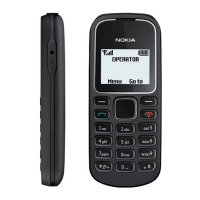
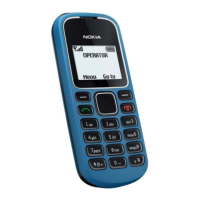
The Nokia 1282 (RM-647) is a mobile phone designed for basic communication, as detailed in its Service Manual Level 1&2. This document provides comprehensive information for service technicians, covering its features, technical specifications, and maintenance procedures.
Function Description
The Nokia 1282 is a mobile phone primarily designed for voice communication and basic messaging. It operates on EGSM 900/1800 bands, making it suitable for use in regions supporting these cellular radio frequencies. The device features a simple, user-friendly interface, typical of Nokia's Series 30 (S30) operating system, which focuses on ease of use and reliability for essential mobile phone functions. Its robust design, as suggested by the maintenance guidelines, indicates a focus on durability for everyday use.
Important Technical Specifications
Transceiver Characteristics:
- Band: EGSM 900/1800. This dual-band capability allows the phone to operate across common GSM networks, providing broad coverage for users.
- Display: The device is equipped with a 1.36-inch black and white display. This type of display is energy-efficient and provides clear visibility for text and basic icons, suitable for a phone focused on core functionalities.
- Resolution: The display has a resolution of 96 x 68 pixels. While low by modern standards, it is adequate for displaying call information, contacts, and short messages clearly on a monochrome screen.
- Operating System: The Nokia 1282 runs on the S30 operating system. This OS is known for its simplicity, low resource requirements, and stability, making it ideal for entry-level mobile phones.
Connections:
- Cellular Radio: GSM. This confirms its primary function as a standard mobile phone for making and receiving calls and SMS.
- DC Charger Connector: A 2.0 mm DC charger connector is used for charging the device. This is a standard Nokia connector for many of its feature phones.
- AV Connector: A 3.5mm AV connector is included, likely for headphones or other audio accessories, allowing users to listen to radio or basic media if supported by the S30 platform.
Battery Performance (dependant on network parameter settings):
- Talk Time (GSM): Up to 12.78 hours. This is a significant talk time, indicating good battery efficiency for extended conversations.
- Standby Time (GSM): Up to 720 hours (30 days). An impressive standby time highlights the phone's low power consumption, making it suitable for users who need a phone that lasts long between charges.
Usage Features
The Nokia 1282 is designed for straightforward mobile phone usage. Its S30 operating system ensures an intuitive experience for basic tasks such as making and receiving calls, sending and reading text messages, and managing contacts. The physical keypad, clearly visible in the exploded view, provides tactile feedback for dialing and typing, which is often preferred by users who prioritize simplicity over touchscreens. The monochrome display, while basic, is highly readable in various lighting conditions and contributes to the device's excellent battery life. The inclusion of a 3.5mm AV connector suggests potential for basic audio functions, possibly including an FM radio, which is a common feature in S30 phones and adds value for entertainment. The device's robust build, as implied by the disassembly instructions, suggests it is built to withstand daily use.
Maintenance Features
The service manual provides detailed instructions for the maintenance and repair of the Nokia 1282, targeting Level 1 and 2 workshop technicians.
ESD Protection:
- Nokia emphasizes the critical importance of ESD (Electrostatic Discharge) protection during servicing. Service points must have sufficient ESD protection, and any product with covers removed must be handled with ESD protection.
- The SIM card can be replaced without ESD protection if the product is otherwise ready for use, but covers require ESD protection for removal.
- All electronic parts are susceptible to ESD, including resistors, and sensitive parts must be packed in metallized protective bags.
- Every repair action involving opening the product or handling components must be done under ESD protection.
- ESD protected spare part packages must not be opened/closed outside an ESD Protected Area.
Care and Maintenance Guidelines:
- General Handling: The phone should be treated with care, kept dry, and away from small children. Precipitation, humidity, and liquids can corrode electronic circuits.
- Environment: Avoid dusty, dirty, hot, or cold areas. High temperatures can damage batteries and plastics, while cold temperatures can lead to moisture formation and circuit board damage upon warming.
- Physical Handling: Do not drop, knock, or shake the phone to prevent damage to internal circuit boards.
- Cleaning: Harsh chemicals, cleaning solvents, or strong detergents should not be used. Painting the phone is also discouraged as it can clog moving parts.
- Antenna: Only supplied or approved replacement antennas should be used to avoid damage and comply with regulations.
Battery Information:
- Initial Use: A new battery achieves full performance after two or three complete charge and discharge cycles.
- Lifespan: Batteries can be charged and discharged hundreds of times but will eventually wear out. Replacement is recommended when operating time significantly shortens.
- Charging: Only approved batteries and chargers should be used. Unplug the charger when not in use, and avoid leaving the battery connected for more than a week to prevent overcharging and shortened lifespan.
- Storage: Fully charged batteries discharge over time if unused. Temperature extremes affect charging ability. For Ni-Cd/NiMh batteries, occasional full discharge is recommended.
- Safety: Never use damaged chargers or batteries. Avoid short-circuiting the battery terminals with metallic objects, as this can cause damage.
- Temperature: Keep the battery between 15°C and 25°C (59°F and 77°F) for optimal performance and lifespan. Extreme temperatures can temporarily impair phone function even with a full charge.
- Disposal: Batteries should be disposed of according to local regulations (e.g., recycling) and not as household waste or in fire.
Disassembly and Assembly Instructions:
- The manual provides a step-by-step guide for disassembling the Nokia 1282, including visual aids.
- Tools: It specifies the use of the Nokia Standard Toolkit version 2 and a DC plug.
- Key Steps: Instructions cover releasing the battery cover, A-cover, removing the keymat, unscrewing internal components (with a warning not to reuse screws), releasing clips for the engine board/UI shielding, and removing the DC jack and speaker.
- Assembly Hints: Specific instructions are given for assembly, such as tightening the four TORX+ size 4 screws to a torque of 15 Ncm in a specified order.
- Soldering: The manual explicitly states "No Level 1 and 2 soldering work for Nokia 1282," indicating that component-level soldering is not part of standard service procedures for this model at these levels. This implies a modular replacement approach for repairs.
Service Devices and SW-Update:
- Service Devices: The manual lists essential service devices, including the CA-101 service cable, BL-5CB battery, AC-3 travel charger (AC-8C for China), SF-204 flash adapter (to be set to Normal mode), and the NMP standard toolkit (v2).
- SW-Update: Instructions for software updates (flash concept - Point of Sales) involve connecting the phone to a PC via the CA-101 cable and SF-204 adapter, using Nokia Care Suite service software. Technicians are advised to always check for the latest flash software version on Nokia Online.
The Nokia 1282 service manual provides a clear framework for professional servicing, emphasizing safety, proper tool usage, and adherence to specific procedures to ensure the device's longevity and functionality.

 Need help?
 General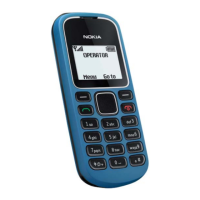

 To Next Page