2002 Nokia Corporation. All rights reserved.
U.S. English
11
2Set up
Install the SIM card
The terminal uses small-size, 3V SIM cards. If
another type of SIM card is installed the terminal
will not be able to recognize the card.
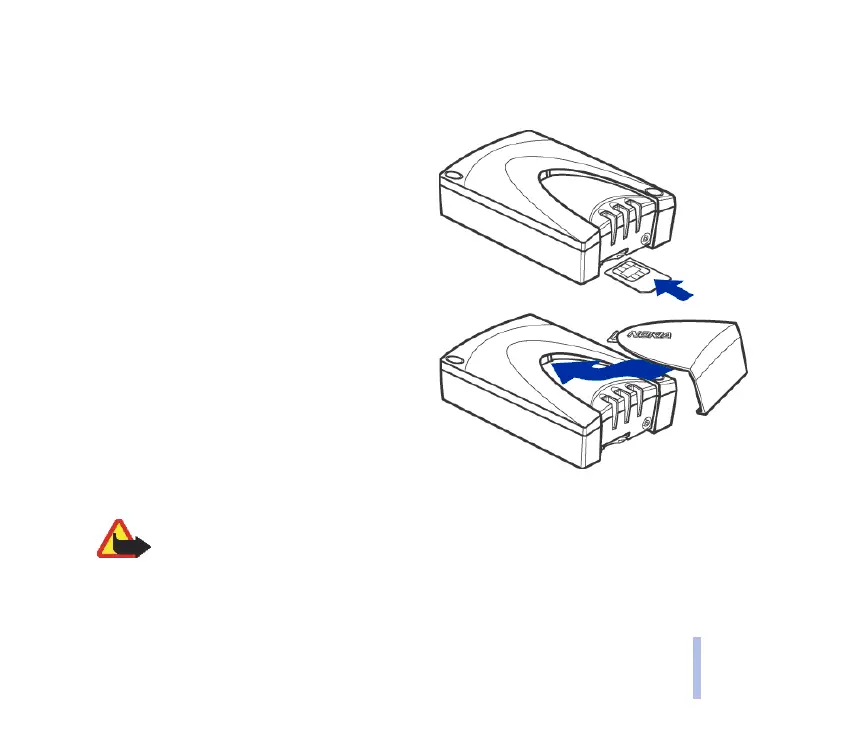
To install a SIM card in the Nokia 31 terminal:
1 Remove the SIM card cover by lifting the
wide end of the cover out and upwards.
2 Insert your SIM card into the slot. Make sure
that the golden contact area is facing up and
the bevelled corner is on the left (see
illustration).
3 Replace the terminal cover by pushing the
narrow end back into the terminal, then
snapping the cover closed.
Warning: Do not install, move or remove the SIM card if the terminal’s power supply
is connected to an AC wall outlet. Insert the SIM card and attach the terminal to the
data adapter before connecting the power supply.



 To Next Page