17Copyright © 2006 Nokia. All rights reserved.
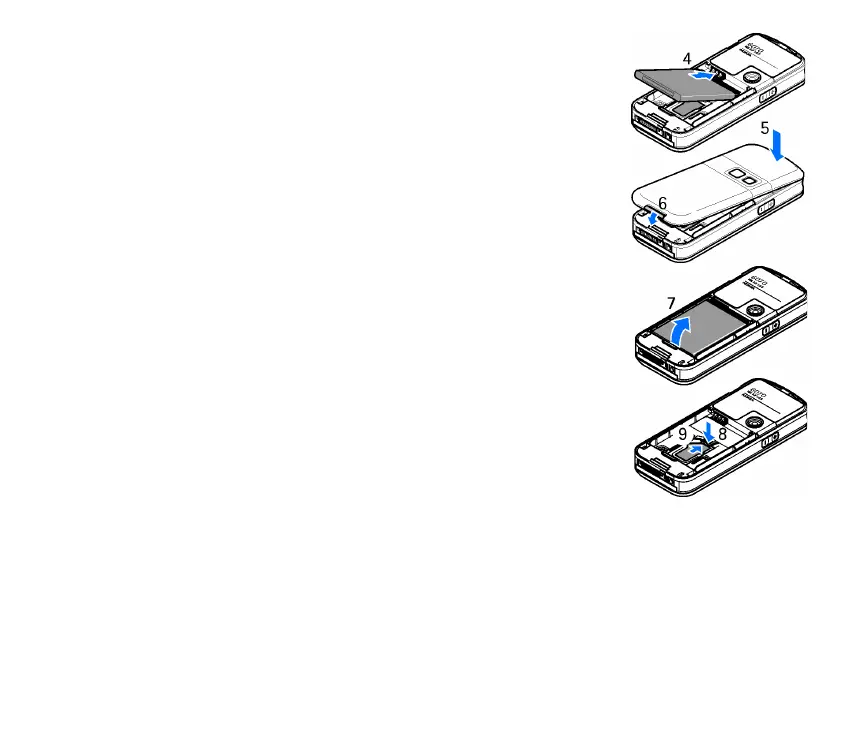
Insert the battery (4). Observe the battery contacts. Always use original Nokia
batteries. See Nokia battery authentication guidelines p. 98.
Align the top of the back cover with the top of the phone (5), and press the
bottom of the back cover to lock it (6).
To remove the battery, lift the lower end of the battery out of the compartment
(7).
To remove the SIM card, press the SIM card release (8), and slide the SIM card
towards the top of the phone (9).



 To Next Page