[ 99 ]
Menu functions
1
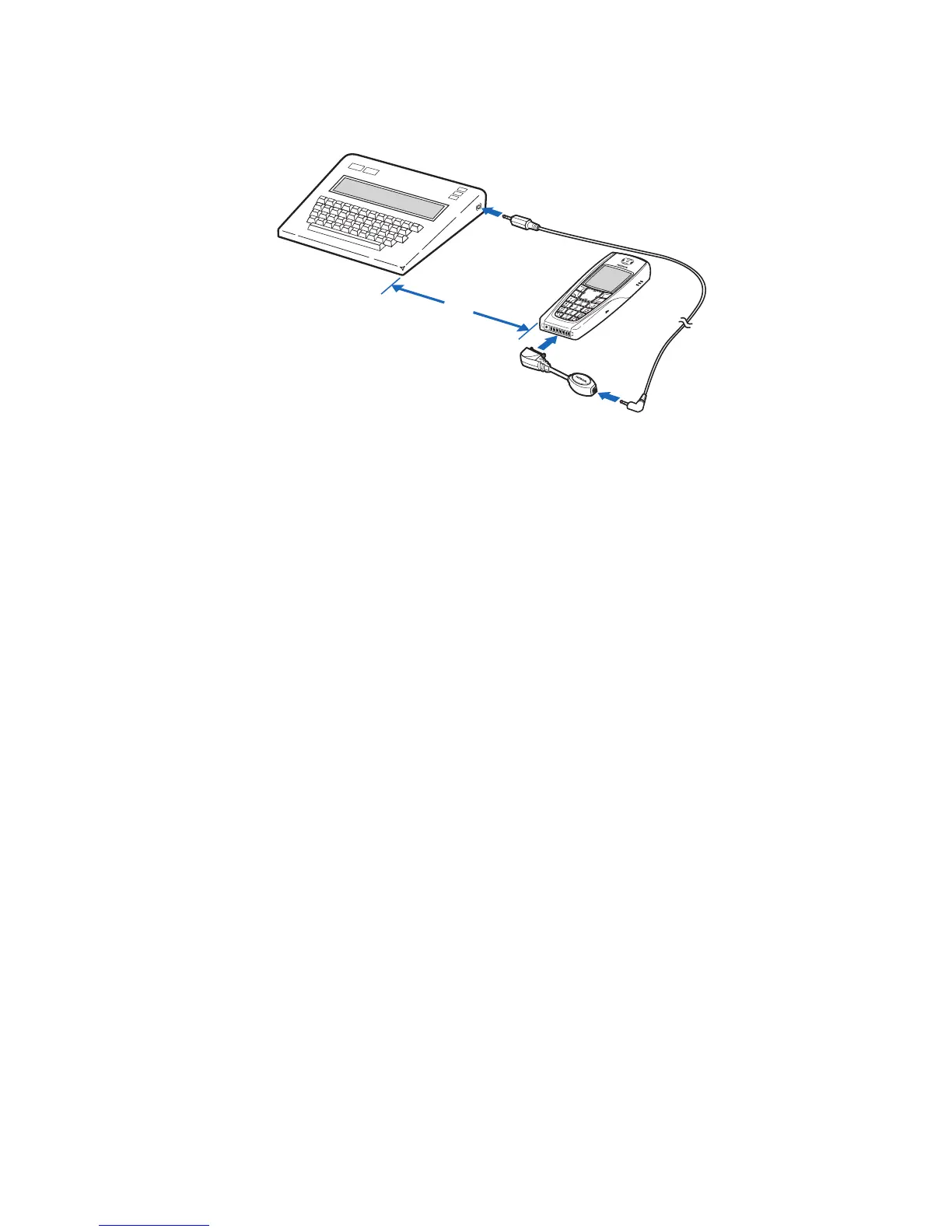
Plug the HDA-10 adapter into the connector on the bottom of your
phone, as shown in the illustration.
2
Press
Menu
4-7-4-1
(
Settings > Accessory settings > TTY/TDD >
Use TTY
).
3
Scroll to
Yes
, then press
Select
.
4
Connect the TTY/TDD by a cable to the HDA-10 adapter.
NOTES ABOUT TTY/TDD CALLS
• The Nokia TTY/TDD Adapter (HDA-10) is for use with compatible
TTY/TDD devices only. Check with the manufacturer of the TTY/TDD
device to ensure that the connection is compatible.
• Check with the manufacturer of the TTY/TDD device for a connecting
cable that is compatible with the Nokia TTY/TDD Adapter (HDA-10).
• TTY/TDD communications depend on network availability. Check with
your service provider for availability and description of services.
MAKE A TTY/TDD CALL
1
From the Start screen, enter the number and press
h
.
2
When the receiving party answers, begin typing your conversation on
the TTY/TDD. Press i
to end the call.
RECEIVE A TTY/TDD CALL
1
Make sure the TTY/TDD device is connected to your phone.
2
Press
h
to answer the call, then type your responses on the
TTY/TDD. Press
i
to end the call.
18”


 To Next Page