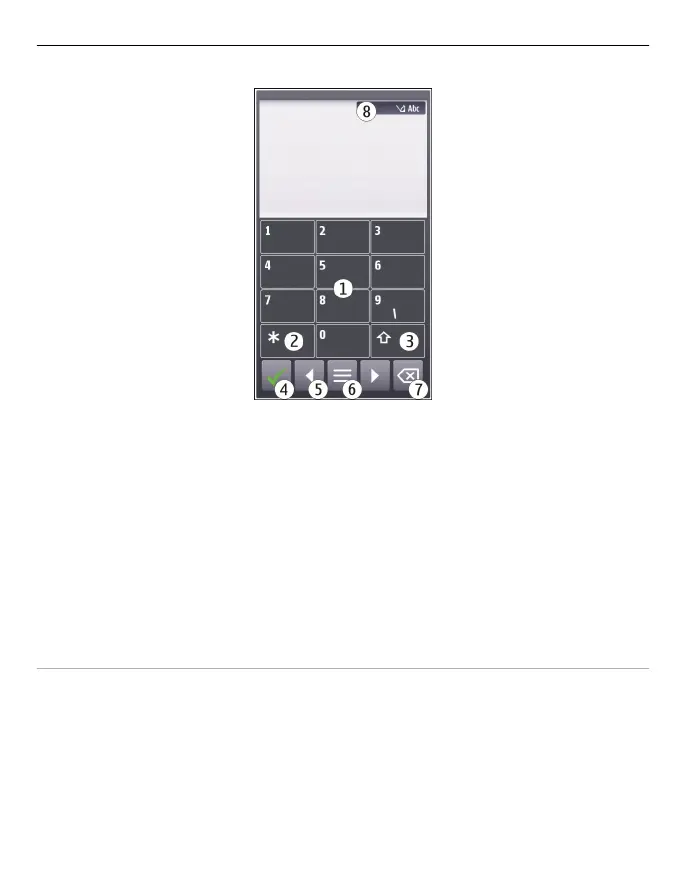
1 Number keys
2* - Enter a special character, or when predictive text input mode is activated and
the word underlined, cycle through the word candidates.
3 Shift key - Change the character case. To activate or deactivate predictive text input
mode, quickly select the key twice. To switch between the letter and number modes,
select and hold the key.
4 Close key - Close the virtual keypad.
5 Arrow keys - Move the cursor left or right.
6 Input menu - Activate predictive text input or change the writing language.
7 Backspace key - Delete a character.
8 Text input indicator (if available) - Indicates the character case, and if letter or
number mode or predictive text input mode is activated.
Activate traditional text input with the virtual keypad
Quickly select # twice.
Enter a character
1 Select a number key (1-9) repeatedly, until the desired character is displayed. There
are more characters available than are visible on the key.
2 If the next letter is located on the same key, wait until the cursor is displayed or
move the cursor forward, and select the key again.
Insert a space
Select 0.
Basic use 25



 To Next Page