EN Sound management
Press control button (R) for 2 seconds to toggle between ANC mode >
Ambient mode > OFF.
DE Anpassen der Klangeinstellungen
Tippen Sie 2 Sek. auf die berührungsempndliche Multifunktionstaste (R), um
zwischen den Betriebsarten ANC-Modus (aktive Geräuschunterdrückung) >
Transparenzmodus > AUS umzuschalten.
FR Contrôle simple
Appuyez 2 secondes sur le bouton de contrôle (R) pour basculer entre le mode
ANC > mode Transparence > Arrêt.
IT Gestione dell'audio
Premere 2 secondi il pulsante di controllo (R) per passare da modalità ANC >
modalità trasparente > Disattiva.
NO Lydbehandling
Trykk på kontrollknappen (R) i 2 sekunder for å veksle mellom ANC-modus >
Ambient-modus > AV.
PO Zarządzanie dźwiękiem
2 sekundy nacisnąć przycisk sterowania (R), aby przełączyć pomiędzy opcjami:
Tryb ANC > Tryb przezroczysty > WYŁ.
RO Gestionarea sunetului
Apăsați de 2 secunde pe butonul de control (R) pentru a comuta între modul ANC
> modul de transparență > DEZACTIVAT.
TR Ses yönetimi
ANC modu > Şeffaık modu > KAPALI arasında geçiş yapmak için kontrol
düğmesine 2 saniye (Sağ) basın.
UA Керування звуком
Натисніть кнопку керування (R) протягом 2 секунд, щоб перемикатися між ANC
> Pass Mode > OFF.
BP Gerenciamento do som
Pressione o botão de controle (D) por 2 segundos para alternar entre o modo ANC
> modo transparente > OFF.
ES Gestión del sonido
Pulse 2 segundos el botón de control (D) para alternar entre el modo ANC > Modo
transparencia > APAGADO.
KR 사운드 관리
제어 버튼(R)을 2 초 동안 눌러 ANC 모드 > 주변 소리 모드 > 꺼짐을 선택합니다.
SC 声音管理
按住
(R)
功能按钮
2
秒
可在 ANC 主动降噪模式 > 透明模式 > 关闭之间切换。
TC 聲音管理
按住
(R)
功能按鈕
2
秒
可在 ANC 主動降噪模式 > 透明模式 > 關閉之間切換。
4.
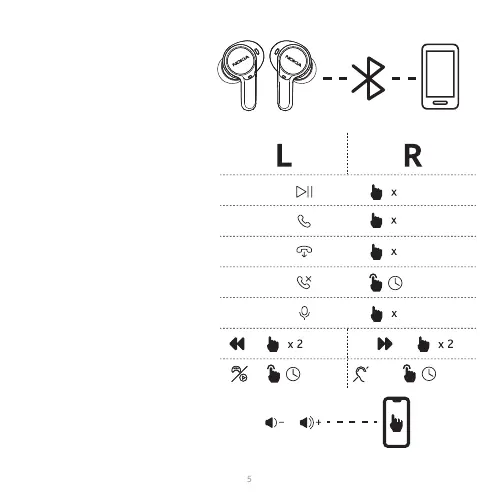
EN Touch control
DE Berührungssteuerung
FR Contrôle tactile
IT Controllo Touch
NO berøringskontroll
PO Control tactil
RO Сенсорне керування
TR Dokunmatik kontrol
UA Controle de toque
BP Controle de toque
ES Control táctil
KR 터치 컨트롤
SC 触控
TC 觸控
ﺲﻤﻠﻟﺎﺑ ﻢﻜﺤﺘﻟا AR
Nokia
TWS-842W
1
2 secs
1
2
2 secs
3
2 secs
ANC
/




 To Next Page