EasyManua.ls Logo

Nokia G-211M-C - User Manual

Nokia G-211M-C
2 pages
Print Icon
To Next Page IconTo Next Page
Loading...
© 2021 Nokia. Nokia Confidential Information. Use subject to agreed restrictions on disclosure and use.
If you have received this document in error, do not use or copy this document for any purpose nor disclose its contents to any other person.
3FE-52343-AAAA-TCZZB
Issue 1, October 2021
Nokia ONT G-211M-C Quick Reference Guide
1. Product Overview
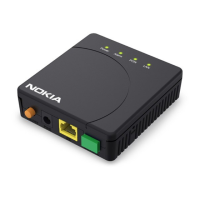
The Nokia Optical Network Terminal (ONT) G-211M-C with one
Gigabit Ethernet (GigE), two plain old telephone service (POTS) ports
and one MoCA RF video interface is part of the industry-leading Nokia
ONT product family and is compatible with the Nokia 7360 ISAM fiber
to the x (FTTx) product line. It is the cost-effective way to deliver
triple play services in a fiber to the home (FTTH) environment to
single family units (SFUs) where data, voice and video ports are
required. The Nokia ONT terminates the symmetrical Gigabit Passive
Optical Network (GPON) fiber interface that is compliant with a Full
Service Access Network (FSAN).
The Nokia ONT G-211M-C is designed for residential customers. This
ONT offers data, voice and video services to the subscriber through
FTTH or fiber to the premises (FTTP) applications. The temperature-
hardened ONT G-211M-C is suitable for indoor deployments and
outdoor deployment in a compatible outdoor enclosure. The ONT is
compliant with ITU-T G.984, G.988 series standards, with GPON as
the uplink interface supporting a line rate of 1 Gb/s downstream and
1 Gb/s upstream. The ONT also compliant with the standard optical
network unit (ONU) management and control interface (OMCI)
definition, and can be managed from a remote site using the 5520
Access Management System (AMS) supporting the full range of fault,
configuration, accounting, performance, and security (FCAPS)
functions.
A. Technical Specifications
Height: 227.1 mm
Width: 147.1 mm
Depth: 35.6 mm
Weight: 440 g
Installation: Wall or desk mounted
Power consumption:
Standby mode: 4.8 W
Typical mode: 8.6 W
B. Manufacturer Information
For Products Purchased in EU/EAA Countries
The products are manufactured and imported by Nokia Solutions and
Networks Oy.
Karakaari 7, 02160 Espoo, Finland.
Nokia is a registered trademark of Nokia Corporation.
For Products Purchased in the United States
The products are imported by Nokia of America Corporation.
Offices: https://www.nokia.com/contact-us/offices/#north-
america
Support: https://www.nokia.com/networks/business-support/
Other contacts: https://www.nokia.com/contact-us/
Please contact your Internet Services Provider in case of questions
on the product.
2. Safety Guidelines
ALWAYS READ THE PRODUCT GUIDE BEFORE SET UP OR USE OF THE
PRODUCT. IT IS YOUR RESPONSIBILITY TO FAMILIARIZE YOURSELF
WITH THE PRODUCT GUIDE AND WARNINGS, AND TO USE A PRODUCT
PROPERLY. CONTACT YOUR INTERNET SERVICES PROVIDER FOR
FURTHER QUESTIONS.
Warning - Risk of electric shock or fire
Connect the Product power adaptor or cord to the right supply
voltage (for example, 230V in Europe, Turkey, Ukraine, 120V AC
in US, 230V in Australia and New Zealand, 230V in South Africa, 220V
in Russia, Morocco).
The socket-outlet shall be easily accessible.
Pay attention to the power load of the electrical outlet and possible
extension cord. An overburdened power outlet or damaged cords
and plugs may cause electric shock or fire. Check the power cords
regularly. If you find any damage, replace the cord immediately.
Do not connect the plug into an extension cord, receptacle, or other
outlet unless the plug can be fully inserted with no part of the blades
exposed.
Leave adequate space for heat dissipation to avoid any damage
caused by overheating the Product. Do not cover the Product or its
ventilation holes. Blocking the ventilation holes may cause fire.
Use the power adapter provided with your Product and do not fasten
the power cable to building surfaces. Ensure the cable can move
freely. Do not place heavy objects on the cable.
Do not use the Product outside, and make sure all the connections
are indoors.
Do not install, use, or service this Product during a thunderstorm.
There is a remote risk of electric shock from lightning.
CID 210922
Question and Answer IconNeed help?

Do you have a question about the Nokia G-211M-C and is the answer not in the manual?

Summary

Product Overview

Technical Specifications

Details product physical dimensions, weight, and power consumption.

Manufacturer Information

Information about the manufacturer and contact details for different regions.

Safety Guidelines

Risk of Electric Shock or Fire

Precautions to prevent electric shock and fire hazards during product operation.

Potential Equipment Damage

Recommendations to protect the user and the product from potential harm.

FCC Declaration of Conformity

Statement of compliance with U.S. FCC Rules for digital devices.

Summary

Product Overview

Technical Specifications

Details product physical dimensions, weight, and power consumption.

Manufacturer Information

Information about the manufacturer and contact details for different regions.

Safety Guidelines

Risk of Electric Shock or Fire

Precautions to prevent electric shock and fire hazards during product operation.

Potential Equipment Damage

Recommendations to protect the user and the product from potential harm.

FCC Declaration of Conformity

Statement of compliance with U.S. FCC Rules for digital devices.

Overview

The Nokia ONT G-211M-C is an Optical Network Terminal designed for residential customers, offering triple-play services (data, voice, and video) in Fiber to the Home (FTTH) or Fiber to the Premises (FTTP) environments. It is compatible with the Nokia 7360 ISAM fiber to the x (FTTx) product line and is a cost-effective solution for single-family units requiring data, voice, and video ports. This ONT terminates the symmetrical Gigabit Passive Optical Network (GPON) fiber interface, compliant with Full Service Access Network (FSAN) standards.

Function Description:

The ONT G-211M-C provides one Gigabit Ethernet (GigE) port, two Plain Old Telephone Service (POTS) ports, and one MoCA RF video interface. It supports GPON as the uplink interface, with a line rate of 1 Gb/s downstream and 1 Gb/s upstream, adhering to ITU-T G.984 and G.988 series standards. The device is also compliant with the standard Optical Network Unit (ONU) management and control interface (OMCI) definition. It can be remotely managed using the 5520 Access Management System (AMS), which supports a full range of Fault, Configuration, Accounting, Performance, and Security (FCAPS) functions. The temperature-hardened design makes it suitable for both indoor and compatible outdoor deployments.

Important Technical Specifications:

  • Dimensions:
    • Height: 227.1 mm
    • Width: 147.1 mm
    • Depth: 35.6 mm
  • Weight: 440 g
  • Installation: Wall or desk mounted
  • Power Consumption:
    • Standby mode: 4.8 W
    • Typical mode: 8.6 W
  • Operating Temperature: -40 to 65 degrees Celsius
  • Relative Humidity: 50% to 93%
  • Uplink Interface: GPON (1 Gb/s downstream, 1 Gb/s upstream)
  • Downlink Interfaces: 1x GigE, 2x POTS, 1x MoCA RF video

Usage Features:

The Nokia ONT G-211M-C is designed for ease of use in residential settings. It provides multiple connectivity options for various services, including high-speed internet, telephone, and video. The wall or desk-mounted installation offers flexibility in placement within the home. Users should connect the product's power adapter or cord to the correct supply voltage (e.g., 120V AC in the US, 230V in Europe) and ensure the socket-outlet is easily accessible. It is crucial to use the power adapter provided with the product and avoid fastening the power cable to building surfaces, ensuring it can move freely. Heavy objects should not be placed on the cable. All connections must be indoors, and the product should not be used outside.

Maintenance Features:

To ensure the longevity and proper functioning of the Nokia ONT G-211M-C, several maintenance guidelines should be followed:

  • Environmental Protection:
    • Avoid placing the product near heat sources or in direct sunlight.
    • Do not expose the product to damp or wet locations (e.g., near bathtubs, sinks, or swimming pools).
    • Prevent any liquid from spilling on the product.
    • Ensure adequate space for heat dissipation and do not cover the product or its ventilation holes to prevent overheating.
  • Physical Handling:
    • Do not insert any sharp objects into the product's openings.
    • Avoid placing the product on unstable surfaces or supports.
    • Do not place heavy objects on top of the product.
    • Do not touch the product or its power adapter/cord with wet hands.
  • Cleaning:
    • Unplug the product before cleaning.
    • Use a soft, dry cloth for cleaning; avoid liquid or aerosol cleaners.
  • Cable Management:
    • Regularly check power cords for damage and replace them immediately if any is found.
    • Ensure plugs are fully inserted into extension cords or outlets, with no part of the blades exposed.
    • Use the correct cables and connect devices to the appropriate ports to avoid damaging the product or connected devices.
  • Safety Precautions:
    • Do not look directly at the optical port without protection.
    • Do not open or attempt to open the product, as this can expose dangerous high voltage points.
    • Do not install, use, or service the product during a thunderstorm due to the remote risk of electric shock from lightning.
    • Maintain a distance of at least 10 cm between individuals (especially those with pacemakers or other medical devices) and the product, as it emits an electromagnetic field that could cause interference. Consult a physician or medical device manufacturer if you have concerns.
    • Keep the product and accessories out of reach of pets to prevent damage, injury, or electrocution.
    • If the product malfunctions or fails to perform as expected, stop using it immediately.
  • Regulatory Compliance:
    • The device complies with part 15 of the U.S. FCC Rules, meaning it may not cause harmful interference and must accept any interference received.
    • No unauthorized changes or modifications should be made to the product without prior express written approval from Nokia, as this could void the user's authority to operate the device and invalidate regulatory certifications.

Nokia G-211M-C Specifications

General IconGeneral
BrandNokia
ModelG-211M-C
CategoryNetwork Hardware
LanguageEnglish

Related product manuals