Need help?
Do you have a question about the Nokia LPS-5 and is the answer not in the manual?
Procedure to power the loopset on by pressing the multifunction key, and how to switch it off.
Steps for establishing a Bluetooth connection between the loopset and a phone or music player.
Method to end the connection with the paired device, either by switching off the loopset or through the device's Bluetooth menu.
Guidance on how to re-establish a connection if it is lost, by switching the loopset off/on or using device settings.
Solutions for common connection issues, including checking charge, power status, pairing, and proximity to the device.
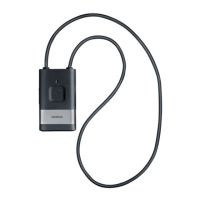
The Nokia Wireless Loopset LPS-5 is an inductive loopset designed for individuals with hearing aids equipped with a telecoil (T-coil). It enables users to connect their compatible mobile phone or music player wirelessly to their hearing aid. When making calls, the loopset's internal microphone allows for direct speech without needing to hold the phone close to the ear. The sound quality transmitted to the hearing aid depends on the hearing aid type and can be affected by electromagnetic disturbances in the surroundings.
The loopset is compliant with the Bluetooth Specification 2.1 + EDR, supporting the Headset Profile 1.1, the Hands-Free Profile (HFP) 1.5, and the Advanced Audio Distribution Profile (A2DP) 1.0. It operates within a range of 10 meters (33 feet) from the connected device. The closer the loopset is to the other device, the better the performance. The connection is subject to interference from distance, obstructions, or other electronic devices.
The device features an internal, nonremovable, rechargeable battery. It is intended for use with Nokia approved chargers: AC-8 and DC-9. A fully charged battery provides up to 6 hours of talk time or up to 22 hours of standby time. Charging the battery fully may take up to 1 hour. The device's surface is nickel-free.
The loopset consists of a neck loop, an indicator light (inside the rubber sleeve at the top), volume keys, a microphone, a multifunction key, and a charger connector. Before initial use, the battery must be charged, and the loopset must be paired with a compatible device.
To charge, connect the charger to a wall outlet, then connect the charger cable to the loopset's charger connector. The indicator light will be red during charging and turn green when fully charged. Disconnect the charger from the loopset, then from the wall outlet. If the battery is discharged, the loopset beeps every 5 minutes, and the indicator light slowly flashes red.
To switch on, press and hold the multifunction key for about 2 seconds. The loopset vibrates once, plays an ascending sequence of beeps, and displays a green indicator light. It then attempts to connect to the last used device. If connected and ready, the indicator light slowly flashes blue. If not paired, it automatically enters pairing mode. To switch off, press and hold the multifunction key for over 5 seconds. The loopset vibrates twice, plays a descending sequence of beeps, and briefly displays a red indicator light. If not connected to a paired device within 30 minutes, it automatically switches off.
To pair for the first time, switch on the loopset; it will enter pairing mode with the indicator light quickly flashing blue. To pair with a new device after previous pairings, ensure the loopset is off, then press and hold the multifunction key for over 5 seconds until the indicator light quickly flashes blue. Within 5 minutes, activate Bluetooth on your phone or music player and search for devices. Select "Wireless Loopset LPS-5" and enter passcode "0000" if prompted. Some devices may require a separate connection after pairing. A successful pairing will show the loopset in your device's Bluetooth menu, and the indicator light will slowly flash blue when connected. The loopset can be paired with up to eight devices but connected to only one at a time.
To disconnect, switch off the loopset or disconnect it via your device's Bluetooth menu. To reconnect, switch the loopset off and back on, or make the connection in the Bluetooth menu, or press and hold the multifunction key for about 2 seconds. The loopset vibrates once and beeps twice upon successful reconnection.
To set up, detach one end of the neck loop, place it around your neck, and plug it back into the loopset. Switch your hearing aid to T mode. Wear the loopset around your neck when in use.
To adjust the loopset's magnetic field strength for the hearing aid, press a volume key during a call or while listening to music. The loopset vibrates and beeps at the selected level. To adjust sidetone volume (sound picked up by the microphone and routed to the hearing aid during a call), press the multifunction key twice during a call, then press a volume key within 15 seconds.
During a call (without another call waiting or on hold), press and hold the multifunction key for about 2 seconds one or more times to select a vibration mode:
Make calls using your mobile phone. During a call, the loopset vibrates, and the indicator light quickly flashes blue. To redial the last called number (if supported), press the multifunction key twice when no call is in progress. To activate voice dialing (if supported), press and hold the multifunction key for about 2 seconds when no call is in progress. To answer or end a call, press the multifunction key or use phone keys. To reject a call, press the multifunction key twice. When receiving a call, the loopset vibrates, plays a ringing tone, and the indicator light quickly flashes blue. To switch a call from the loopset to the device, switch the loopset off or use the device's feature. To switch back, switch the loopset on (and connect it) or press and hold the multifunction key for about 2 seconds if already on.
Requires mobile device support for Bluetooth Hands-Free Profile 1.5 and activated call waiting. To answer a waiting call and end the active call, press the multifunction key. To answer a waiting call and put the active call on hold, press and hold the multifunction key for about 2 seconds. To end the active call and make the call on hold active, press the multifunction key. To switch between active and on-hold calls, press and hold the multifunction key for about 2 seconds.
Connect the loopset to a compatible device supporting A2DP Bluetooth profile. Use the connected device's playback controls. If a call is received or made while listening to music, the music may pause until the call ends, depending on the device.
When a short message tone is sent from a compatible phone to the loopset, it vibrates twice. This feature does not work for long message tones or if message tones are deactivated on the phone.
To clear pairing, loopset volume, sidetone, and vibration mode settings, switch on the loopset, then press and hold the multifunction key and the volume up key for about 5 seconds. The indicator light alternates red, green, and blue twice, and the loopset enters pairing mode. To reset the loopset if it stops functioning (even if charged), connect it to a charger while pressing and holding the multifunction key. A reset does not clear settings.
If unable to connect, ensure the loopset is charged, switched on, paired, and within 10 meters (33 feet) of the connected device.
The device is a product of superior design and craftsmanship and should be treated with care.
The crossed-out wheeled-bin symbol indicates that electrical and electronic products, batteries, and accumulators must be collected separately at the end of their life, as per European Union requirements. Do not dispose of these as unsorted municipal waste. Return used electronic products, batteries, and packaging materials to a dedicated collection point to prevent uncontrolled waste disposal and promote recycling. More information is available from product retailers, local waste authorities, national producer responsibility organizations, or Nokia representatives (www.nokia.com/werecycle or www.nokia.mobi/werecycle).
 General
| Brand | Nokia |
|---|---|
| Model | LPS-5 |
| Category | Hearing Aid |
| Language | English |


 To Next Page