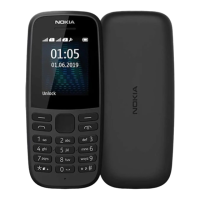
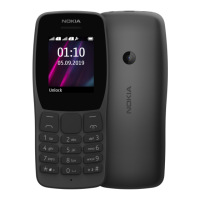
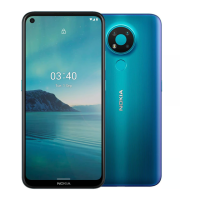
The Nokia 3210 is a mobile phone designed for basic communication and essential features, emphasizing ease of use and durability. It supports dual-SIM functionality, allowing users to manage two SIM cards simultaneously.
Function Description:
The Nokia 3210 serves primarily as a communication device, enabling users to make and receive calls, manage contacts, and send messages. Beyond core communication, it includes features for personalization, such as changing tones and wallpapers, and offers basic utilities like a camera for photos and videos, an alarm clock, a calendar, and a calculator. The phone is designed for straightforward operation with a physical keypad and a simple menu navigation system. It also includes a flashlight for convenience.
Important Technical Specifications:
- Models: TA-1615, TA-1618, TA-1628, TA-1619, TA-1686.
- SIM Card: Nano-SIM. The device is designed for use with nano-SIM cards only; incompatible SIM cards may cause damage. Dual-SIM models are available, indicated by two IMEI codes on the sales box.
- Memory Card: Supports microSD memory cards up to 32 GB. Users are advised to use fast, well-known manufacturer brands.
- Battery: Uses an original rechargeable battery. For devices with removable batteries, users can replace them when talk and standby times decrease. For non-removable batteries, replacement requires an authorized service facility.
- Charging: Charges via a compatible charger, which may include a data cable and USB power adapter (sold separately if not included in the sales pack). Continuous charging should not exceed 12 hours.
- Connectivity: Wireless devices may be susceptible to interference. Bluetooth® connections are supported.
- SAR Limit: The ICNIRP SAR limit for mobile devices is 2.0 W/kg averaged over 10 grams of tissue. The device meets RF exposure guidelines when used against the head or at least 5/8 inch (1.5 cm) away from the body.
- Software: Pre-installed system software and apps utilize a significant portion of memory space. The product includes open-source software.
Usage Features:
- Keypad: The phone features a physical keypad for typing and navigation. The scroll key is central for menu navigation (up, down, left, right) and selecting items. The left selection key also functions as the call key, and the right selection key doubles as the power/end key.
- Keypad Lock: Keys can be locked by selecting "Lock keypad" and unlocked by selecting "Unlock" and pressing
*.
- Text Input: Text is entered by pressing keys repeatedly for desired letters.
0 inserts a space. * inserts special characters or punctuation. # switches character cases or, when using predictive text, can be pressed and held for punctuation. Holding a number key types a number.
- Calls: To make a call, type the number (press
* twice for + in international calls) and press the call key. To answer, press the call key. To end, press the end key.
- Contacts: Contacts can be added by navigating to Menu > Contacts > Add new contact, then entering details and saving. Contacts from call logs can also be saved.
- Messages: To send a message, go to Menu > Messages > New message, type the recipient's number or select from contacts, write the message, and press "Send."
* inserts symbols.
- Personalization:
- Tones: Change ringtones and other tones via Menu > Settings > Profiles > Settings > Ring settings.
- Home Screen: Change wallpaper via Menu > Settings > Personalisation > Lock screen background > Wallpapers.
- Profiles: Select from various profiles (e.g., silent, outdoor) via Menu > Settings > Profiles. Profiles can be adjusted or activated.
- Camera: To take a photo, go to Menu > Camera, zoom with the scroll key, and press the scroll key to capture. Photos are viewed in Menu > Gallery.
- Video Recording: To record a video, go to Menu > Camera, scroll to the video icon, press the scroll key to start, and press the stop icon to end. Videos are viewed in Menu > Videos.
- Clock and Calendar:
- Time and Date: Manually set time and date via Menu > Settings > Time & language > Date and time. Options include setting time zone, time, and date, then saving. Auto-update can also be changed.
- Alarm Clock: Set alarms via Menu > Alarm > New alarm.
- Calendar: Add events via Menu > Extras > Calendar > Add new event.
- Calculator: Access via Menu > Extras > Calculator. Enter factors, use the scroll key for operations, and press the scroll key for the result.
C clears fields.
- Flashlight: The device includes a flashlight.
Maintenance Features:
- Device Care:
- Keep the device dry and away from dust, dirt, and extreme temperatures (15°C to 25°C / 59°F to 77°F for optimal battery performance).
- Avoid dropping, knocking, or shaking the device.
- Clean with a soft, dry cloth.
- Do not paint the device.
- Keep away from magnets.
- Do not open the device unless instructed in the user guide.
- If the device becomes warm during extended use, it may automatically slow down, close apps, or switch off.
- Battery and Charger Safety:
- Use only approved batteries and chargers.
- Unplug the charger when charging is complete; continuous charging should not exceed 12 hours.
- Do not dismantle, puncture, or damage the battery.
- If a battery leaks, avoid contact with skin or eyes and seek medical help.
- Always switch off the device and unplug the charger before removing covers or the battery (for removable battery models).
- Avoid accidental short-circuiting of the battery.
- Security:
- A security code can be set via Menu > Settings > Security > Keyguard > Security code. This code must be remembered as HMD Global cannot bypass it.
- Protect against harmful content by being cautious with messages, connectivity requests, and browsing. Install antivirus software on connected computers.
- Factory Reset: To restore original factory settings and remove all data, type
*#7370# on the home screen. A security code may be required. Users are responsible for removing private content before disposing of the phone.
- Recycling: Return used electronic products, batteries, and packaging to dedicated collection points to promote recycling and prevent uncontrolled waste disposal. Remove personal data before recycling. Information on recycling points and HMD's take-back program is available at www.hmd.com/phones/support/topics/recycle.

 Need help?
 General

 To Next Page