EasyManua.ls Logo

Nokia XS-010X-Q - User Manual

Nokia XS-010X-Q
3 pages
Print Icon
To Next Page IconTo Next Page
Loading...
Nokia Proprietary and Confidential 3FE-49331-AAAA-TCZZB
Use pursuant to applicable agreements CID210704 Issue 1, July 2021
Nokia ONT XS-010X-Q Quick Reference Guide
1. Product Overview
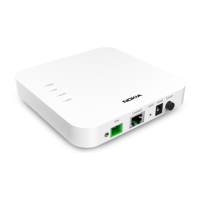
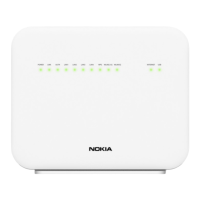
The Nokia Optical Network Terminal (ONT) XS-010X-Q that has one
1/10 Gigabit Ethernet (GigE) is part of the industry-leading Nokia
ONT product family. It is designed to deliver triple play services in a
fiber to the home (FTTH) environment to single family units (SFUs)
where an Ethernet port
is required. The Nokia
ONT terminates the 10
G symmetrical Passive
Optical Network (XGS-
PON) fiber interface
that is compliant with a
Full Service Access
Network (FSAN).
The Nokia ONT XS-010X-Q is designed for residential customer
requirements and offers data services to the subscriber through
FTTH or fiber to the premises (FTTP) applications. The Nokia ONT XS-
010X-Q is an ONT suitable for indoor deployments and is compliant
with ITU-T G.9807.1 supporting a line rate of 10 Gb/s upstream and
10 Gb/s downstream. With XGS-PON as the uplink interface, the XS-
010X-Q is also compliant with the standard optical network unit
(ONU) management and control interface (OMCI) definition. The XS-
010X-Q can be managed from a remote site using application
management services (AMS) and supports the full range of fault,
configuration, accounting, performance, and security (FCAPS)
functions.
A. Technical Specifications
Height: 3.0 cm (1.18 in)
Width: 13.5 cm (5.31 in)
Length: 13.5 cm (5.31 in)
Weight: 0.366kg (0.81 lb)
Desktop or wall mount
Power consumption:
Standby mode: 4.11 W
Typical mode: 7.84 W
B. Manufacturer Information
For Products Purchased in EU/EAA Countries
The products are manufactured and imported by Nokia Solutions and
Networks Oy.
Karakaari 7, 02160 Espoo, Finland.
Nokia is a registered trademark of Nokia Corporation.
For Products Purchased in the United States
The products are imported by Nokia of America Corporation.
Offices: https://www.nokia.com/contact-us/offices/#north-
america
Support: https://www.nokia.com/networks/business-support/
Other contacts: https://www.nokia.com/contact-us/
Please contact your Internet Services Provider in case of questions
on the product.
2. Safety Guidelines
ALWAYS READ THE PRODUCT GUIDE BEFORE SET UP OR USE OF THE
PRODUCT. IT IS YOUR RESPONSIBILITY TO FAMILIARIZE YOURSELF
WITH THE PRODUCT GUIDE AND WARNINGS, AND TO USE A PRODUCT
PROPERLY. CONTACT YOUR INTERNET SERVICES PROVIDER FOR
FURTHER QUESTIONS.
Warning - Risk of electric shock or fire
Connect the Product power adaptor or cord to the right supply
voltage (for example, 230V in Europe, Turkey, Ukraine, 120V AC
in US, 230V in Australia and New Zealand, 230V in South Africa, 220V
in Russia, Morocco).
The socket-outlet shall be easily accessible.
Pay attention to the power load of the electrical outlet and possible
extension cord. An overburdened power outlet or damaged cords
and plugs may cause electric shock or fire. Check the power cords
regularly. If you find any damage, replace the cord immediately.
Do not connect the plug into an extension cord, receptacle, or other
outlet unless the plug can be fully inserted with no part of the blades
exposed.
Leave adequate space for heat dissipation to avoid any damage
caused by overheating the Product. Do not cover the Product or its
ventilation holes. Blocking the ventilation holes may cause fire.
Use the power adapter provided with your Product and do not fasten
the power cable to building surfaces. Ensure the cable can move
freely. Do not place heavy objects on the cable.
Do not use the Product outside, and make sure all the connections
are indoors.
Do not install, use, or service this Product during a thunderstorm.
There is a remote risk of electric shock from lightning.
Caution - Potential equipment damage
Follow these recommendations to protect yourself and the Product
from harm:
Do not look directly at the optical port without protection.
Do not insert any sharp object into the openings of a Product.
Do not put the Product near a heat source. Avoid placing the
Product in direct sunlight.
Do not put the Product in damp or wet locations; for example,
near a bathtub, washbowl, kitchen sink or laundry tub, in a wet
basement, or near a swimming pool. Do not spill any liquid on
the Product.
Do not touch the Product or its power adapter or cord with wet
hands.
Do not place the Product on an unstable surface or support.
Question and Answer IconNeed help?

Do you have a question about the Nokia XS-010X-Q and is the answer not in the manual?

Summary

Product Overview

Technical Specifications

Details on the physical dimensions, weight, and power consumption of the Nokia ONT XS-010X-Q.

Manufacturer Information

Information about the manufacturers and importers for products sold in EU/EAA and United States regions.

Safety Guidelines

Risk of Electric Shock or Fire

Critical warnings and precautions to prevent electric shock, fire hazards, and damage during product operation.

Potential Equipment Damage

Recommendations to protect the product from damage due to environmental factors, misuse, or improper handling.

Installation Guide

ONT Installation Steps

Step-by-step instructions for connecting and installing the Nokia ONT XS-010X-Q device.

Regulatory Compliance

EU Declaration of Conformity

Statement of compliance with EU directives for Radio Equipment, Low Voltage, EMC, and RoHS.

EMC Warning Precautions

Specific precautions related to EMC compliance and potential radio interference in residential settings.

EU RoHS Directive

Information regarding the Restriction of Hazardous Substances in electrical and electronic equipment.

End of Life Collection and Treatment

Guidelines for the proper disposal and recycling of the product in the European Union and EEA.

FCC Compliance

FCC Declaration of Conformity

Statement of compliance with U.S. FCC Rules, including conditions for operation and interference.

Human Exposure Guidelines

Information on FCC radiation exposure limits and recommended minimum safe distances.

User Information and Restrictions

Key information for users, including limitations on modifications and antenna usage.

Summary

Product Overview

Technical Specifications

Details on the physical dimensions, weight, and power consumption of the Nokia ONT XS-010X-Q.

Manufacturer Information

Information about the manufacturers and importers for products sold in EU/EAA and United States regions.

Safety Guidelines

Risk of Electric Shock or Fire

Critical warnings and precautions to prevent electric shock, fire hazards, and damage during product operation.

Potential Equipment Damage

Recommendations to protect the product from damage due to environmental factors, misuse, or improper handling.

Installation Guide

ONT Installation Steps

Step-by-step instructions for connecting and installing the Nokia ONT XS-010X-Q device.

Regulatory Compliance

EU Declaration of Conformity

Statement of compliance with EU directives for Radio Equipment, Low Voltage, EMC, and RoHS.

EMC Warning Precautions

Specific precautions related to EMC compliance and potential radio interference in residential settings.

EU RoHS Directive

Information regarding the Restriction of Hazardous Substances in electrical and electronic equipment.

End of Life Collection and Treatment

Guidelines for the proper disposal and recycling of the product in the European Union and EEA.

FCC Compliance

FCC Declaration of Conformity

Statement of compliance with U.S. FCC Rules, including conditions for operation and interference.

Human Exposure Guidelines

Information on FCC radiation exposure limits and recommended minimum safe distances.

User Information and Restrictions

Key information for users, including limitations on modifications and antenna usage.

Overview

The Nokia Optical Network Terminal (ONT) XS-010X-Q is a key component of Nokia's ONT product family, designed to deliver triple-play services in fiber-to-the-home (FTTH) environments for single-family units (SFUs) requiring an Ethernet port. This device terminates the 10 G symmetrical Passive Optical Network (XGS-PON) fiber interface, adhering to Full Service Access Network (FSAN) standards.

Function Description:

The XS-010X-Q is tailored for residential customer needs, providing data services through FTTH or fiber-to-the-premises (FTTP) applications. It's suitable for indoor deployments and complies with ITU-T G.9807.1, supporting a line rate of 10 Gb/s upstream and 10 Gb/s downstream. Utilizing XGS-PON as the uplink interface, it also conforms to the standard optical network unit (ONU) management and control interface (OMCI) definition. The device can be managed remotely via application management services (AMS) and supports a comprehensive range of fault, configuration, accounting, performance, and security (FCAPS) functions.

Important Technical Specifications:

  • Dimensions:
    • Height: 3.0 cm (1.18 in)
    • Width: 13.5 cm (5.31 in)
    • Length: 13.5 cm (5.31 in)
  • Weight: 0.366 kg (0.81 lb)
  • Mounting: Desktop or wall mount
  • Power Consumption:
    • Standby mode: 4.11 W
    • Typical mode: 7.84 W
  • Operating Temperature: -5 to 45 degrees Celsius
  • Relative Humidity: 5% to 95%
  • Compliance:
    • ITU-T G.9807.1 (10 Gb/s upstream/downstream)
    • FSAN (Full Service Access Network)
    • OMCI (Optical Network Unit Management and Control Interface)
    • EU Radio Equipment Directive 2014/53/EU
    • EU Low Voltage Directive 2014/35/EU
    • EU EMC Directive 2014/30/EU
    • EU RoHS Directives 2011/65/EU and 2015/863/EU
    • EU Eco-design Directive 2009/125/EC
    • FCC Part 15 Class B digital device

Usage Features:

  • Installation:
    1. Connect the power cable to the PWR port on the case.
    2. Connect the power socket to the wall outlet.
    3. Remove the protective cap on the OPTICAL port of the case.
    4. Remove the protective cap from the fiber optic.
    5. Connect the optical fiber to the optical port of the case.
    6. Connect the case to the home router via an Ethernet cable.
    7. Push the ON/OFF button to turn the device "ON".
  • Safety Guidelines:
    • Always read the product guide and warnings before setup or use.
    • Connect the power adapter to the correct supply voltage (e.g., 230V in Europe, 120V AC in US).
    • Ensure the socket-outlet is easily accessible.
    • Regularly check power cords for damage and replace immediately if found.
    • Ensure plugs are fully inserted into outlets.
    • Allow adequate space for heat dissipation; do not cover the product or its ventilation holes.
    • Use only the provided power adapter and do not fasten the power cable to building surfaces.
    • Do not place heavy objects on the cable.
    • For indoor use only; do not use the product outside.
    • Avoid installing, using, or servicing during a thunderstorm.
    • Maintain a distance of at least 10 cm between users and the product to avoid exposure to electromagnetic fields that could interfere with pacemakers or other medical devices.
    • Keep the product and accessories out of reach of pets.
    • Stop using immediately if the product malfunctions.
  • Caution - Potential Equipment Damage:
    • Do not look directly at the optical port without protection.
    • Do not insert sharp objects into openings.
    • Avoid placing near heat sources or in direct sunlight.
    • Do not place in damp or wet locations (e.g., near bathtubs, sinks, pools).
    • Do not spill liquid on the product.
    • Do not touch the product or power adapter/cord with wet hands.
    • Do not place on an unstable surface.
    • Use only approved antennas; product changes or modifications will invalidate certifications.
    • The product and its antenna(s) must not be co-located or operated with any other antenna or transmitter.

Maintenance Features:

  • Cleaning: Unplug the product and use a soft, dry cloth for cleaning. Do not use liquid or aerosol cleaners.
  • Troubleshooting (FCC): If the equipment causes harmful interference, try reorienting or relocating the receiving antenna, increasing separation between equipment and receiver, connecting to a different circuit outlet, or consulting a dealer/experienced radio/TV technician.
  • No Unauthorized Modifications: Do not make any changes or modifications without prior express written approval from Nokia, as this could void the user's authority to operate the device.
  • End-of-Life Collection and Treatment (EU/EEA): This product should not be disposed of with household waste. It must be deposited at an appropriate facility for recovery and recycling, in compliance with applicable EU and local legislation (e.g., European Directive 2012/19EU on WEEE). Nokia offers collection and treatment for products bearing its logo at the end of their useful life. For more information on recycling/disposal, contact your service provider or refer to www.nokia.com/notices/declaration-of-conformity/.

Nokia XS-010X-Q Specifications

General IconGeneral
BrandNokia
ModelXS-010X-Q
CategoryTouch terminals
LanguageEnglish

Related product manuals