18
6. MOBILE PHONE
To pair a mobile phone to the B101 system, follow the procedure illustrated in Chapter 5.
Briefly press any key when you hear the incoming call signal.
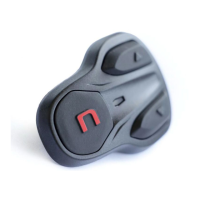
Press and hold “n” key for about 2 seconds.
Hanging up/rejecting a phone call
Press and hold “n” key for about 2 seconds.
Press the “” and “” keys simultaneously.
Transferring call in progress
During the call, press the “” and “” keys simultaneously for
4 seconds. The call will be transferred from the helmet to the
telephone.
Press and hold “n” key for about 2 seconds.
Manual phone disconnection
Press the “” and “” keys simultaneously for 4 seconds.
7. MUSIC VIA BLUETOOTH
To pair a mobile phone or an Mp3 device to the B101 system, follow the procedure illustrated in
Chapter 5.
When the player is connected and playing music, press and
hold the “” key for about 2 seconds.
When the player is connected and playing music, press and
hold the “” key for about 2 seconds.
8. GPS SATELLITE NAVIGATOR
B101 system is compatible with the most common satellite navigators for motorcycles. For a list of
compatible models and additional details, visit the website www.n-com.it
To pair a GPS to the B101 system, follow the procedure illustrated in Chapter 5.



 To Next Page