4
Getting Started
Unpack
the box, which contains:
1.
nomad Unit
2.
Power Adapter
3.
Power Cable
4.
Audio Cable
5.
User Manual (this document)
Connect Power
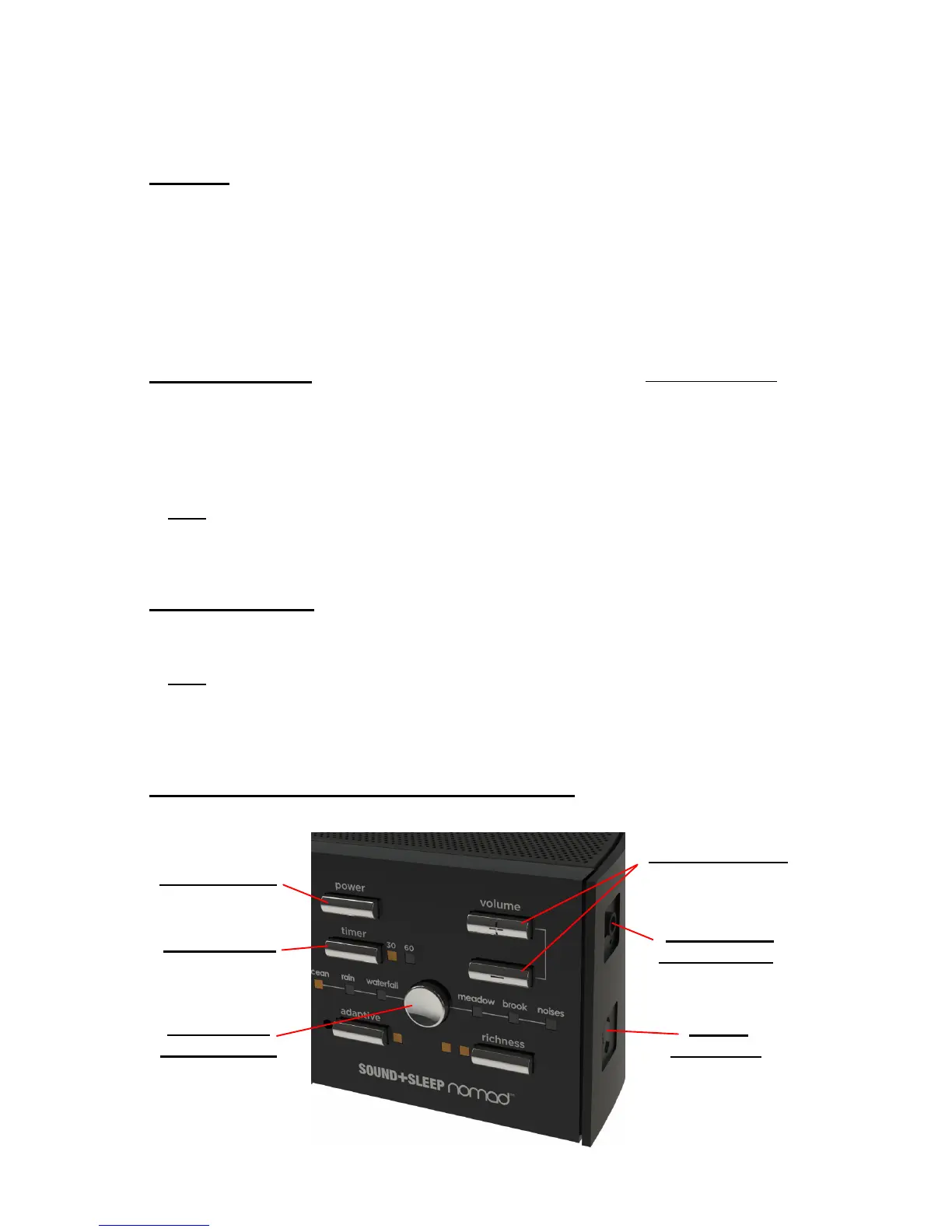
The Power Connector is located on the lower right edge,
under the Audio Input Jack. It is a standard micro USB connector. Align and
gently push the proper end of the Power Cable into the Power Connector
(ensure wider edge of the plug is facing the front of the nomad unit), next
plug the other end of the Power Cable into the supplied Power Adapter. Plug
the Power Adapter into an un-switched wall outlet.
Note: nomad can also be powered by two AA batteries or by plugging the
Power Cable into a powered USB connector on another device (personal
computer, laptop, etc.).
Turn on nomad
Press the Power Button. The unit will start playing in a
second or two. The unit can be turned Off immediately with the Power
Button, or turned Off gradually over time with the Sleep Timer (see page 6).
Note: Out of the box, the unit starts with the OCEAN SoundStory, in
Adaptive Mode, with High Richness (these are explained in the next
section). After that, the unit will return to settings used when you last
powered it Off cleanly (see Note on page 8).
Press The SoundStory Select Button
to select the desired
SoundStory, and adjust the Volume with the Up/Down Buttons.


 To Next Page