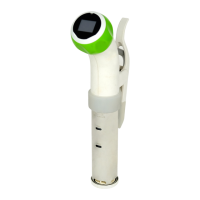
1 Attach Nomiku to a pot. It should clip on the far side of the pot and
face toward you. We recommend using a pot that is at least 6
inches tall. The maximum amount of water Nomiku can be used in
is 5 gallons (20 liters).
2 Add hot water to the pot. The water level should be between the
“Min” and “Max” levels on Nomiku. As Archimedes taught us, the
water level will rise when you add food to the container, so don’t fill
it up too high.
3 Plug in the power cord. The Nomiku “o” will appear dimly. Remember
the outlet must be properly grounded, and you cannot use an
extension cord. Be aware of where the power box and cables will
be when you start cooking, as they should lie flat and away from
anything hot.
4 Press the Nomiku screen. Nomiku will come to life. The Nomiku logo
will display briefly as the water circulation starts. The display will
then show the current temperature of the water as a large number
and the set temperature as a smaller number below it.
5 Turn the knob to set the temperature. Turn right to increase the
temperature and left to decrease it. The set temperature will adjust
as you turn. To switch temperature units from Celsius to Fahrenheit,
or vice versa, simply tap the screen. Temperatures between 4 and
52.2° C ( 39.9 and 125.9° F) appear in orange with a warning
symbol. This is the bacterial growth zone or FDA “Danger Zone” and
proper precautions must be taken. (See Nomiku Primer for more.)
6 Wait for the water to heat up. The temperature unit and set
temperature will disappear when the target temperature is reached.
Simply tap the screen or turn the knob to show them again.
7 Add your food and let Nomiku do its work. Remove when cooked.
Sear if desired. Eat food. Repeat.
8 Turn Nomiku off. Nomiku should be turned off when food is done
and when it is not in use. Just press and hold the screen for three
(3) seconds.
9 Unplug Nomiku. Now you can put it away.
OPERATION
6 Nomiku Use and Care - Operation


 To Next Page
 Loading...