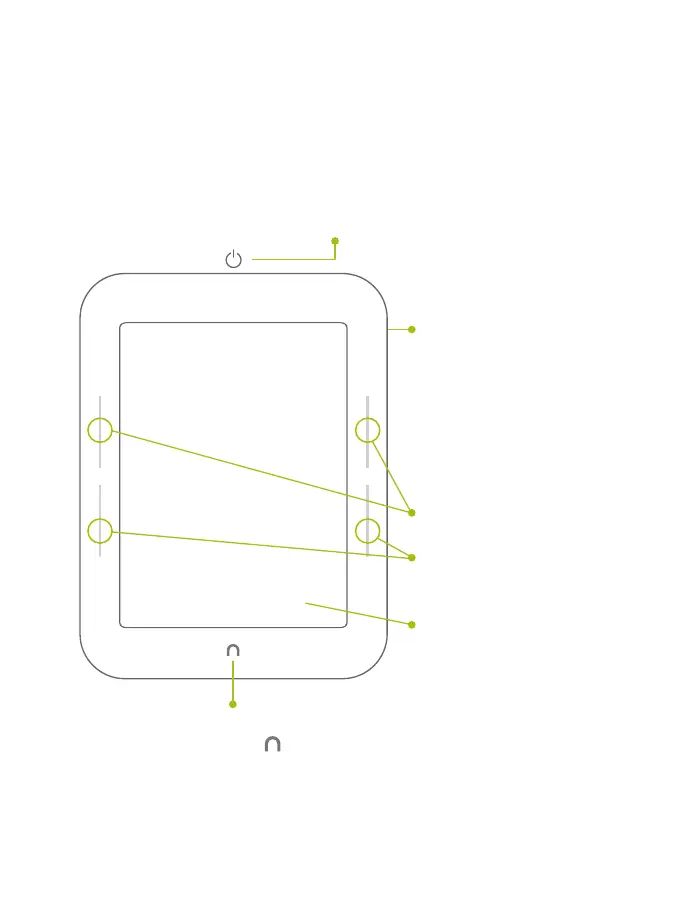
Get to know your NOOK
Power Button
Press and hold the power button on the back of your NOOK
for approximately 2 seconds to turn it on or o.
microSD
™
Memory
Card Slot
On the right-hand side
of your NOOK, lift the
rubber flap to insert a
microSD memory card*
for storing your
personal files.
Page Turn Buttons
Turn forward one page
or scroll up a list.
Turn back one page or
scroll down a list.
Touchscreen E Ink
®
Display
Your NOOK features a
full touchscreen for easy
navigation. Turn pages
with just a tap or swipe.
NOOK Button
Press the NOOK Button to
wake up your device from sleep mode
(turn the display on). When the device is
on, press the NOOK Button to view the
Quick Nav Bar.
*microSD memory card
not included.
6



 To Next Page