45
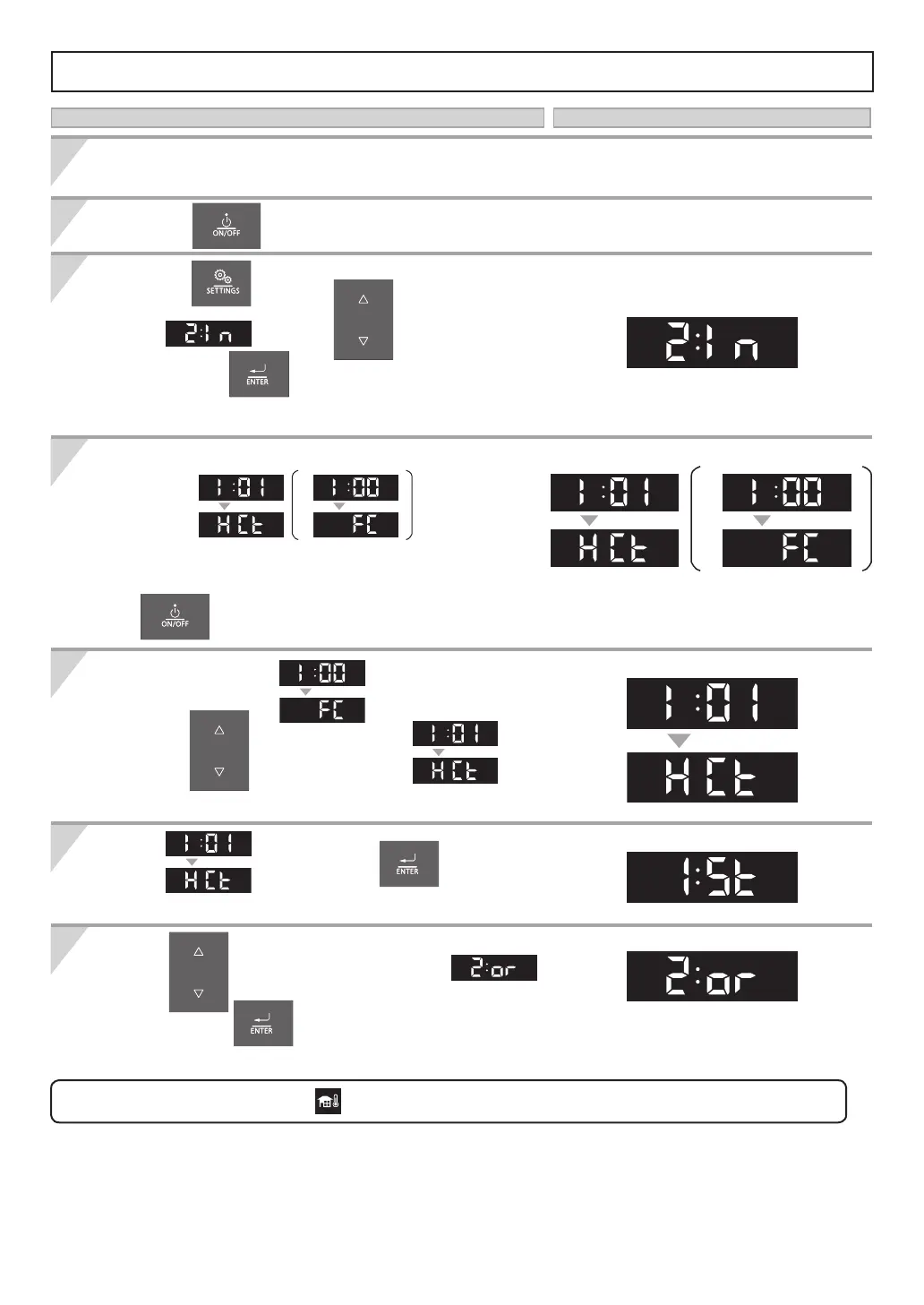
Setting the Outdoor Reset Control Mode - [I:01_HCt]
Connect Outdoor Temperature Sensor to terminal.
(Refer to pages 48, 49 for details.)
Press the button.
Select
using the buttons, and
then press the
button.
The "Installer Mode" screen appears.
When entering the "Installer Mode", display will
change to .
*This function will appear within the rst 10 minutes
of connecting electrical power and before pressing
the
button.
When display shows ,
press the
buttons to navigate
in the "Installer Mode".
Select
After 1 sec.
, then press the button to
enter the function.
Press the
buttons to change the parameter value
,
and then press the button to save the settings and to exit the function.
And additional menu items will become available to adjust.
The icon
will ash if the outdoor sensor is not detected.
Press the button to OFF. The Operation Panel must be off.
Operation Screen Display
1
2
3
4
5
6
7
After 1 sec.
After 1 sec. After 1 sec.
or
*
After 1 sec. After 1 sec.
or
*
After 1 sec.
After 1 sec.


 To Next Page