46
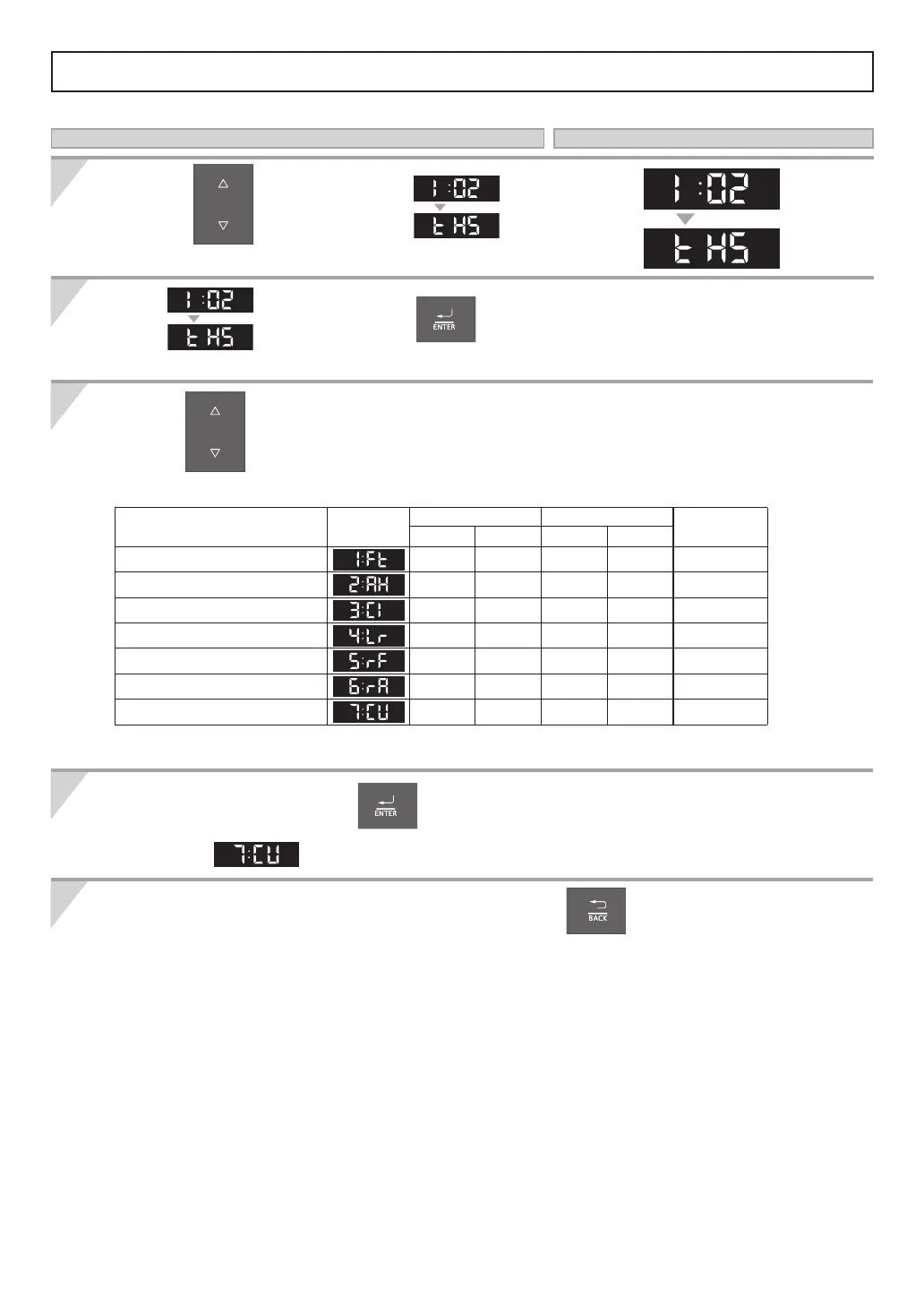
Adjusting Outdoor Reset Control Options
Types of Heating System
* Factory Default.
Type of Heating System
Screen
Display
Temperature(°F) Temperature(°C)
Note
LOW HIGH LOW HIGH
[1:Ft] Fin Tube Baseboard 120 180 49 82 Default
[2:AH] Air Handler 140 180 60 82
[3:CI] Cast Iron Baseboard 100 170 38 76
[4:Lr] Low Mass Radiant Floor 80 140 27 60
[5:rF] Mass Radiant Floor 80 120 27 49
[6:rA] Radiator 120 170 49 76
[7:CU] Custom 100* 180* 38* 82*
Press the buttons to navigate
in the "Installer Mode".
Press the buttons to navigate into desired system.
Note: The Operation Panel must be off.
When you are done, press the
button to save the settings and to exit the function.
If you select
, refer to pages 47, 54-57.
To exit the "Installer Mode" or another function, press the
button.
Select
After 1 sec.
, and then press the button
to enter the function.
Operation Screen Display
1
2
3
4
5
After 1 sec.
After 1 sec.


 To Next Page
 Loading...