:.u
I._
‘*.
;&A...”
INSTAL
TION
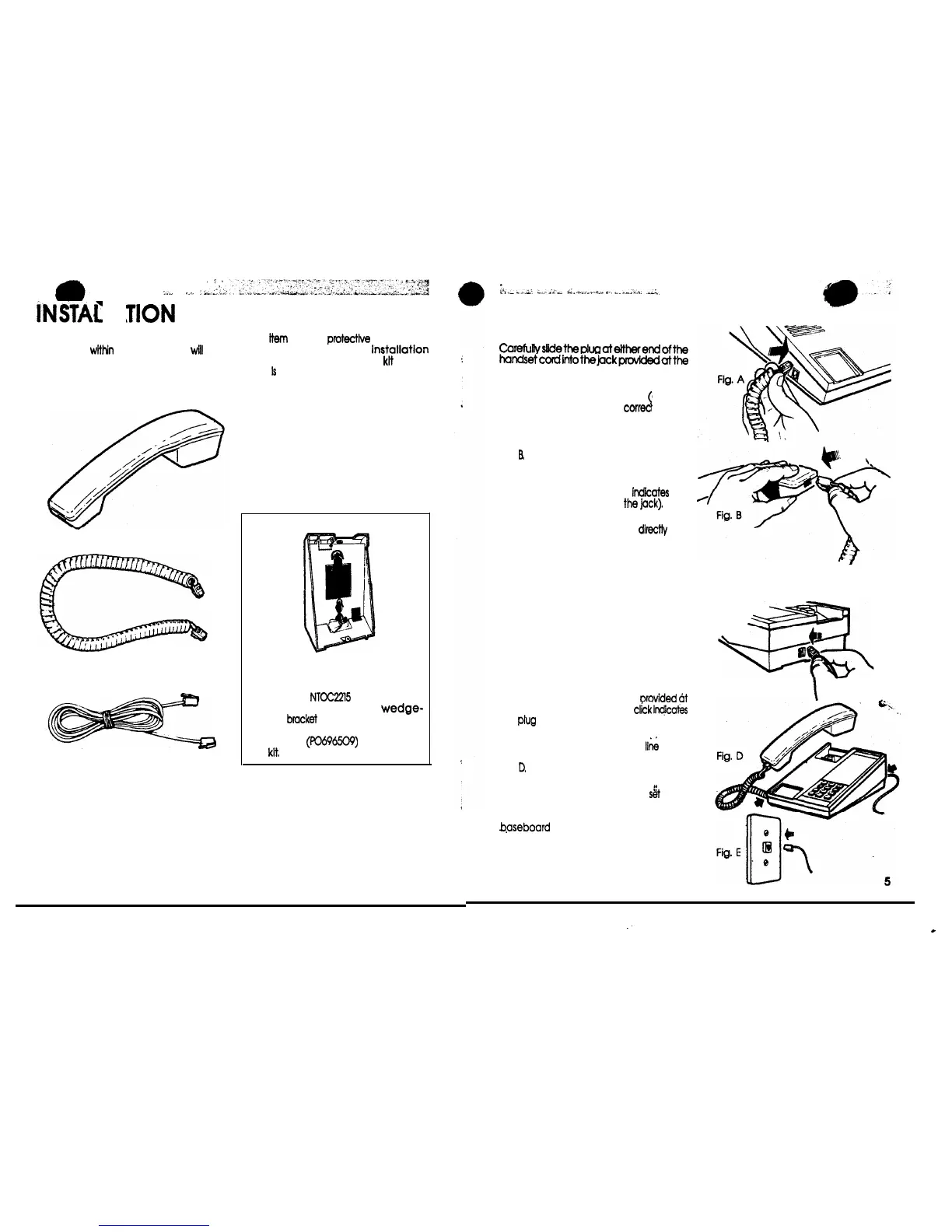
IDENTIFY COMPONENTS. Packed
separately
within
the carton you
will
find
all supplied items which are to be
attached to the telephone set housing
throughout these Instructions. Remove
HANDSET
HANDSET CORD
LINE CORD
4
eadh
item
from its
pro&c&e
packaging
before beginning the
instatlation
procedures (The wall-mount
kit
shown
below
Is
an optional item available from
your telephone supplier).
Bracket Assembly
The optional
NTCC22l5
Wall-Mount Kit
(A0342537) Includes a
wedge-
shaped
bmcket
for attachment to the
base of the set. Complete installation
instructions
(pO696509)
accompany
the
kit,
:,
irr-
.“jr
%.,%2,
i
..L_._..,_,.
a-.
_.
*_..;.
_A_
HANDSET INSTALLATION --
STEP 1
Carefunyslidetheplugatettherendofthe
handsetcordintothejackprovldedatthe
right side of telephone set as shown in
Fig. A.
Ensure plug Is properly seated audible
\
click) and installed in the
correc
jack.
STEP 2
Grasp the handset and the opposite end
of the handset cord as shown in
Fig.
R
Fully insert the plastic plug at the end of
cord into the jack located at end of
handset. (An audible click
lndlcates
the
plug is properly seated In
the
jack).
WARNING: Do not insert the plug at the
free end of the handset cord
direct&
into
a wall or baseboard jack. Such misuse
may result In unsafe sound levels
DESK-TOP APPLICATION
STEP 1
Complete HANDSET INSTALLATION
(Fig. A and B).
STEP 2
Place the telephone set as shown In Fig. C
and carefully slide the plug at either end
of the line cord into the lack
orovided
6t
the back of set. (An audible
click
ln@cafes
the
plug
is properly seated in the jack).
STEP 3
Fig. C
\
Properly installed handset and II& cords
for a desk-top installation are shown in
Fig.
D.
STEP 4
Place fully assembled telephone
sit
(base
down) in location required and insert plug
located at opposite end of line cord into
b.aseboard
or wall jack receptacle as
shown in Fig. E.
Place handset on hook. Check for dial
tone by lifting handset off-hook and
listening.
:
.


 To Next Page
 Loading...