DIREC
ORY NUMBER/INDEX CARD
”
‘-
INSTALLATION
The number and index card and plastic cover are assembled on each telephone
set.
TO
REMOVE CARD
STEP
1
Lift
the top edge of the
Clear
piastic
cover
with
vour
finaernaii. The top
edge
of the
cove;
is
be&d
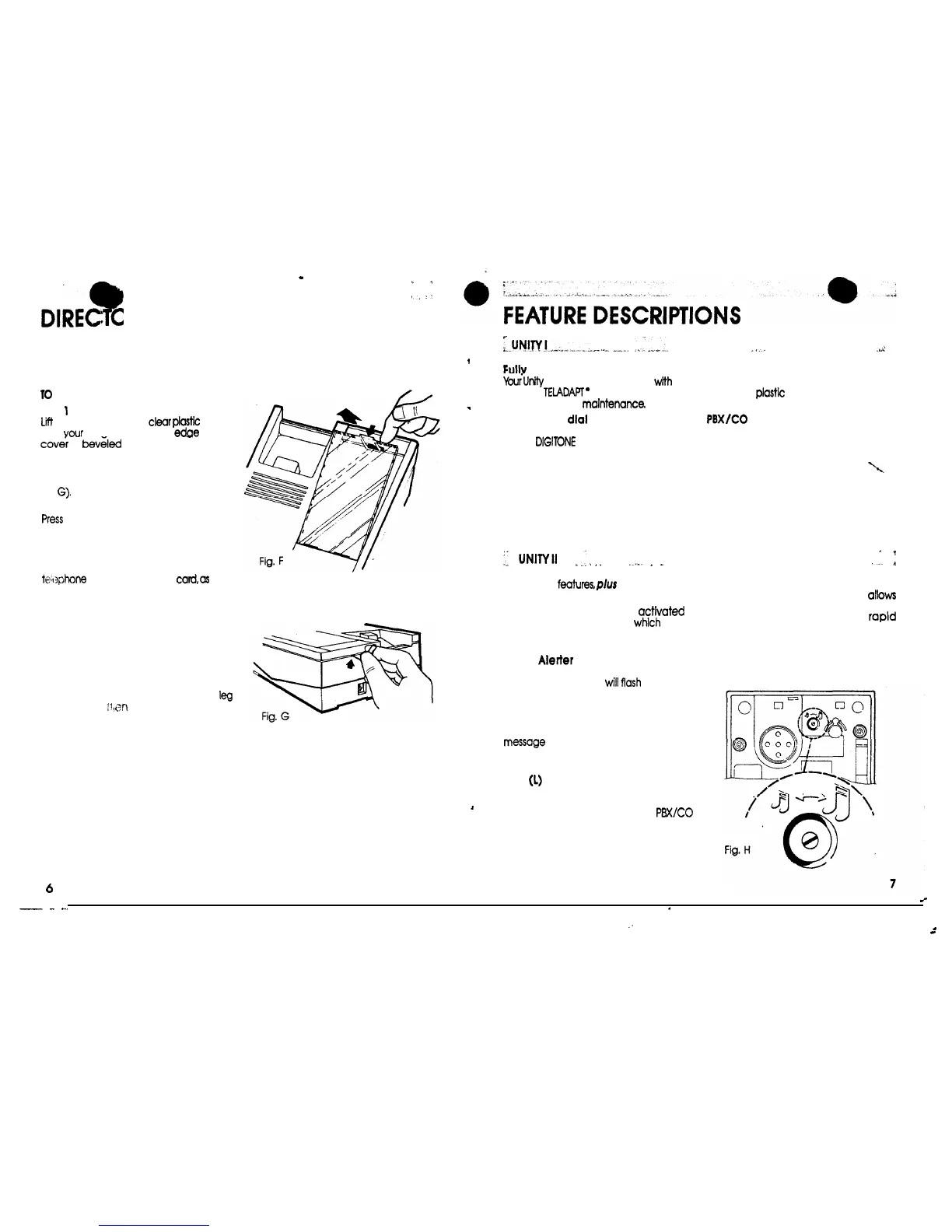
(Fig. F).
-
(If the clear plastic cover is difficult to
remove a hole Is available at back of set
to insert a paper clip to release tab, see
Fig
G).
STEP 2
Press
down lightly on the retaining leg of
the clear olostic cover. The cover can
then be lifted off.
STEP 3
Type or print your area code and
te~t3phone
number clearly on
card,as
weil
as the telephone numbers you wish to
have on index for easy reference.
TO REPLACE CARD
STEP 1
Reinsert number card
into position
in the
indented slots.
STEP 2
Place tabs at bottom of clear plastic
cover into slots in phone Align retaining
leg
in slot at top,
;I
(dn
gently push down on
cover until it snaps into place.
)I
;..uN~.~!._..“_.,,..._
.__..I.
_1.^.
..L.:.
,
Fullv
Modular
YourUr#y
Telephone is equipped
with
fully
modular TEiADAPT
’
cords which
allow
for
.
easy repair and
maintenance.
Push button
dial
Your new Unity has
a
convenient push
button
DIGITONE
dial. Press each button in
the sequence of your desired number for
fast, accurate dialing.
Tone
Alerter with complete turn-off
Your Unity comes equipped with a
pleasant sounding tone aierter. A slide
switch (on the base) allows you, to set the
volume level to High-Low-Off positions.
.
.
:.
UNlNII
I
.I
.
.
.
..I..
.
_
All UNITY I
featuresplus the following:
Release(R) button
When the release button is
activated
it
disconnects the telephone
which
allows
you to make another call without
replacing the handset.
Visual
Alerter
(Ringing)
The light located in the plastic faceplate
of your telephone set
will
flash
when your
phone rings. The light will flash even if the
tone alerter Is in the “off” position.
Message waiting
A neon lamp provides indication of a
messaQe
waiting. Message waiting can
be provided in PBX applications where
message waiting is a PBX feature.
LINK
(1)
button
When activated the LINK button breaks
I
the line with a timed interruption of
400-600 milliseconds (For easy
PBX/CO
feature access.)
,,..-
Personal directory
.d
Your Unity telephone has a directory card
under the
plastic
window which can be
used for personal numbers
PBX/CO
switch
This switch permits the user to match the
set performance to the specific system in
use (PBX or CO). See OPERATION CHECKS
for details
1.
’
I
__.
f
Alerter tone control
This base-located control (Fig. H)
allows
users of sets located in close proximity to
vary the alerter tones for
raptd
identiicatiin of the ringing set(s). To adjust
the tone differentiation control, use a
paper clip or small screwdriver; turning
clockwise raises the tone, counter-
clockwise lowers the tone.
6
,
_
-
_
.
:
.
_


 To Next Page
 Loading...