N500-69-00 1 I56-1391-02
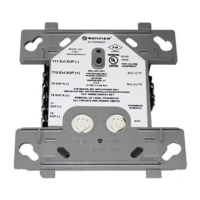
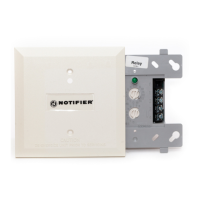
FTM-1 Firephone Control Module
INSTALLATION AND MAINTENANCE INSTRUCTIONS
12 Clintonville Rd
Northford, CT 06472-1653
(203) 484-7161
Before Installing
This information is included as a quick reference installation
guide. Refer to the control panel installation manual for detailed
system information. If the modules will be installed in an existing
operational system, inform the operator and local authority that
the system will be temporarily out of service. Disconnect power to
the control panel before installing the modules.
NOTICE: This manual should be left with the owner/user of this
equipment.
General Description
Firephone Control Modules are intended for use in intelligent,
two-wire systems, where the individual address of each module is
selected using the built-in rotary switches. This module is used to
connect a remote reghter telephone to a centralized telephone
console. A ringing sound is provided at each off-hook handset
until it is connected to the console. Wiring to individual telephone
jacks and handsets is supervised, and status is reported to the
panel as NORMAL, TROUBLE, or TELEPHONE. This module has
two pairs of output termination points available for fault-tolerant
wiring, and includes a panel-controlled LED indicator.
Compatibility Requirements
To ensure proper operation, this module shall be connected to
compatible Notier system control panels only (list available from
Notier).
Mounting
This module mounts directly to 4″ square electrical boxes (see
Figure 2A). The box must have a minimum depth of 2
1
/
8
″. Flush
mounted electrical boxes (SMB500) are available.
Wiring
NOTE: All wiring must conform to applicable local codes, ordi-
nances and regulations. When using control modules in
nonpower limited applications, the CB500 Module Barrier
must be used to meet UL requirements for the separation
of power-limited and nonpower-limited terminals and
wiring. The barrier must be inserted into a 4″x4″x2
1
/
8
″
junction box, and the control module must be placed into
the barrier and attached to the junction box (Figure 2A).
The power-limited wiring must be placed into the isolated
quadrant of the module barrier (Figure 2B).
Figure 1. Removing
rotary switch stop:
Figure 2A. Module mounting with barrier:
C0219-00
Figure 2B:
C0218-00
Specications
Normal Operating Voltage: 15 to 32 VDC
Maximum Current Draw: 7.5 mA (LED on).
Average Operating Current: 2.4mA (LED ashing).
Handset Offhook Resistance: 400, 1500 Ohms
External Supply Voltage (between Terminals T3 and T4)
Maximum: 28 Volts DC
Temperature Range: 32˚F to 120˚F (0˚C to 49˚C)
Humidity: 10% to 93% Noncondensing
Dimensions: 4
1
/
2
″ H x 4″ W x 1
1
/
4
″ D (Mounts to a 4″ square by 2
1
/
8
″ deep box.)
Accessories: SMB500 Electrical Box; CB500 Barrier
1. Install module wiring in accordance with the job drawings and
appropriate wiring diagrams (Figures 3-4).
2. Set the address on the module per job drawings.
Note: Some panels support extended addressing. In order to
set the module above address 99 on compatible systems, care-
fully remove the stop on the upper rotary switch with thumb in
the direction shown in Figure 1.
3. Secure module to electrical box (supplied by installer), as
shown in Figure 2A.
ISOLATED
QUADRANT
0
1
2
3
4
9
8
7
6
5
0
TE
N
S
O
N
E
S
A
D
D
R
E
S
S
LO
O
P
9
8
7
6
5
4
3
2
1
0
9
8
7
6
5
4
3
2
1
10
11
12
13
14
15
0
1
2
3
4
9
8
7
6
5
0
TENS
ONES
ADDRESS
LOOP
9
8
7
6
5
4
3
2
1
0
9
8
7
6
5
4
3
2
1
10
11
12
13
14
15
9
8
7
6
5
4
3
2
1
0
0
1
2
3
4
5
6
7
8
9
TENS
ONES
ADDRESS
LOOP
0
7
8
6
5
4
3
2
1
9
10
11
12
13
14
15
C0217-00
www.PDF-Zoo.com


 To Next Page
 Need help?
 General