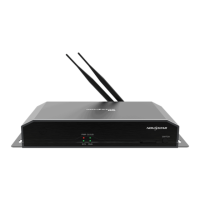
The TCB300 LCD Multimedia Player from NovaStar is a versatile device designed for LCD displays in various applications such as advertising media, digital signage, and commercial displays. It offers powerful processing capabilities and comprehensive control plans, supporting remote centralized publishing and monitoring in addition to local screen control via PC, mobile phones, and LAN.
Function Description:
The TCB300 serves as an LCD multimedia player, enabling the display of various content on LCD screens. Its primary function is to process and output multimedia content, supporting a wide range of image, audio, and video formats. The device is designed for both standalone operation and integration into larger display networks, offering flexible control options.
Important Technical Specifications:
Electrical Parameters:
- Input voltage: 5 V DC
- Maximum power consumption: 15 W
Storage Space:
- Operating memory: 1 GB
- Internal storage space: 32 GB on-board, with 28 GB available for users.
Storage Environment:
- Temperature: -40°C to 80°C
- Humidity: 0% RH to 80% RH, non-condensing
Operating Environment:
- Temperature: -20°C to 60°C
- Humidity: 0% RH to 80% RH, non-condensing
Dimensions (H x W x D):
- Unit dimensions: 196.0 mm × 115.5 mm × 34.0 mm
- Packing dimensions: 335 mm × 190 mm × 62 mm
Net Weight:
Connectivity:
- SIM CARD slot: For 4G module.
- USB 1: USB 2.0 port.
- ETHERNET: Gigabit Ethernet port.
- WiFi-AP: Wi-Fi AP antenna port.
- 4G: 4G antenna port.
- AUDIO: Audio output.
- USB 2: USB Type B port.
- HDMI OUT: HDMI output.
Included in Packing List:
- 1 × TCB300 unit
- 1 × Wi-Fi antenna
- 1 × Power adapter (5V 3A)
Audio and Video Decoder Specifications:
- JPEG: JFIF file format 1.02 (48x48 to 8176x8176 pixels). Supports SRGB JPEG and Adobe RGB JPEG. Does not support non-interleaved scan.
- BMP: No restriction.
- GIF: No restriction.
- PNG: No restriction.
- WEBP: No restriction.
- MPEG: MPEG1/2/2.5 Audio Layer1/2/3 (2 channels, 8kbps-320Kbps, CBR and VBR, 8KHz-48KHz sampling rate). Supports MP1, MP2, MP3.
- Windows Media Audio: WMA Version 4, 4.1, 7, 8, 9, wmapro (2 channels, 8kbps-320Kbps, 8KHz-48KHz sampling rate). Does not support WMA Pro, lossless, and MBR.
- WAV: MS-ADPCM, IMA-ADPCM, PCM (2 channels, N/A bit rate, 8KHz-48KHz sampling rate). Supports 4bit MS-ADPCM, IMA-ADPCM.
- OGG: Q1-Q10 (2 channels, N/A bit rate, 8KHz-48KHz sampling rate).
- FLAC: Compress Level 0-8 (2 channels, N/A bit rate, 8KHz-48KHz sampling rate).
- AAC: ADIF, ATDS Header AAC-LC and AAC-HE, AAC-ELD (5.1 channels, N/A bit rate, 8KHz-48KHz sampling rate).
- AMR: AMR-NB, AMR-WB (1 channel, AMR-NB 4.75-12.2kbps@8kHz, AMR-WB 6.60-23.85kbps@16kHz, 8KHz, 16KHz sampling rate).
- MIDI: MIDI Type 0 and 1, DLS version 1 and 2, XMF and Mobile XMF, RTTTL/RTX, OTA, iMelody (2 channels, N/A bit rate, N/A sampling rate).
- MPEG-1/2: 48x48 to 1920x1080 pixels, 30fps, 80Mbps (Ideal Case). Supports DAT, MPG, VOB, TS. Supports Field Coding.
- MPEG-4: 48x48 to 1920x1080 pixels, 30fps, 38.4Mbps. Supports AVI, MKV, MP4, MOV, 3GP. Does not support MS MPEG4 v1/v2/v3, GMC, DivX3/4/5/6/7/10.
- H.264/AVC: 48x48 to 1920x1080 pixels, 1080P@60fps, 57.2Mbps. Supports AVI, MKV, MP4, MOV, 3GP, TS, FLV. Supports Field Coding, MBAFF.
- MVC (H.264 MVC): 48x48 to 1920x1080 pixels, 60fps, 38.4Mbps. Supports MKV, TS. Supports Stereo High Profile only.
- H.265/HEVC: 64x64 to 1920x1080 pixels, 1080P@60fps, 57.2Mbps. Supports MKV, MP4, MOV, TS. Supports Main Profile, Tile & Slice.
- GOOGLE VP8: 48x48 to 1920x1080 pixels, 30fps, 38.4 Mbps. Supports WEBM, MKV.
- H.263: SQCIF(128x96), QCIF(176x144), CIF(352x288), 4CIF(704x576), 30fps, 38.4Mbps. Supports 3GP, MOV, MP4. Does not support H.263+.
- VC-1: 48x48 to 1920x1080 pixels, 30fps, 45Mbps. Supports WMV, ASF, TS, MKV, AVI.
- MOTION JPEG: 48x48 to 1920x1080 pixels, 30fps, 38.4Mbps. Supports AVI.
- Note: Output data format is YUV420 semi-planar, and YUV400 (monochrome) is also supported for H.264.
Usage Features:
Control and Management:
- Comprehensive Control Plans: Supports control via PC, mobile phones, and LAN.
- Remote Centralized Publishing and Monitoring: Enables remote content management and terminal monitoring through the VNNOX cloud platform.
- Wi-Fi AP Connection: The TCB300 has a permanent Wi-Fi AP. The SSID defaults to "AP+Last 8 digits of SN" (e.g., "AP10000033"), and the password defaults to "12345678".
- 4G Module: Integrated 4G module for network connectivity.
- USB Drive Importing Display: Allows content to be imported and displayed directly from a USB drive.
Software Integration:
- ViPlex Handy (Mobile Client for Android and iOS): LAN-based screen management software for screen management, solution editing, and publishing. Supports logging into one TCB300 unit at a time.
- ViPlex Express (PC Client for Windows): LAN-based screen management software for screen management, solution editing, and publishing. Supports logging into multiple TCB300 units (advised up to 100 units).
- VNNOX (Online Software): A one-stop cloud platform for remote content management, terminal control, and terminal monitoring.
Connection Methods:
- Ethernet Cable: Connects directly to a PC or via a router. Requires DHCP service enabled in ViPlex Express for direct connection, or DHCP turned off and PC set to obtain IP automatically for router connection.
- Wired LAN: Connects via a router to a PC.
- Wi-Fi AP: Direct Wi-Fi connection to the device.
Status Indicators (Front Panel):
- PWR (Power Status Indicator): Always on when power input is normal.
- SYS RUN (System Status Indicator):
- Flashing once every other 2 seconds: System operating normally.
- Flashing once every other second: System installing upgrade package.
- Flashing once every other 0.5 second: System downloading data from the Internet or copying upgrade package.
- Always on/off: System operating abnormally.
- CLOUD (Internet Connection Status Indicator):
- Always on: Unit connected to the Internet and connection status is normal.
- Flashing once every other 2 seconds: Unit connected to VNNOX and connection status is normal.
Solution Publishing:
- ViPlex Handy: Allows users to add solutions, set names and resolutions, choose templates, and edit areas within the solution layout. Supports various media types including image, video, text, analog clock, weather, and digital clock. Solutions can be published directly from the app.
- ViPlex Express: Provides similar solution editing and publishing capabilities. Automatically converts unsupported video formats during publishing.
Maintenance Features:
- Factory Reset Button (RESET): Located on the rear panel, holding it down for 5 seconds resets the device to factory defaults.
- Firmware Updates: System status indicators provide feedback on upgrade package installation and data download, indicating ongoing maintenance processes.
- Troubleshooting: Connection status checks (pre-stored image display on LCD) help verify hardware connections. Status indicators provide quick visual cues for system and network health.

 Need help?
 General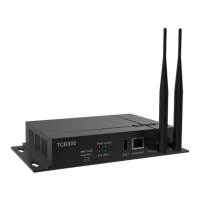

 To Next Page