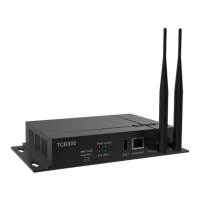
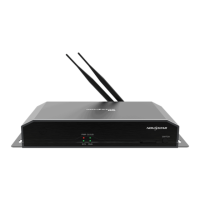
The NovaStar Taurus Series Multimedia Players, specifically the TB2 model, are designed as a second-generation solution for small and medium-sized LED full-color displays. These multimedia players offer a comprehensive set of features aimed at providing flexible and powerful control over LED screens, catering to a wide range of commercial display applications.
Function Description
The primary function of the TB2 is to serve as a multimedia player for LED displays, enabling the playback of various content. It supports both synchronous and asynchronous display modes, offering versatility in how content is presented. In synchronous mode, the TB2 can display content in real-time from an external HDMI input, automatically scaling the content to fit the screen. This mode is ideal for applications requiring live feeds or synchronized presentations across multiple displays. The asynchronous mode, on the other hand, allows the TB2 to store and play content independently, making it suitable for scenarios where continuous playback of pre-scheduled programs is needed without a constant external input. Users can manually switch between these modes or set an HDMI priority for automatic switching.
The TB2 is equipped with a powerful processing unit, featuring a 1.5 GHz quad-core processor, 1 GB of operating memory, and 8 GB of internal storage. This robust hardware enables it to handle 1080P video hardware decoding, ensuring smooth and high-quality content playback. It supports a loading capacity of up to 650,000 pixels, with a maximum width of 1920 pixels and a maximum height of 1080 pixels, accommodating a variety of screen configurations.
An omnidirectional control plan is a core aspect of the TB2's functionality, providing multiple ways to manage and publish programs to the display. This includes control via PC, mobile phones (Android and iOS), and local area networks (LAN). For remote management, the TB2 integrates with NovaStar's cloud services, allowing for centralized program publishing and monitoring across multiple screens. This cloud-based approach, utilizing software like VNNOX and NovaICare, enhances efficiency, reliability, and security for managing a network of displays.
Usage Features
The TB2 offers several key usage features that enhance its flexibility and user-friendliness:
- Synchronous and Asynchronous Dual-Mode: This allows users to choose the most appropriate display mode based on their content requirements. The ability to switch between modes, either manually or with HDMI priority, provides dynamic control over content presentation.
- Wi-Fi AP Connection: The TB2 has a permanent Wi-Fi AP (Access Point) feature, eliminating the need for wired connections for control. Users can connect to the TB2 directly via Wi-Fi from a mobile phone, tablet, or PC using the provided SSID and default password. This simplifies setup and allows for convenient management of displays from anywhere within Wi-Fi range. The Wi-Fi antenna can be changed if stronger signal strength is required.
- Omnidirectional Control Plan: The device supports various control methods:
- PC Control: Using NovaLCT-Taurus and ViPlex Express software, users can publish programs and control screens via network cable or Wi-Fi.
- LAN Control: For local network environments, a PC can connect to the TB2 via LAN for program publishing and screen control, also using NovaLCT-Taurus and ViPlex Express.
- Mobile Control: The ViPlex Handy client software, available for Android and iOS, allows mobile phones and tablets to connect via Wi-Fi for screen management, editing, and program publishing.
- Cluster Control: For managing multiple screens, NovaStar's cluster solution enables centralized management and monitoring through cloud services (VNNOX, NovaICare, ViPlex Handy, ViPlex Express). This is particularly beneficial for large-scale advertising networks or digital signage deployments, offering enhanced efficiency, reliability, and security through data backup, disaster recovery, channel encryption, and permission management.
- Stereo Audio Output: The TB2 includes an audio output port, allowing for synchronized audio playback with video content, enhancing the multimedia experience.
- USB Drive Support: A 1-way USB interface enables easy importing of display content directly from a USB drive, providing a convenient method for content updates.
- Smart Brightness Adjustment: The device features an onboard brightness sensor interface, supporting automatic and timed smart brightness adjustment. This helps optimize display visibility and energy consumption based on ambient light conditions or scheduled settings.
- Gigabit Wired Network: In addition to Wi-Fi, the TB2 supports a Gigabit Ethernet port for reliable and high-speed wired network connections, ensuring stable data transmission for content updates and control.
Maintenance Features
Maintenance of the TB2 is designed to be straightforward, focusing on ease of use and system stability:
- System Status Indicators: The front panel includes clear LED indicators for power (PWR), cloud connection (CLOUD), system status (SYS), and FPGA run status (RUN). These indicators provide immediate visual feedback on the device's operational state, helping users quickly identify if the system is running normally, downloading data, or experiencing an issue. For example, the SYS indicator flashes once every 2 seconds for normal operation and once every 0.5 second when downloading data.
- Factory Reset Button: A dedicated RESET button on the front panel allows users to restore the device to factory default settings by holding it down for 5 seconds. This is a crucial feature for troubleshooting or reconfiguring the device.
- Regular Dust Removal: The manual emphasizes the importance of performing dust removal regularly. This simple maintenance step helps prevent overheating and ensures the longevity and optimal performance of the internal components.
- Authorized Maintenance: Users are advised not to maintain the products without authorization. In case of issues, contacting NovaStar for support is recommended. This ensures that any repairs or part replacements are performed by trained professionals using genuine NovaStar parts, maintaining the device's integrity and warranty.
- Storage and Transport Safety: Guidelines are provided for safe storage and transport, including protection against dust, water, direct sunlight, and extreme temperatures. Users are encouraged to save the original packing materials for secure future shipping, which helps prevent damage during transit.
- Installation and Use Safety: The manual outlines safety precautions for installation and use, such as ensuring proper grounding, avoiding hot-swapping power cords, and wearing protective gear like wrist bands and insulating gloves. These measures contribute to both user safety and the device's operational reliability.
- Software Updates: While not explicitly detailed as a maintenance feature, the use of client software like ViPlex Express and NovaLCT-Taurus implies that software updates would be managed through these platforms, ensuring the device's firmware and applications remain current and secure.
In summary, the NovaStar TB2 is a versatile and powerful multimedia player for LED displays, offering robust processing, flexible control options, and user-friendly features for a wide range of commercial applications. Its design prioritizes ease of use, connectivity, and reliable performance, supported by clear operational indicators and straightforward maintenance guidelines.

 Need help?
 General

 To Next Page