3
4
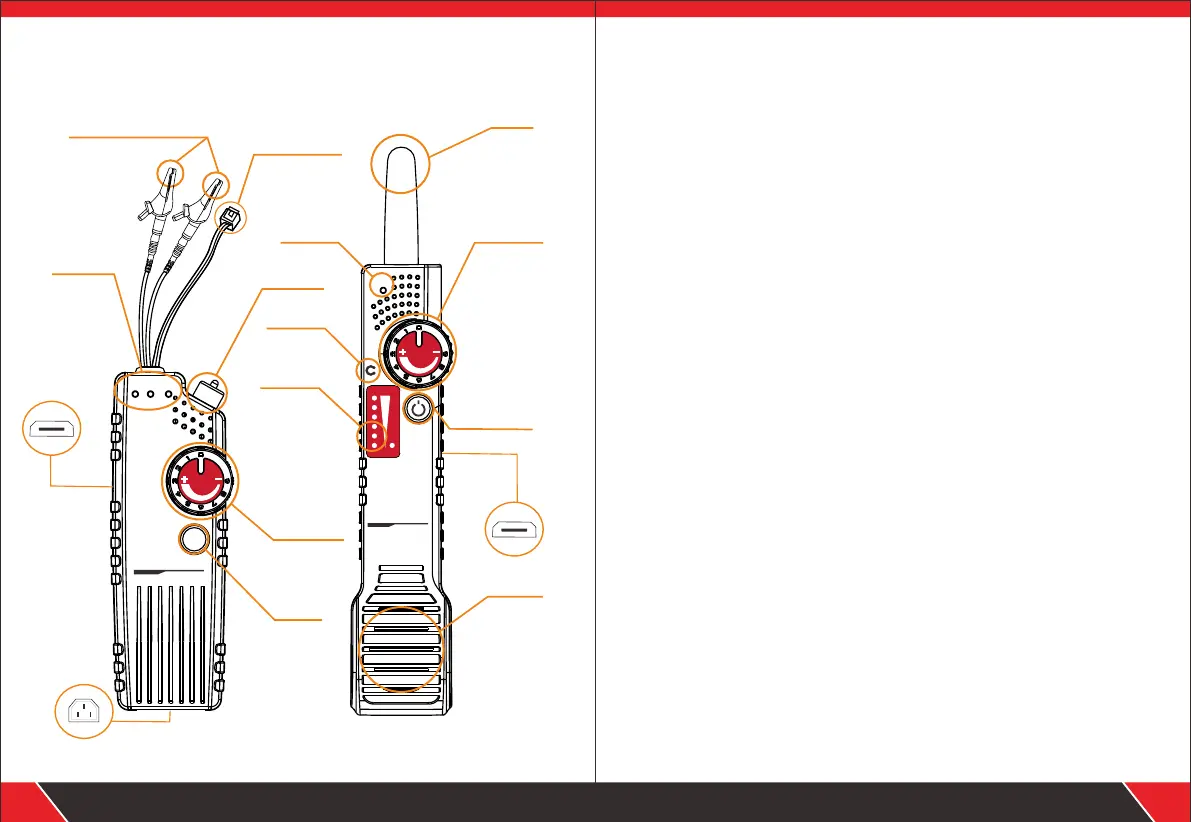
Product interface and keypad functions
AUDIO
POWER
CHG SCAN
NF-820
CHG Port
High&Lo w Voltag e Wi re Teack er
EM I T TER
SEN
NF-820
POW ER
SEN
RECE IV E R
High& Low Vo lta ge Wire Te ack er
Alligator clip
Telephone cable
adaptor
Status
indicator
Charging
ports
Toggle
switch
Sensitivity
Power
Power
indicator
Earphone
Probe
Signal
indicator
Speaker
Tone generator
Amplifier probe
Sensitivity
Power
Your excellent helper in cable test!
Your excellent helper in cable test!
Power cord
interface
1.1 Transmitter interface instruction
1. Toggle switch to “ON” place, the POWER led will light up to
green , switch to “ OFF” to turn down the device.
2. Adjust the Sensitivity signal button from 1-8, turn to 4 or 5 the
signal will be more stronger to hear the trace voice , but 8 is
the strongest.
5. Press the AUDIO button enter SCAN mode to trace the target
cable , at the same time , SCAN led will light up..
4. Charging Indicator turns red, which means charging mode,
indicator turns green, which means fully charged.
3. Charging port to charge for transmitter when connect with
Micro USB cable, the battery is 1800Amh.
1. Sensitivity adjust signal strength and volume from 1-8.
2. Probe the device will generate “do do do” when probe get
close to targeted cable.
1.2 Receiver interface instruction
3. Long press to turn on or turn off for the POWER button.
4. Earphone can help you identify the target voice when work in
noisy environment.
6. You can charge it when out of power , the charging port on the
right middle side, the battery is 1100Amh.
The indicator will be on when turn on the receiver.
“do do do” will come from the speaker when the probe get
close to targeted cable.
5. Power indicator & Speaker.
CHG
Charging
ports


 To Next Page