REAL MEDIA PLAYER MP700 HD
REAL MEDIA PLAYER MP700 HD
English
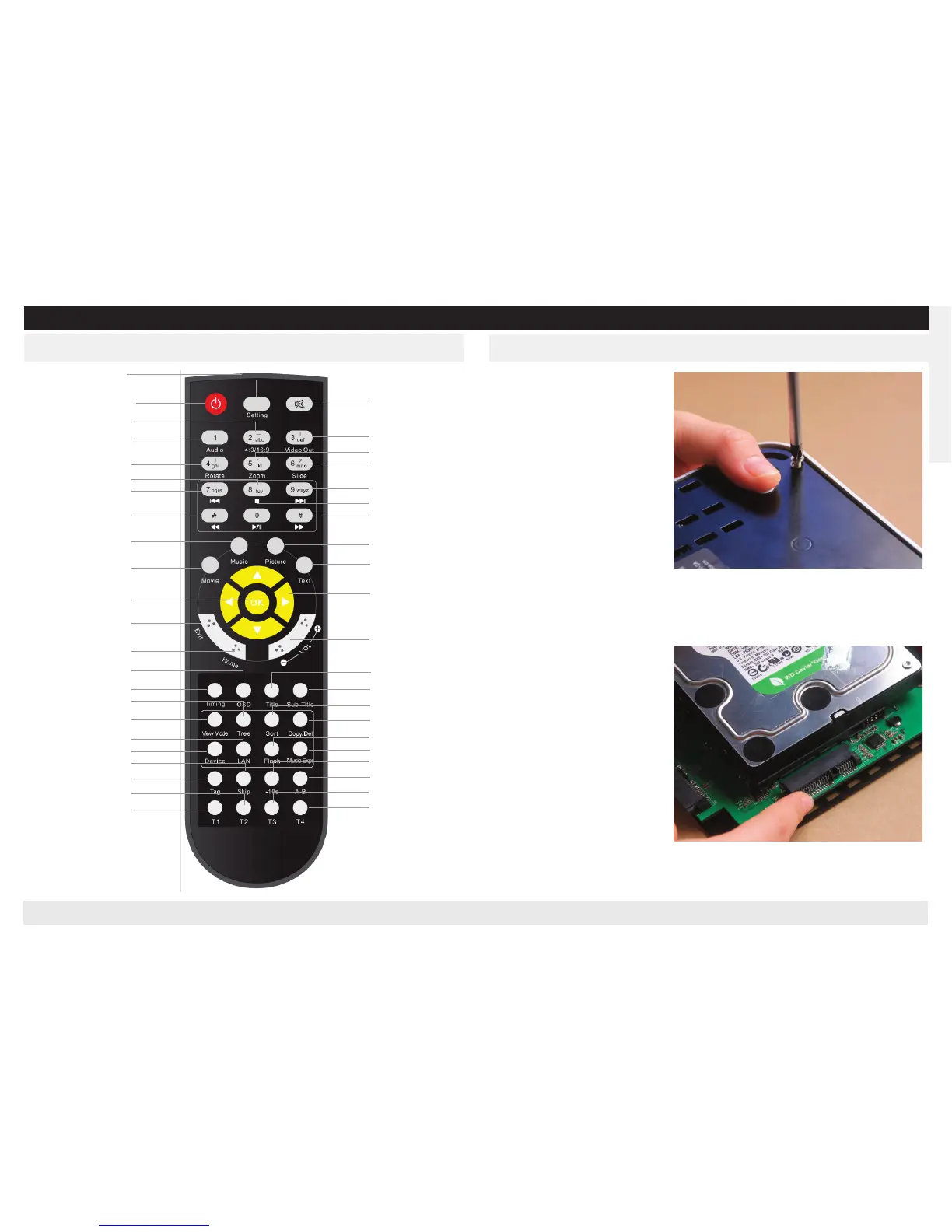
Set up Internal Hard DiskRemote control
(Hard disk need to be bought in
addition, and this step can be
skipped if don’t need internal
hard disk)
Remove the 4 screws out of the
player’s bottom by driver.
Lift the shell from the rear panel
and place aside
Insert the SATA interface to-
ward the slot
S
etting
Power
Aspect 4:3/16:9
Audio
Rotate the picture
Stop
Previus file
Fast rewind
Music
Movie
Confirm
Exit
Main Menu
OSD
Timing
Tree
View Mode
Enter Network
Switch Device
Skip
Remember current time
Resrved Key
Resrved Key
Mute
Video Out
Zoom
Slide
Next file
Play/Pause
Fast forward
Picture
Text
Direction button
Button Volume +/-
Title
Sub-Title
Sort
Copy/Delete
Open Flash
Play Music
Fast rewind 10 seconds
A-B Playback
Resrved Key
Resrved Key


 To Next Page