16
382 South Abbott Ave, Milpitas, CA 95035, USA • www.nuforce.com
EMAIL: salesteam@nuforce.com
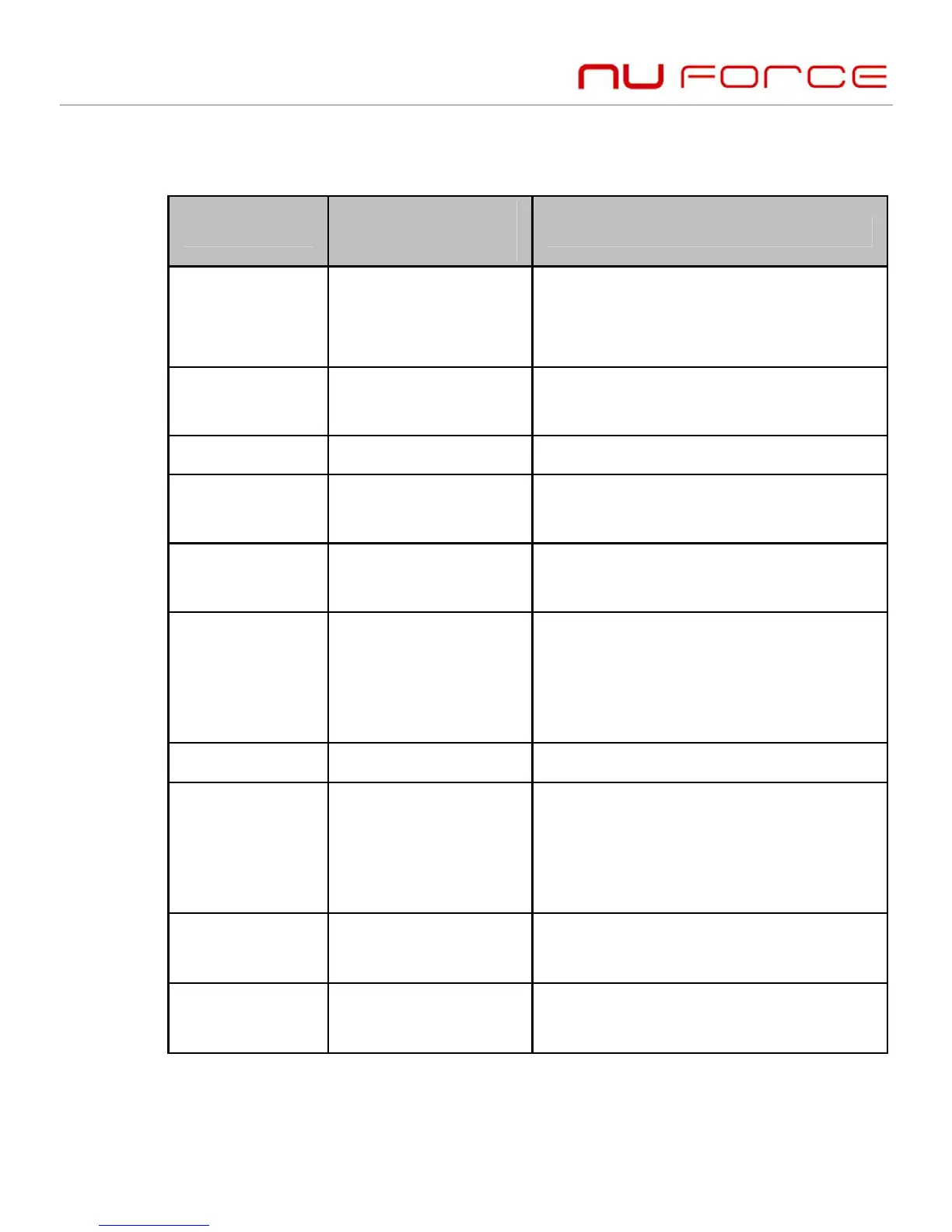
6. Making a call with the headset
Function
Status of
headset
Operation
Voice dial Standby mode
Press and hold MFB button for
two seconds and release when
you hear a dictation tone
Redial last
number
Standby mode Short-press the MFB button
twice
Volume up During a call Short or long press + button
Volume
down
During a call Short or long press – button
Answer a
call
Incoming ring
Short press MFB button
Reject a call Incoming ring
Press and hold MFB button for
two seconds, and then release
it when you hear the
indication tone
End a call During a call
Short-press MFB button
Call transfer During a call
Press and hold MFB button for
two seconds, and release it
when you hear the indication
tone
Microphone
mute
During a call
Short-press the MFB button
twice
Cancel
mute
During a call
(mute)
Short-press the MFB button
twice
Warning: Excessive headphone volume can cause hearing loss.


 To Next Page