EasyManua.ls Logo

Nuheat SIGNATURE - User Manual

Nuheat SIGNATURE
24 pages
Print Icon
To Next Page IconTo Next Page
Loading...

Questions and Answers

Summary

SYSTEM TESTS

SETUP WIZARD

GFCI

SECTION 2: SETUP;PREFERENCES

2.5 Operating Mode

Select between Auto (schedule-based) and Manual (user-set) operating modes.

2.6 Temperature Control

Configure how the thermostat controls temperature (floor, air/room, or combined).

SECTION 3: PROGRAM;SCHEDULE

3.1 Program;Schedule

Set and adjust heating schedules for weekdays and weekends.

SECTION 4: WIFI SETTINGS

4.1 WiFi Settings

Connect the thermostat to a WiFi network for advanced features.

SECTION 7: FACTORY RESET

7.1 Factory Reset

Reset the thermostat to its original factory default settings.

SECTION 8: WIFI TROUBLESHOOTING

8.1 WiFi Troubleshooting

Solutions for common issues when connecting to a WiFi network.

Nuheat SIGNATURE Specifications

General IconGeneral
Wi-Fi ConnectivityYes
CompatibilityElectric floor heating systems
Temperature Range41°F to 104°F (5°C to 40°C)
Programming7-day programmable
Voice ControlAmazon Alexa, Google Assistant
Maximum Load15A
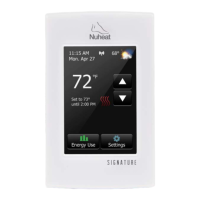
Display3.5-inch color touchscreen
ControlSmartphone app, touchscreen
Power Supply120V/240V AC
TypeFloor heating thermostat
Remote ControlYes, via app
SensorsFloor sensor
Warranty3 years

Related product manuals