- 04 -- 04 -
Compatibility
Frequently Asked Questions (FAQ)
Package Contents
Compatible with Windows/Mac
Q: What should I do if there are issues with repeated input or input lag?
A:
(1) This issue might be caused by a computer update. Try restarting your
computer and reconnecting the keyboard.
(2) Debris caught between the keys can also cause problems. Try ipping
the keyboard over and gently tapping it to remove debris. Be mindful to
prevent coffee or water from entering the keyboard during regular use.
(3) If the problem persists after trying the above steps, you can always
reach out to us at support@nulea.com or via the online chat window on
www.nulea.com for further assistance.
Q: How do I deal with an uncomfortable keyboard layout?
A:
(1) Transitioning to an ergonomic keyboard can vary from person to person.
Some users may need more time to adapt to the new keyboard layout and
hand placement. This is normal. Regular practice and learning keyboard
shortcuts can help you adjust more quickly.
(2) If you are still having trouble adapting to the keyboard layout after
some time, you can always contact us at support@nulea.com or via the
online chat window on www.nulea.com. We are happy to assist you.
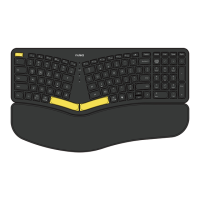
1* Keyboard
1* User Manual


 To Next Page