3
User Guide (English)
Introduction
Box Contents
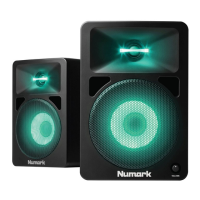
N-Wave 360
1/8" (3.5mm) TRRS Connection Cable
1/8" (3.5mm) TRS Audio Cable
Power Cable
User Guide
Safety & Warranty Manual
Support
For the latest information about this product (system requirements, compatibility information,
etc.) and product registration, visit numark.com/nwave360.
For additional product support, visit numark.com/support.
Quick Start
Important: Ensure that high quality, shielded audio cables are used away from sources of
electromagnetic interference.
Before turning on the power of N-Wave 360's right speaker, do the following:
1. Ensure the volume control on N-Wave 360's right speaker is turned down.
2. Connect N-Wave 360's left and right speakers with the included 1/8" TRRS connection
cable.
3. Connect any audio sources (such as an audio interface, mixer, etc.) to the inputs on N-
Wave 360's right speaker. Power on the audio sources.
4. Connect the included power cable to the power input on N-Wave 360's right speaker,
and then plug the other end of the power cable into an outlet.
5. Flip the power switch on N-Wave 360's right speaker to the "on" position.
6. Adjust the volume control on the front panel of N-Wave 360's right speaker.



 To Next Page