22
WARNING!
NEVER BLEND HOT LIQUIDS IN ANY SEALED nutribullet
®
CUP Doing so
may cause excessive pressure buildup, resulting in risk of personal injury
or property damage. Hot items should only be blended in the pitcher using
proper safeguards.
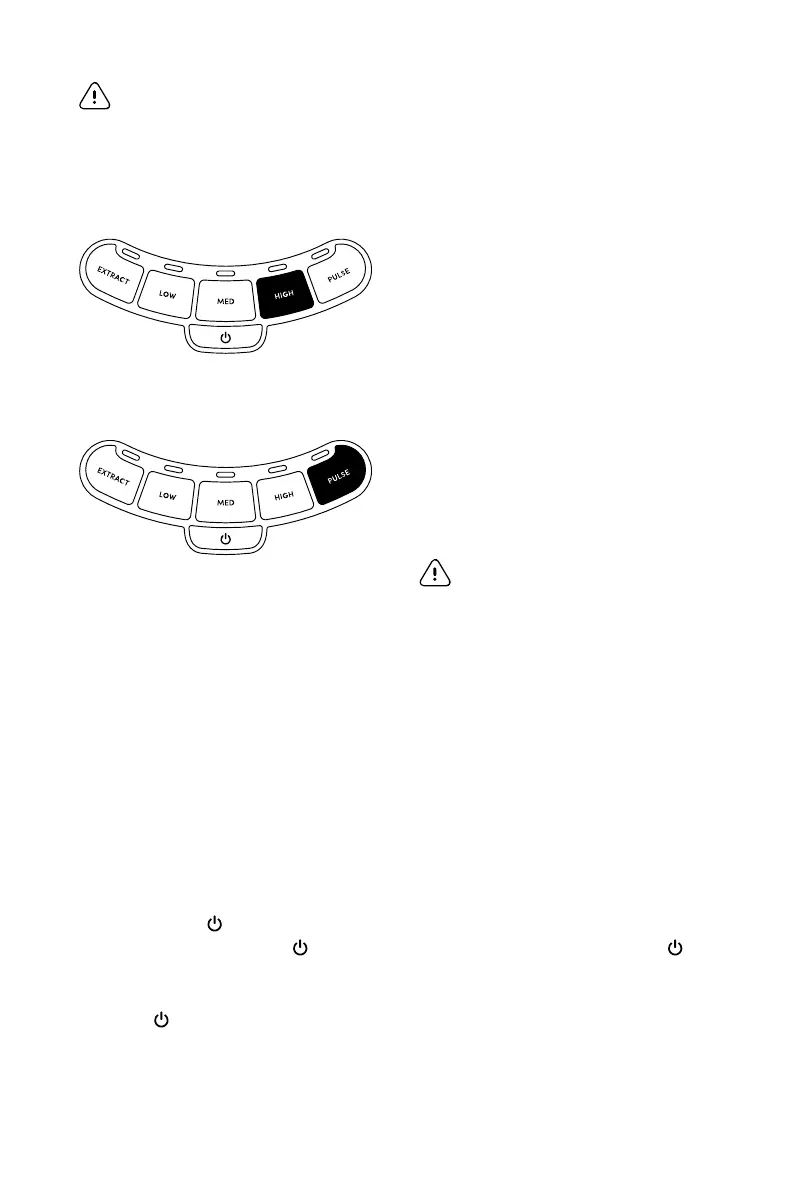
HIGH SPEED
Use to liquefy thick
mixtures and blend frozen
fruits and vegetables.
PULSE*
Use to control chopping
and processing.
WARNING: DO NOT use this
setting with hot ingredients!
How to use the blending control panel
LOW, MEDIUM OR HIGH
Select a speed and press once
to turn on. The button will
illuminate. To pause/stop the
unit, press the button a second
time — it will de-illuminate — or
press POWER . While in the
idle-mode, the POWER button
will remain lit. To fully power
down after pausing, press
POWER and unplug the unit.
NOTE: If using the pitcher, speeds
will run until paused/stopped. If using
the nutribullet
®
cups, speeds will
automatically shut o after 60 seconds.
THE EXTRACT PROGRAM
Press the EXTRACT button
and the nutribullet
®
Blender
Combo will do the work for you.
This program automatically
stops at the end of its cycle. To
pause or stop the blender, press
EXTRACT again or POWER .
PULSE
Press and release the PULSE
button to chop ingredients. If
you hold this button down, it will
continue to run until you release it.



 To Next Page