10
Using the
Magic Bullet
®
Air Fryer.
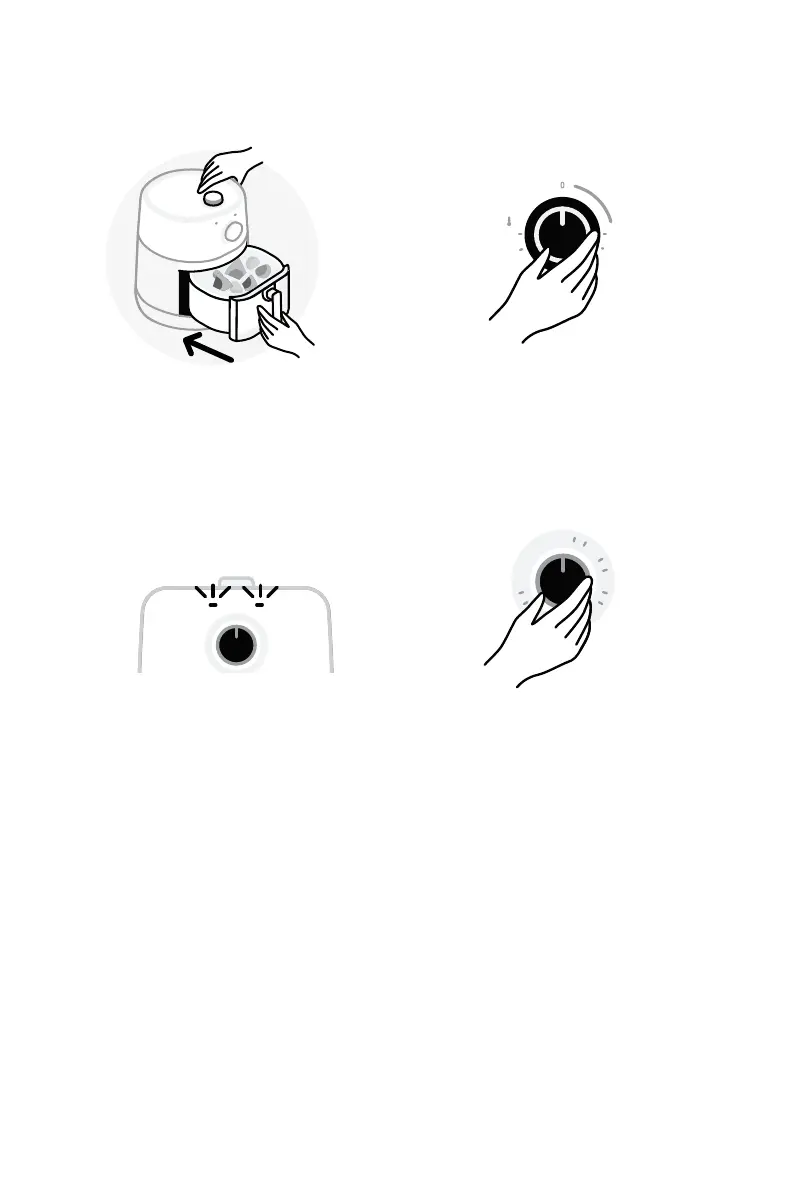
Holding down the base with one hand and rmly grasping
the handle with the other, pull on the handle and remove
the fry pot from the base.
7 Holding the pot by the
handle, push the Fry Pot
back into the Base until
you hear it click into place.
Make sure the outside of
the pot is flush with the
Base and not sticking out.
9 Once the timer is set the two
indicator lights on the front
of the unit will illuminate.
Green (right): Indicates that
the unit is heating to the set
temperature. This light will
turn o once it has reached
the set temperature.
Orange (left): Indicates
that the timer is set and
the unit is running. This
light will remain on during
the duration of cooking.
It will turn o when the
timer has reached “0”
indicating that the unit
is no longer running.
Turn timer clockwise to desired cooking time.
0
20
30
60
8 Turn the Temperature Dial to
the desired temperature for
your recipe.
Turn temperature dial to desired setting
(temperature needed for your recipe).
400 180
200
250
350
300
10 Turn Timer clockwise to
desired cooking time.
Cooking will now begin.
Once the cooking time
has elapsed, the timer
will automatically shut
o the unit.
Turn Timer counter-
clockwise to reduce the time
remaining until auto-shuto,
or turn it all the way counter-
clockwise to manually shut
o the unit.



 To Next Page