22
22
Your NuWave Jubilee was engineered with an automatic shut-off
feature to prevent overheating during use.
• If the Jubilee shuts off to cool itself down, an odor may be
detected. Unplug the unit and wait for it to completely cool down.
• To prevent overheating, do not cook at temperatures or
settings not recommended for specific ingredients or recipes.
• Do not leave unit on or cook for prolonged times not needed.
WARNING
Immediately unplug and contact Customer Service
Department if you experience any malfunctions.
1-877-689-2838 or help@nuwavenow.com
Problem: Solution(s):
Prb1 Probe not connected to unit.
Prb2
Probe target temperature higher than cooking
temperature.
Prb3 Probe short circuit.
Prb4
Probe Sensor not detecting temperature
increase.
Er1
The unit is overheating. Allow to cool. If problem
persists contact Customer Service.
Err1
The unit is malfunctioning. Contact Customer
Service.
Err2
The unit is malfunctioning. Contact Customer
Service.
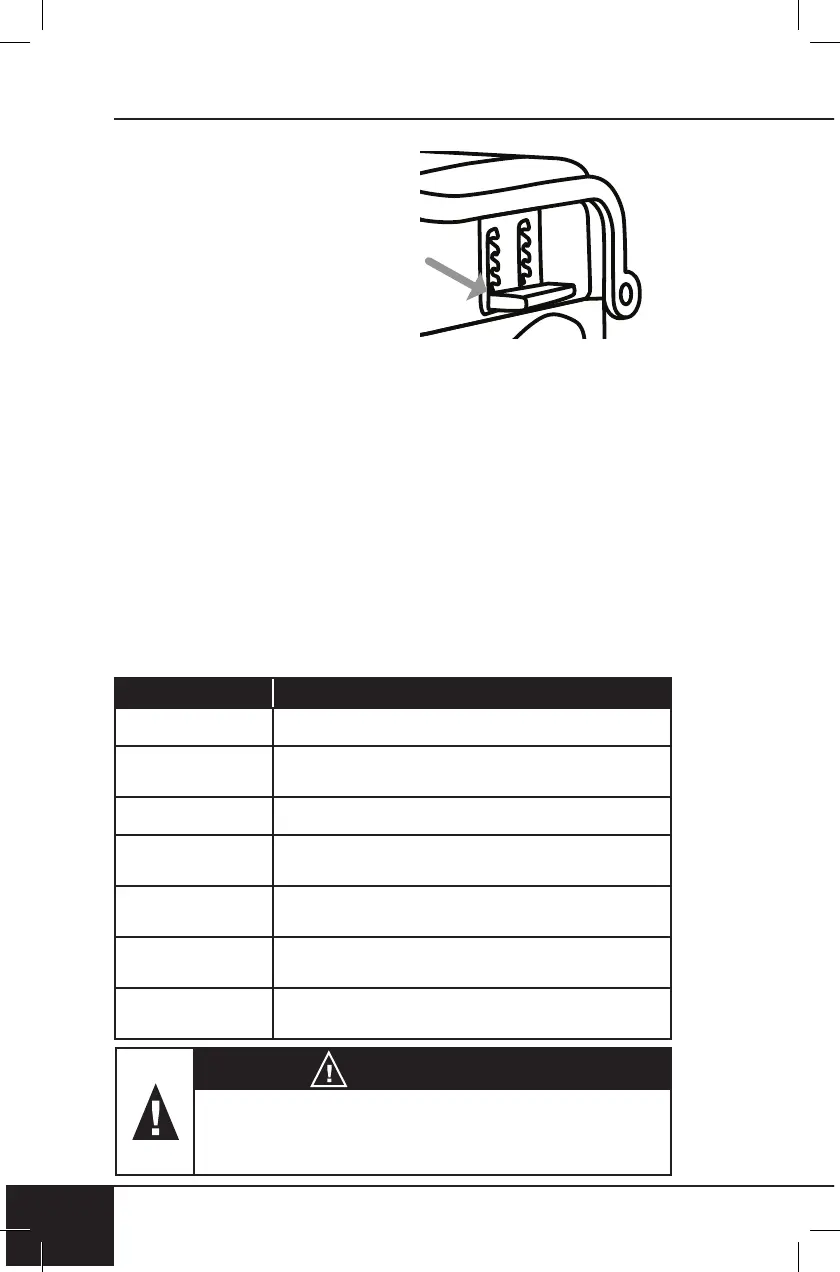
Reinstalling the Handles
To reinstall handle(s), reverse
actions/steps 1-5 from “Removing
the Handles.”
1. Place metal ends of one Handle
through the opening of position 1.
2. Insert metal ends into holes in
underneath of Lid.
3. Hold in place and swing silver
Grill Hook up and insert end into
its slot.
4. Repeat with other Handle.
• Ensure Handles are secure.
5. Reinstall the Top (upper) Grill Plate.
• Open and close Lid to ensure Grill Plate is secure.
TROUBLESHOOT GUIDE
CLEANING & MAINTENANCE


 To Next Page