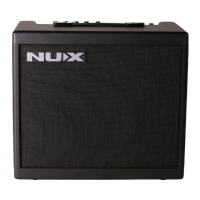
The NUX AC-25 is a portable, battery-operated acoustic amplifier designed for acoustic-electric guitars. It features two channels with separate controls, Bluetooth connectivity, an onboard tuner, and a dedicated tone editing app.
Function Description:
The AC-25 serves as a compact and versatile amplification solution for acoustic musicians. Its primary function is to amplify acoustic-electric guitars and microphones, offering two independent channels for simultaneous use. The amplifier is designed for portability, allowing musicians to play anywhere without needing a constant power source, thanks to its rechargeable battery. Bluetooth connectivity extends its utility by enabling audio streaming for backing tracks and remote tone editing via a dedicated app. The integrated tuner ensures instruments are always in tune, and various output options allow for connection to headphones, mixers, or recording devices.
Important Technical Specifications:
- Speaker: 6.5", 4ohm, 50W, 63Hz ~ 20kHz
- Sampling Rate: 44.1kHz
- A/D, D/A Convert: 24bit
- Signal Processing: 32bit
- Rated Power: 25W
- Input Level & Impedance:
- Channel 1: -10dBu / 1M Ohms
- Channel 2: -30dBu / 2K Ohms
- AUX-IN: +3dBu / 21k Ohms
- Phones Output: 250mW + 250mW
- Tuning Range: A0~C8
- A4: 440Hz
- DC Power Supply: 15V/2.5A Negative Tip
- Battery Pack Capacity: 12.6V/3000mAh
- Dimensions: 280(L) x 218(D) x 220(H)mm
- Weight: 5Kg
- Continuous Playing Time: Up to 4 hours on a full charge.
Usage Features:
- INPUT Jack: 1/4" (6.35mm) input, compatible with both passive and active acoustic pickups.
- VOLUME Knob: Controls the input signal level for Channel 1.
- BASS Knob: Adjusts the bass frequency level.
- MIDDLE Knob: Adjusts the middle frequency level.
- TREBLE Knob: Adjusts the treble frequency level.
- TUNER Button: Engages/disengages the built-in tuner.
- Display: Shows tuning information.
- COMBO Jack: XLR input or 1/4" (6.35mm) instrument input, suitable for microphones or other instruments.
- VOLUME Knob: Controls the input signal level for Channel 2.
- SEND Knob: Adjusts the amount of reverb sent to Channel 2.
Global Controls:
- REVERB Knob: Sets the overall reverb level for both channels.
- MASTER Knob: Sets the overall output volume level.
- BLUETOOTH Button: Engages/disengages the Bluetooth function. A green indicator flashes when ready for pairing.
- POWER Indicator: Lights steadily when the amplifier is on.
- ON/OFF Switch: Turns the amplifier on/off. Users are advised to turn down the master volume before powering on.
Rear Panel Connections:
- DC-IN Jack: For connecting the included 15V/2.5A power supply to power the amplifier or charge the battery.
- CHARGING Indicator: Lights steadily during charging and turns off when the battery is fully charged.
- LOW BATT. Indicator: Lights up when the battery level is low, indicating the need for recharging.
- PHONES Jack: 1/4" composite audio signal output. Plugging in headphones mutes the amplifier's speaker.
- AUX-IN Jack: 1/8" line-level input for connecting external audio devices like CD players, MP3 players, or smartphones for stereo playback.
- LINE OUT Jack: For connecting to a mixer, recording device, or other external audio systems.
Physical Features:
- SPEAKER Cover: Removable by pulling a ribbon on the lower right corner.
- SPEAKER: 6.5" full-range speaker with a sound hole.
- STAND: A folding stand that can be pulled up when needed for angled positioning.
Tuner Operation:
- Press the TUNER button to activate the built-in tuner.
- Adjust the tuning peg of each string according to the visual feedback on the display (FLAT, SHARP, IN TUNE).
- Press the TUNER button again to exit tuner mode.
- The amplifier is muted when the tuner is engaged.
- The tuner only works with Channel 1.
Bluetooth Operation:
- Bluetooth automatically turns on when the amplifier is powered on. It can be manually turned off by holding the BLUETOOTH button for 2 seconds.
- A flashing green indicator signifies the Bluetooth module is ready for pairing.
- On a Bluetooth-enabled device, find "NUX AC25" in the Bluetooth settings and tap to pair. A cue tone will confirm successful connection.
Battery Management:
- The amplifier is equipped with rechargeable battery packs. It can be powered by the internal battery or the included power supply.
- The Low Batt. indicator lights up when the battery level is low, requiring the power supply to be plugged in for recharge.
- The amplifier can be used normally while charging.
- The charging indicator turns off automatically once the battery is fully charged.
- A full charge takes approximately 4 hours and provides up to 4 hours of continuous use (actual time may vary based on settings).
Maintenance Features:
- FCC WARNING: Adheres to FCC Part 15 rules, ensuring the device does not cause harmful interference and accepts any interference received. Users are advised against unauthorized modifications.
- FCC RF Exposure Statement: The device meets general RF exposure requirements and can be used in portable exposure conditions without restriction.
- CE Mark: Complies with European Harmonized Standards EN 61000-6-3:2007+A1:2011 & EN 61000-6-1:2007 under the Council Directive 2004/108/EC on Electromagnetic Compatibility.
- Supplied Accessories: User Manual, Power Supply.
- Copyright: © 2020 Cherub Technology. Reproduction of the publication in any form without prior written permission is prohibited.

 Need help?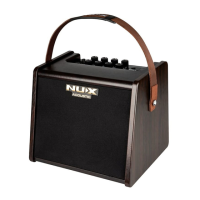

 To Next Page
 General