4
5
03
Hardware Installation
Remove two adjacent slot covers if you do not have a graphics card installed.
Remove two adjacent slot covers that
corresponds to the PCl-Express slot you
are installing the TITAN X graphics card
In.
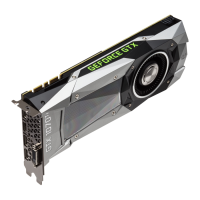
Note: The NVIDIA@TITAN X card is double-wide and will require removing two slot
covers.
Plug the TITAN X graphics card into the Primary PCl Express x 16 slot on your
motherboard. This is often the slot closest to the CPU but may be the second
or third slot. Look for the slot labeled x 16. It will likely be the only PCl
Express slot with a retention lever on the end of the slot or the one closest to
the CPU
Install your first TITAN X graphics card
into the Primary PCl Express x 16 slot.
Note: It is recommended that you install the graphics card into the primary PCl
Express x 16 slot. If you install the graphics card into the secondary slot, your system
may not recognize the graphics card and there will be nothing displayed on the
monitor.
Also note that on some motherboard SBIOS, the physical location of the primary slot
can be configured when there are more than one PCl Express x 16 slots.
9





 To Next Page