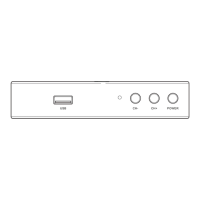
This document is the user manual for the Oakcastle SB-200 HD Freesat Recorder.
The Oakcastle SB-200 is a digital set-top box designed to receive and record Freesat (free-to-air satellite) television and radio channels. It allows users to watch live TV, record programs, and access multimedia content from USB devices.
Important Technical Specifications:
- MPEG Transport Stream: MPEG.4 MP@L4.0 1920 x 1080 @ 50MHz, Rate 64MHz
- Maximum USB Storage Supported: 1TB
- Video Decoding: Profile level MPEG.4 MP @ L4.0 1920 x 1080 @ 50MHz, Rate 64Mbps, Input rate 80Mbps, Aspect Ratio 4:3/Letter Box/16:9/Pan & Scan, Video Resolution 1080i/p, 720p, 576p, 576i
- Audio Decoding: Standard: MPEG Layer 1,2,3: Dolby AC-3, 12S S/PDIF, Channels: Single, Dual Mono, Stereo, Joint Stereo, Dolby Digital bit-streams
- Main System: Main Processor: MSD 7S02E, Memory: 64Mb Flash; DDR3 1GB
- USB Files Supported: TS, TRP, DAT, MPG, MPEG, AVI, MKV, MOV, MP4, VOB, 3PG, MP3, WMA, ACC, AC-3, E-AC-3, AAC, DTS, WAV, BMP, JPG, PNG, H.264, VC-1, DIV4/5/6
- Audio & Video In/Out: HDMI: HDMI 1.4 connector (with HDCP copy protection), SCART: CVBS, RGB, S/PDIF: Coaxial Digital Audio Output, USB: USB 2.0
- Power Supply: Input Voltage: 100-240V AC, Power Consumption: 18W maximum, ERP Compliant. Protection: Separate internal fuse, Switch-mode
- Dimensions + Weight: W144mm x H30mm x D85 mm, weight 0.25kg, Optimum operating temperature 0-50 degrees celsius
Usage Features:
The device offers a comprehensive set of features for TV viewing and recording:
- Channel Selection: Users can switch channels using navigation controls (up/down), by entering the channel number directly via the keypad, or by selecting from the channel list accessed via the OK button or the Electronic Program Guide (EPG). The RECALL button allows returning to the last viewed channel.
- Radio Mode: The device supports switching between TV and radio modes using the TV/RADIO button, allowing users to listen to digital radio stations. It uses Logical Channel Numbering (LCN) by default.
- Volume Control: Volume can be adjusted using the Volume +/- buttons, and the Mute/Unmute button allows for quick silencing.
- Program Information: The INFO button displays current and upcoming program details.
- Subtitles: Subtitles can be enabled or disabled, and the language selected, if available, using the SUBT button.
- Time Shift (Pause Live TV): The Time Shift function allows users to pause live TV, requiring a USB stick with at least 1GB of storage.
- Favourites: Channels can be added to a favourites list for quick access. This involves navigating through the menu, selecting 'Program Edit', entering a password (default 000000), and using the FAV button to assign a favourite type.
- Channel Manager: The 'Program Edit' menu (password 000000) provides options to organize channels:
- Move: Reorder channels using the PVR button (red button) and arrow controls.
- Lock: Lock or unlock channels using the Aspect/yellow button, requiring a password.
- Delete: Delete channels using the Schedule/blue button. Deleted channels can be reinstated by rescanning.
- USB Multimedia & Recording:
- Multimedia Playback: The device can play music, view photos, and watch films or recordings from a USB device. Users navigate to the 'USB' section in the main menu and select 'Music', 'Photo', 'Movie', or 'PVR'.
- Recording Programs: The DVR function requires a FAT32 formatted USB storage device.
- Method 1 (REC button): Press the REC button to start recording the currently viewed program. Press STOP to end.
- Method 2 (REC from EPG): Schedule future recordings directly from the Electronic Program Guide by highlighting a program and pressing the REC button.
- Method 3 (Blue button/Timer): Set up to eight timers for scheduled recordings. The device can automatically switch on to record even if it's off. Recordings can be set to repeat Once, Daily, or Weekly. Times are entered in 24-hour format.
- PVR Partitions: When using an external hard drive, users can select different partitions for recording. Recorded files are saved in an 'OakcastleRecordings' folder.
- Electronic Program Guide (EPG): The EPG (accessed via the EPG button) displays program information, current channel lists, and upcoming programs. It allows users to select channels to watch or schedule recordings.
- Scanning & Rescanning:
- Automatic Search: Automatically scans for and detects digital TV and radio stations.
- Manual Searching: Allows users to search for specific channels or channels from a particular broadcaster, useful for reinstating deleted channels or after moving location.
- Audio Language & Format: The AUDIO button allows users to select different audio languages or formats if broadcast (e.g., English (AC3) for Dolby Digital, English (MPEG2) for non-Dolby).
- Audio-Visual Settings & Options: Accessed via the 'Picture' section in the main menu.
- Aspect Ratio: Auto, 4:3, or 16:9.
- Resolution: 576i, 576p, 720p, 1080i, or 1080p.
- TV Format: PAL, NTSC.
- Video Output: RGB, CVBS.
- Options Menu: Includes settings for OSD Language, Subtitle Language, Audio Language, Digital Audio output format (SPDIF), and Audio Description for the visually impaired.
- Parent Control: The device has a default PIN (000000) for parental control. Users can set age limits for programs, requiring the PIN to access restricted content.
- Automatic Power On/Off and Sleep: Users can set specific times for the STB to switch on and off. A sleep timer (1 to 12 hours) is also available.
- Network Settings & Apps:
- Network Settings: Automatically adjusted via DHCP. Allows switching Link Type between LAN and WiFi, and changing IP Settings.
- Network Apps: Includes FTP Download (for software updates), Weather (10-day forecast), RSS (news feeds), YouTube (video viewing), and IPTV (playback of preselected web content, with the ability to add custom web TV/radio links, requiring an internet connection via a DSL router).
Maintenance Features:
- System Information: Users can view system details like model number, software version (SW version), and hardware version (HW version) through the 'System' menu, which is useful for technical support.
- Factory Reset: The 'Restore Factory Default' option in the 'System' menu allows users to reset the STB to its original factory settings, clearing all channels, stations, preferences, and user settings. A rescan is required after a factory reset.
- Software Update: Software can be updated via 'FTP Download' under 'USB' or 'Network Apps'. Manual updates are also possible by transferring an upgrade file to a USB memory stick (placed at the root level) and selecting 'Software Update' from the 'System' section.
The device comes with a standard 12-month warranty, which can be extended to a 3-year warranty by registering the product online at www.oakcastle.co.uk. The manual also includes important safety information, emphasizing the need to read all instructions, protect power cords, use manufacturer-specified accessories, and dispose of electrical products responsibly.

 Need help?
 General

 To Next Page