EasyManua.ls Logo

Oakcastle SB-110 - User Manual

Oakcastle SB-110
28 pages
Print Icon
To Next Page IconTo Next Page
Loading...
SB·110
USER MANUAL

Questions and Answers

Summary

BOX CONTENTS

WHATS IN THE BOX

Lists the items included in the product package, such as the recorder, guide, and remote.

CONTROLS & FUNCTIONS

REMOTE CONTROL

Details the functions and numbering of buttons on the remote control unit.

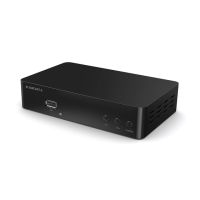
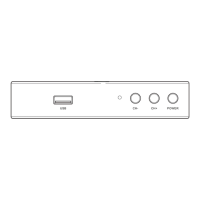
CONTROL BUTTONS

Identifies and describes the buttons and ports located on the main unit of the device.

HOW TO CONNECT

Connection

Provides instructions and diagrams for connecting the Freeview box to a TV using HDMI or SCART cables.

GETTING STARTED

Steps for getting started with your Freeview Box

Outlines the initial setup process, including plugging in, connecting to TV, and channel searching.

BASIC OPERATIONS

Selecting TV Channels

Explains how to switch between TV channels using navigation, keypad, or EPG.

Selecting Radio Stations

Details the procedure for tuning into and selecting radio stations available on the device.

Adjusting Volume and Mute

Describes how to control the audio volume and mute/unmute the sound using the remote.

Viewing Program Information

Explains how to view program details and hide the information banner using the INFO button.

Enabling Subtitles

Details how to enable and select subtitles for programs if available.

Pausing Live TV (Time Shift)

Explains the Time Shift function to pause and resume live TV playback.

Managing Favourite Channels

Guides on adding channels to a favourites list and selecting them later.

CHANNEL MANAGEMENT

Channel Manager Overview

Introduces the channel manager for organizing, moving, locking, and deleting channels.

Move Channels

Instructions on how to reorder channels within the channel list using the remote.

Lock Channels

Details the process for locking or unlocking individual TV channels.

Delete Channels

Explains how to remove channels from the list and the need to rescan.

USB, MULTIMEDIA, AND RECORDING

USB Function Overview

Overview of using the USB function for recording, playing, and viewing files.

Accessing USB Media

How to access and play media files (music, photos, movies) from a connected USB drive.

Recording TV Programs

Instructions on how to record TV programs using the REC button or EPG menu.

Scheduling Recordings via Button

Details how to schedule recordings using the blue SCHEDULE button and set timers.

Recording Notes and Repeat

Important notes regarding operations during recording and setting repeat recordings.

PVR Partition Configuration

Instructions for configuring PVR settings and selecting partitions on an external hard drive.

ELECTRONIC PROGRAM GUIDE (EPG)

EPG Program Information Display

How to view current and upcoming program details using the EPG.

Selecting Channels via EPG

Method to select and tune into a channel directly from the EPG list.

Scheduling Recordings from EPG

Guide on how to schedule a program recording directly from the EPG.

CHANNEL SCANNING AND RESCANNING

Automatic Channel Search

Steps to perform an automatic scan for digital TV and radio channels.

Manual Channel Search

Instructions for manually searching for specific channels by frequency.

AUDIO LANGUAGE AND FORMAT SELECTION

Selecting Audio Languages and Formats

How to select different audio languages and formats for broadcasts.

AUDIO-VISUAL SETTINGS AND OPTIONS

Picture and Display Settings

Options to adjust aspect ratio, resolution, TV format, and video output.

General Options Settings

Settings for OSD language, subtitle language, audio language, digital audio, and audio description.

PARENTAL CONTROLS AND AUTO-POWER

Setting Up Parental Controls

How to enable and set parental guidance limits using a PIN.

Automatic Power and Sleep Timers

Procedure to set the device to switch on/off automatically or enter sleep mode.

SYSTEM MAINTENANCE AND INFORMATION

Viewing System Information

How to view model, software, and hardware version information for technical support.

FACTORY RESET AND SOFTWARE UPDATES

Resetting to Factory Defaults

Steps to restore the device to its original factory default settings.

Updating Device Software

Instructions for updating the device's software, either via FTP or USB.

NETWORK SETTINGS AND APPLICATIONS

Configuring Network Settings

How to configure network connections (LAN/WiFi) and IP settings.

Using Network Applications

Lists and describes available network applications like FTP, Weather, RSS, YouTube, and IPTV.

TROUBLESHOOTING COMMON ISSUES

Troubleshooting Guide and Solutions

A guide to diagnose and resolve common issues with the device, covering symptoms, causes, and solutions.

SPECIFICATIONS AND WARRANTY INFORMATION

Device Technical Specifications

Technical specifications of the device, including video/audio decoding, system, and dimensions.

Product Warranty Details

Information on the product's 12-month warranty and how to register for an extended warranty.

SAFETY AND WARNING INFORMATION

General Safety Instructions

General safety instructions and warnings for proper use and maintenance of the device.

Additional Device Warnings

Further warnings concerning exposure to liquids, heat, and proper plug usage.

Recycling and Disposal Guidelines

Guidance on responsible disposal of electrical products and batteries.

Oakcastle SB-110 Specifications

General IconGeneral
BrandOakcastle
ModelSB-110
CategorySet-top boxes
LanguageEnglish