5
1310836-07 | MAR 02 2016
ADDING OR REPLACING THE ARTWORK IN THE
HEADER OF THE UNIT
1
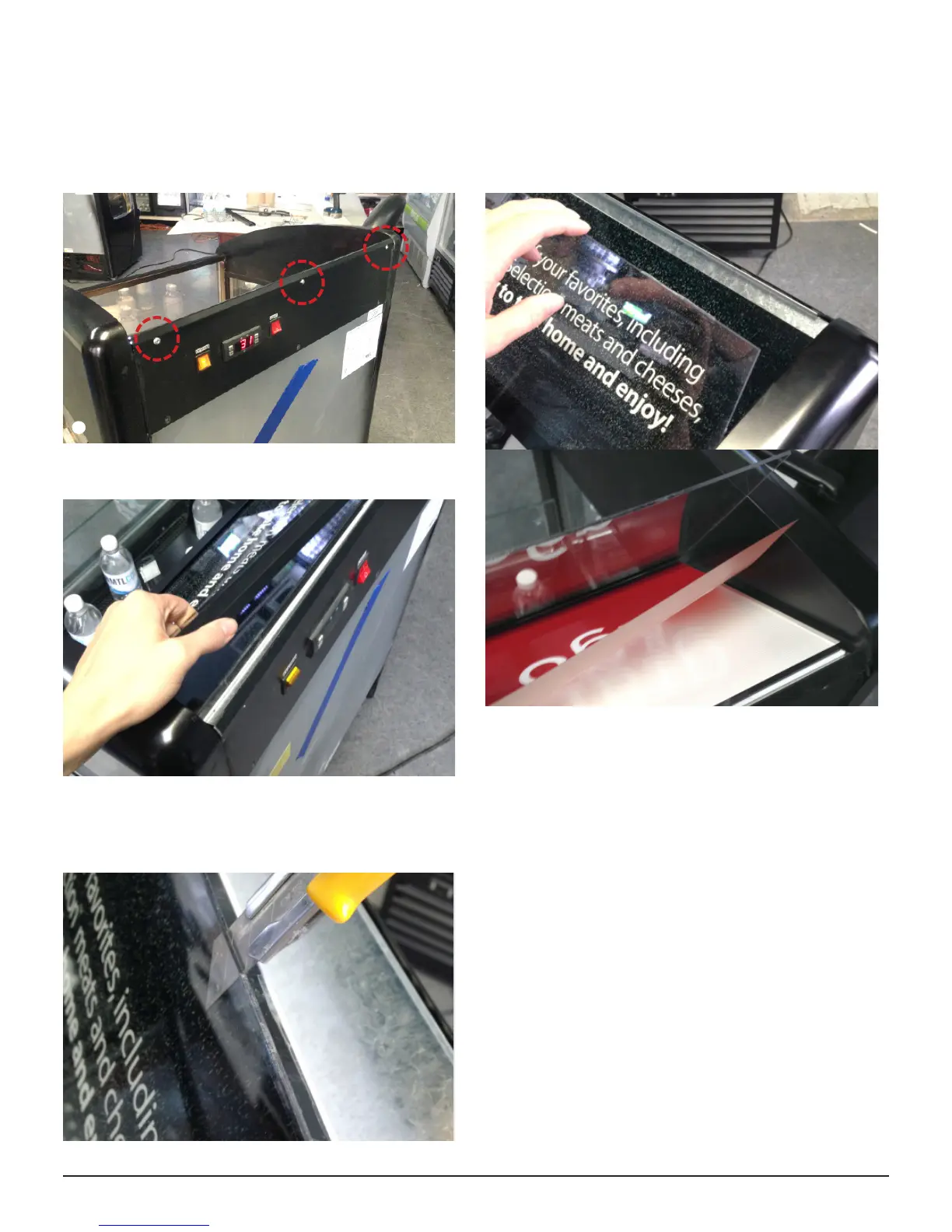
Power o & unplug Oasis unit
2
Remove top three screws at the back of the unit ▼
2
3
Remove the header frame ▼
4
The artwork is sandwiched between two sheets of
plastic. Use a knife or box cutter to cut the tape holding
the two sheets together. ▼
5
Li the top sheet, remove the artwork and replace it. ▼
x x
6
Reassemble: Replace the tape along the edges of the
plastic sheets & secure the header frame with the three
screws.
APPLYING DECAL GRAPHICS ON GLASS
1
Wet the glass and the sticky side of the graphics with
soapy water (a small amount of soap diluted with water in
a spray bottle, or use Windex)
2
Apply the graphics. The soapy water allows you to move
them around on the glass until they are in the proper
position.
3
Use a squeegee or a malleable straight edge to remove
all excess water and air bubbles beneath the graphics.
4
Once dry, verify that the edges of the graphics are
properly glued. Give the edges a nal press if needed.
Installation



 To Next Page