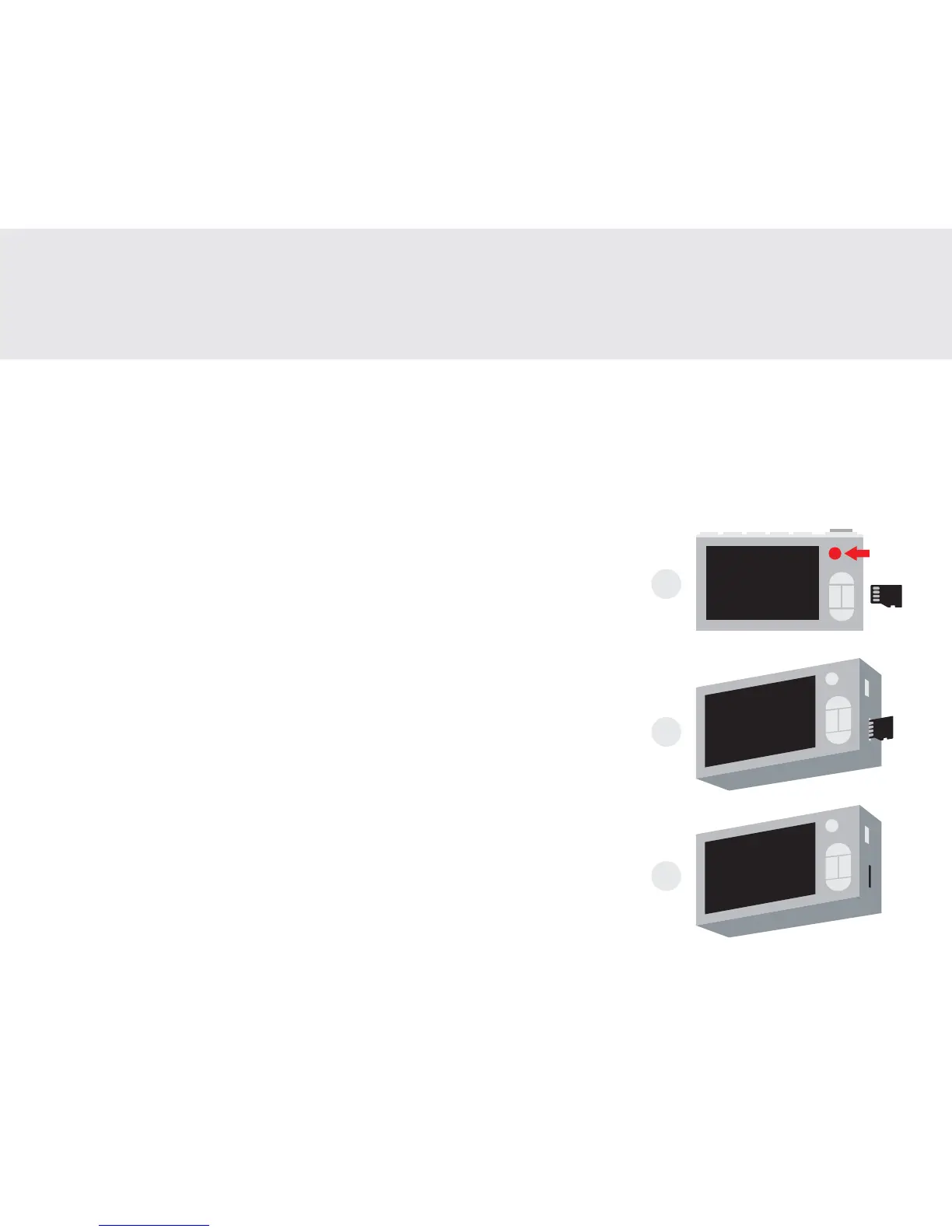
1. Insert the microSD card as illustrated.
2. Gently push the card into the slot with a pointed object. The card should clip into place.
3. When properly installed, the microSD card should be fully ushed with the camera body.
FR: 1. Insérez la carte microSD comme illustré.
2. Poussez doucement la carte dans la fente avec un objet pointu. La
carte devrait se clipser en place.
3. Lorsqu'elle est correctement installée, la carte microSD doit être
entièrement rincée avec le boîtier de la caméra.
ES: 1. Inserte la tarjeta microSD como se ilustra.
2. Empuje suavemente la tarjeta en la ranura con un objeto puntiagudo.
La tarjeta debe encajar en su lugar.
3. Una vez instalada correctamente, la tarjeta microSD debe quedar
completamente en el cuerpo de la cámara.
JA: 1. 図のようにmicroSDカードを挿入します。
2. 尖っているものを使ってカードをスロットに静かに押し込みます。カ
ードは所定の位置にはめ込まれる必要があります。計のデバイスID
が表示されます、例えば、「#00208」。
3. microSDカードが正しく取り付けられたら、カメラ本体を完全にフラ
ッシュしてくだ さい 。
How to install the microSD card
Comment installer la carte microSD | Cómo instalar la tarjeta microSD | microSDカードのインストール方法
1
2
3
1


 To Next Page